
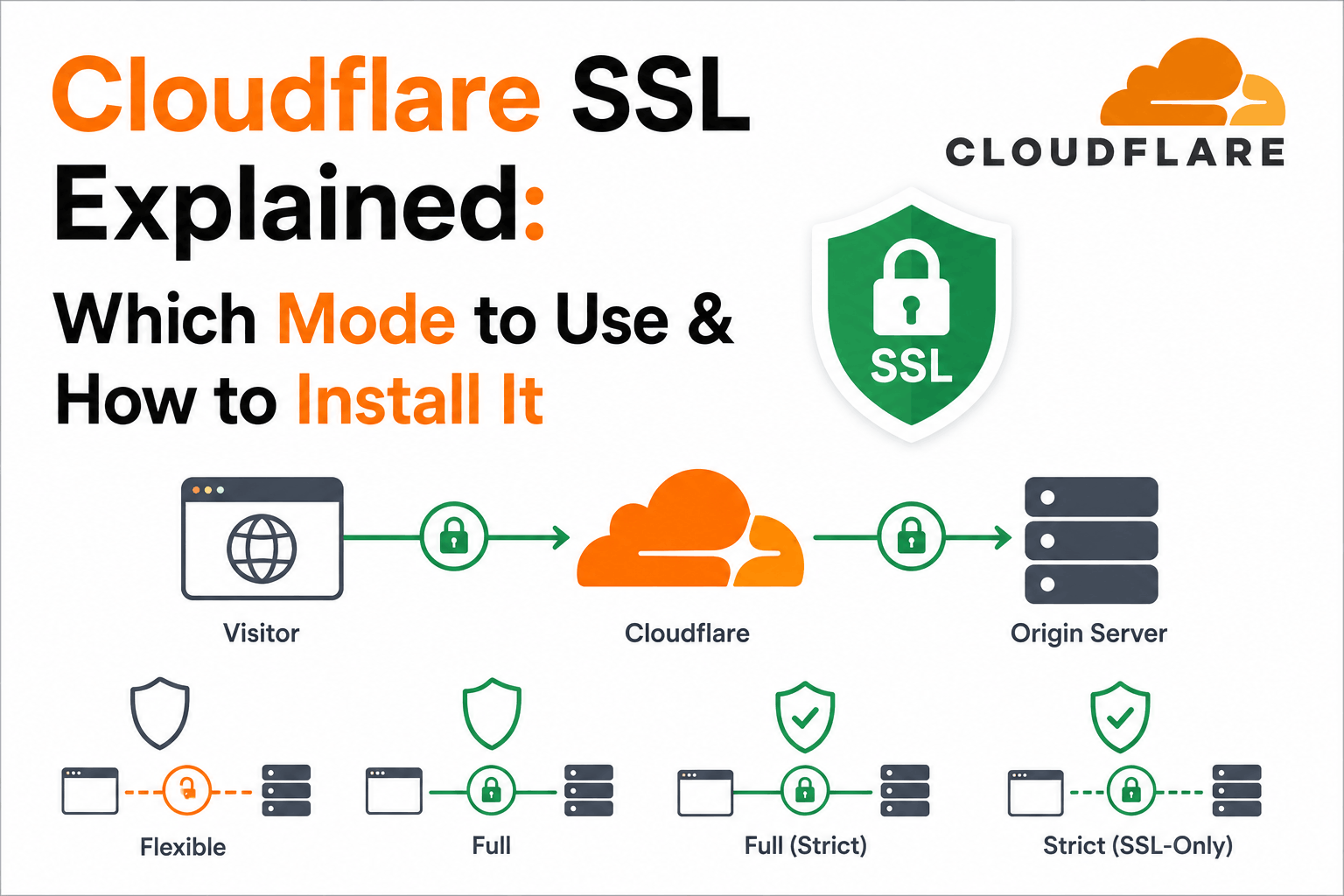
When you add your domain to Cloudflare, Cloudflare sits between your visitors and your origin server. Every HTTPS connection actually involves two separate TLS sessions: one between the visitor’s browser and Cloudflare’s edge, and one between Cloudflare and your origin server. Cloudflare presents its own certificate to visitors on the first leg. What happens on the second leg depends entirely on which SSL mode you have selected.
This two-connection architecture is the fundamental thing to understand about Cloudflare SSL. Once you understand it, the four SSL modes become self-explanatory, the risk of Flexible mode becomes obvious, and the purpose of the Cloudflare Origin Certificate becomes clear. Without understanding it, the mode options look like arbitrary settings.
This guide covers the architecture, the four SSL modes and when each is appropriate, the Cloudflare Origin Certificate and why it exists, and the step-by-step installation process.
The Two-Connection Architecture: What Cloudflare Actually Does
A visitor connecting to your Cloudflare-proxied domain connects to Cloudflare’s edge server, not to your origin server directly. Cloudflare’s edge terminates the visitor’s TLS connection and presents Cloudflare’s own certificate for your domain. This certificate is issued by Cloudflare from their Universal SSL or Advanced Certificate Manager infrastructure. The visitor’s browser validates this certificate and establishes the encrypted session with Cloudflare.
Cloudflare then makes a separate connection from its edge to your origin server to fetch the content. This second connection is entirely separate from the first. It can use HTTP or HTTPS. If it uses HTTPS, Cloudflare may or may not validate your origin server’s certificate depending on the SSL mode configured.
This architecture means that even if your origin server has no SSL certificate at all, your visitors can still see a padlock in their browser because the visitor-to-Cloudflare leg is always encrypted. This is both useful (for sites that cannot easily install certificates) and dangerous (it creates an illusion of end-to-end encryption that does not exist in Flexible mode).
The certificate visitors see when they click the padlock on your site is Cloudflare’s certificate, not your origin server’s certificate. Your origin server’s certificate is only seen by Cloudflare. This is relevant to certificate management: when you need to renew or replace the certificate that visitors interact with, you manage it through Cloudflare, not through your origin server configuration (unless you are managing your own origin certificate).
The Four SSL Modes: What Each Does and When to Use It
Cloudflare’s SSL mode controls the second leg of the connection: from Cloudflare’s edge to your origin server. The first leg (visitor to Cloudflare) is always encrypted regardless of which mode you choose.
| Mode | Visitor to Cloudflare | Cloudflare to Origin | Certificate Validated? | Use When |
| Off | HTTP only | HTTP only | N/A | Never recommended. Visitors see no encryption. |
| Flexible | HTTPS (Cloudflare cert) | HTTP (unencrypted) | N/A | Origin cannot support HTTPS at all. Transitional only. |
| Full | HTTPS (Cloudflare cert) | HTTPS | No. Any cert accepted, including self-signed, expired. | Origin supports HTTPS but has a self-signed or otherwise invalid certificate. |
| Full (Strict) | HTTPS (Cloudflare cert) | HTTPS | Yes. Must be valid, unexpired, hostname-matching, from public CA or Cloudflare Origin CA. | Origin has a publicly trusted cert or Cloudflare Origin Certificate. Use this whenever possible. |
Flexible mode: why it is dangerous
Flexible mode looks appealing as a quick setup option. Your visitors see a padlock. Your browser shows HTTPS. The dashboard shows SSL is active. But the connection from Cloudflare to your origin server is unencrypted plain HTTP. This means any attacker who can see traffic between Cloudflare and your origin, which includes anyone at your hosting provider, on your server’s network, or with access to network infrastructure between Cloudflare and your data center, can read the plaintext content including form submissions, passwords, and any sensitive data your application handles.
Cloudflare itself warns against using Flexible mode for sites that handle sensitive information. Their documentation states that if your application contains sensitive information such as personalized data or user login, you should use Full or Full (Strict). For any production site, Flexible mode provides encryption theater: a visible padlock with no actual end-to-end protection.
Do not use Flexible mode for any site that accepts login credentials, processes payments, handles personal data, or serves any content that should be confidential. The padlock visitors see is technically accurate (their connection to Cloudflare is encrypted) but deeply misleading: the sensitive data they submit travels in plaintext from Cloudflare to your origin server.
Full mode: when it is acceptable
Full mode encrypts the Cloudflare-to-origin leg but does not validate the origin certificate. Cloudflare will connect over HTTPS even if the certificate on your origin is self-signed, expired, or has a hostname mismatch. This prevents network observers from reading the traffic between Cloudflare and your origin, but it does not verify that Cloudflare is actually connecting to your origin rather than an impersonator.
Full mode is appropriate as a transitional step when you are moving from no certificate to a proper certificate on the origin, or when you use a self-signed certificate on the origin and cannot yet replace it with a trusted one. For a production site where you want genuine end-to-end security verification, Full (Strict) is the correct mode.
Full (Strict) mode: the recommended setting
Full (Strict) mode encrypts both legs of the connection and validates the origin certificate. Cloudflare requires that your origin certificate is unexpired, has the correct hostname in its Subject Alternative Names, and was issued by either a publicly trusted CA (Let’s Encrypt, DigiCert, Sectigo, etc.) or by Cloudflare’s own Origin CA. This is the setting Cloudflare’s documentation recommends for most sites.
When your origin has a Let’s Encrypt certificate, Full (Strict) works automatically. When your origin does not have a publicly trusted certificate, the Cloudflare Origin Certificate is the designed solution: a free certificate issued by Cloudflare’s own CA that is trusted only by Cloudflare’s edge, enabling Full (Strict) mode without requiring a certificate from a public CA.
The Cloudflare Origin Certificate: What It Is and Why It Exists
The Cloudflare Origin Certificate is a free SSL certificate issued by Cloudflare’s own Certificate Authority. It is designed specifically for the second leg of the Cloudflare connection: from Cloudflare’s edge to your origin server. It enables Full (Strict) mode without requiring a certificate from Let’s Encrypt or a commercial CA.
The critical property to understand: Cloudflare Origin Certificates are trusted only by Cloudflare’s edge servers. They are not trusted by browsers or by any public CA trust store. If a visitor connects directly to your origin server’s IP address, bypassing Cloudflare, they will see an untrusted certificate error. This is by design: Origin Certificates are for the Cloudflare-to-origin leg only.
| Certificate type | Issued by | Trusted by | Validity | Use for |
| Universal SSL | Cloudflare (via DigiCert or Let’s Encrypt) | All browsers | 90 days, auto-renewed | The visitor-facing certificate. Cloudflare manages this automatically. |
| Cloudflare Origin Certificate | Cloudflare Origin CA | Cloudflare edge only | Up to 15 years | The origin server certificate when using Full (Strict) mode. |
| Let’s Encrypt on origin | Let’s Encrypt ISRG Root | All browsers and Cloudflare | 90 days | Origin server certificate. Works with Full (Strict). Requires auto-renewal setup. |
| Commercial CA on origin | DigiCert, Sectigo, etc. | All browsers and Cloudflare | Up to 200 days | Origin server certificate for organizations needing OV or EV validation. |
The Cloudflare Origin Certificate has a configurable validity period up to 15 years. Unlike Let’s Encrypt’s 90-day cycle, you set it once and it is valid for as long as you choose. For origins that only ever receive traffic through Cloudflare’s proxy (never directly), this is the simplest path to enabling Full (Strict) mode.
How to Create and Install a Cloudflare Origin Certificate
Creating a Cloudflare Origin Certificate takes about five minutes in the Cloudflare dashboard. The certificate is then installed on your origin server the same way any SSL certificate would be.
Step 1: Create the certificate in Cloudflare
- Log into the Cloudflare dashboard and select your domain
- In the left navigation, click SSL/TLS
- Click Origin Server
- Click Create Certificate
- Choose whether Cloudflare generates the private key (Cloudflare generates and you download both) or you provide your own CSR (you generate the key pair and paste the CSR)
- Confirm the hostnames to cover. By default, Cloudflare includes your apex domain and wildcard, for example example.com and star.example.com
- Choose the validity period. Options range from one week to 15 years. For most origins, 15 years eliminates renewal concerns for the foreseeable future.
- Click Create
After clicking Create, Cloudflare shows the Origin Certificate and Private Key text. These are displayed only once. Copy both immediately and save them securely. If you close this screen without saving the private key, you cannot retrieve it again and must create a new certificate.
The private key shown in the Cloudflare dashboard after certificate creation is displayed only once. If you navigate away without copying it, you cannot retrieve it. You would need to create a new Origin Certificate. Copy and save both the certificate and private key immediately after creation.
Step 2: Install on Nginx
Save the Origin Certificate text to a file on your server, for example at /etc/ssl/certs/cloudflare-origin.pem. Save the Private Key text to a separate file at /etc/ssl/private/cloudflare-origin.key. Then configure your Nginx server block to use them:
| # In your Nginx server block for port 443:
ssl_certificate /etc/ssl/certs/cloudflare-origin.pem; ssl_certificate_key /etc/ssl/private/cloudflare-origin.key; ssl_protocols TLSv1.2 TLSv1.3;
# Restrict access to Cloudflare IP ranges only (optional but recommended): # This prevents direct access to origin bypassing Cloudflare. # Cloudflare publishes its IP ranges at https://www.cloudflare.com/ips/
# Test and reload: # nginx -t && systemctl reload nginx |
Step 3: Install on Apache
In Apache, set SSLCertificateFile to the path of the origin certificate PEM file and SSLCertificateKeyFile to the path of the private key file. For Apache 2.4.8 and later, a single file containing both the certificate and any intermediate is sufficient. Reload Apache after making the changes.
Step 4: Set Cloudflare SSL mode to Full (Strict)
- In the Cloudflare dashboard, go to SSL/TLS, then Overview
- Under Your SSL/TLS encryption mode, select Full (strict)
With the Origin Certificate installed on the server and Full (Strict) enabled in Cloudflare, the full connection is now encrypted and validated end-to-end. Visitors connect to Cloudflare’s edge over HTTPS. Cloudflare connects to your origin over HTTPS and validates your Origin Certificate. Both legs are encrypted and authenticated.
Authenticated Origin Pulls: Preventing Direct Access to Your Origin
With Cloudflare proxying your domain, your origin server is still reachable directly via its IP address unless you take additional steps. An attacker who discovers your origin IP can bypass Cloudflare entirely, avoiding rate limiting, DDoS protection, and the visitor-facing SSL certificate management. They also access the origin over a connection that is not through the Cloudflare proxy.
Authenticated Origin Pulls adds a mutual TLS layer to the Cloudflare-to-origin connection. When enabled, Cloudflare presents a client certificate to your origin server with every request. Your origin server is configured to only accept connections that present this Cloudflare client certificate. Requests that arrive directly, bypassing Cloudflare, do not carry this certificate and are rejected by the origin.
To enable Authenticated Origin Pulls: in the Cloudflare dashboard, go to SSL/TLS, then Origin Server, and enable Authenticated Origin Pulls. Download the Cloudflare origin pull certificate from the Cloudflare documentation. Configure your web server to require client certificate authentication using this certificate for the relevant virtual host. The Nginx ssl_verify_client directive and the Apache SSLVerifyClient directive handle this.
How Cloudflare Manages the Visitor-Facing Certificate
Cloudflare issues and renews the certificate that visitors see automatically. The Universal SSL certificate is provisioned within minutes of adding a domain to Cloudflare and proxying at least one DNS record. Renewals happen automatically before expiry. You do not configure, install, or renew this certificate manually.
For organizations that need specific certificate types (extended validation, specific CA, specific certificate policy OIDs), Cloudflare’s Advanced Certificate Manager (ACM) provides certificate customization options including custom hostnames covered, CA selection, and certificate upload for your own certificates.
The origin certificate (whether a Cloudflare Origin Certificate, Let’s Encrypt, or a commercial certificate) remains your responsibility. Cloudflare does not automatically renew certificates on your origin server. For Let’s Encrypt on the origin, you need Certbot or another ACME client with a renewal schedule. For the Cloudflare Origin Certificate with a long validity period, renewal is infrequent. Monitor origin certificate expiry separately from the Cloudflare edge certificate.
Frequently Asked Questions
What is a Cloudflare SSL certificate?
Cloudflare issues SSL certificates for domains proxied through its network, which are presented to visitors when they connect to your site. These certificates are issued from Cloudflare’s Universal SSL infrastructure and are renewed automatically. Separately, Cloudflare offers Origin Certificates: free certificates for installation on your origin server, trusted only by Cloudflare’s edge, designed to enable encrypted and verified connections between Cloudflare and your origin when using Full (Strict) mode.
What is the difference between Flexible, Full, and Full (Strict) SSL on Cloudflare?
All three modes encrypt the connection from visitors to Cloudflare’s edge. The difference is in the connection from Cloudflare to your origin server. Flexible mode sends this connection unencrypted as plain HTTP. Full mode sends it encrypted over HTTPS but does not validate your origin certificate. Full (Strict) mode sends it encrypted and validates that your origin certificate is unexpired, matches the hostname, and was issued by a trusted CA or Cloudflare’s Origin CA. Full (Strict) is the recommended setting for any site that handles sensitive data.
Is Cloudflare Origin Certificate trusted by browsers?
No. Cloudflare Origin Certificates are issued by Cloudflare’s own CA, which is not in any browser or OS trust store. They are trusted only by Cloudflare’s edge servers. If a visitor connects directly to your origin server’s IP address bypassing Cloudflare, they will see an untrusted certificate error. This is expected behavior. Origin Certificates are designed for the Cloudflare-to-origin leg of the connection, where Cloudflare is the client validating the certificate, not the visitor’s browser.
Do I need a separate SSL certificate if I am using Cloudflare?
For the visitor-facing connection, no. Cloudflare manages and renews the edge certificate automatically. For the origin server connection, yes, if you want to use Full or Full (Strict) mode. The Cloudflare Origin Certificate is free and covers this use case. Alternatively, a Let’s Encrypt certificate on your origin provides a publicly trusted certificate that also works with Full (Strict) mode. Without any certificate on the origin, you are limited to Flexible mode, which leaves the Cloudflare-to-origin connection unencrypted.
What happens if my origin certificate expires while using Full (Strict) mode?
Cloudflare will fail to establish a validated connection to your origin and visitors will see a 526 error (Invalid SSL Certificate). Full (Strict) mode validates the origin certificate on every connection and does not fall back to an unvalidated connection if the certificate expires. You must renew the origin certificate and update it on the server before it expires. Cloudflare does not send expiry notifications for origin certificates. Set up your own monitoring with an external certificate monitoring service that checks the certificate your origin presents, not only the Cloudflare edge certificate.
Can I use Let’s Encrypt on my origin server with Cloudflare?
Yes. A Let’s Encrypt certificate on your origin server is publicly trusted and satisfies Cloudflare’s Full (Strict) mode requirements. With Certbot configured for automated renewal, the certificate renews every 90 days without manual intervention. Ensure the Certbot deploy hook reloads your web server after renewal. The combination of Let’s Encrypt on the origin and Full (Strict) mode in Cloudflare provides end-to-end encrypted and authenticated connections at no certificate cost.

