
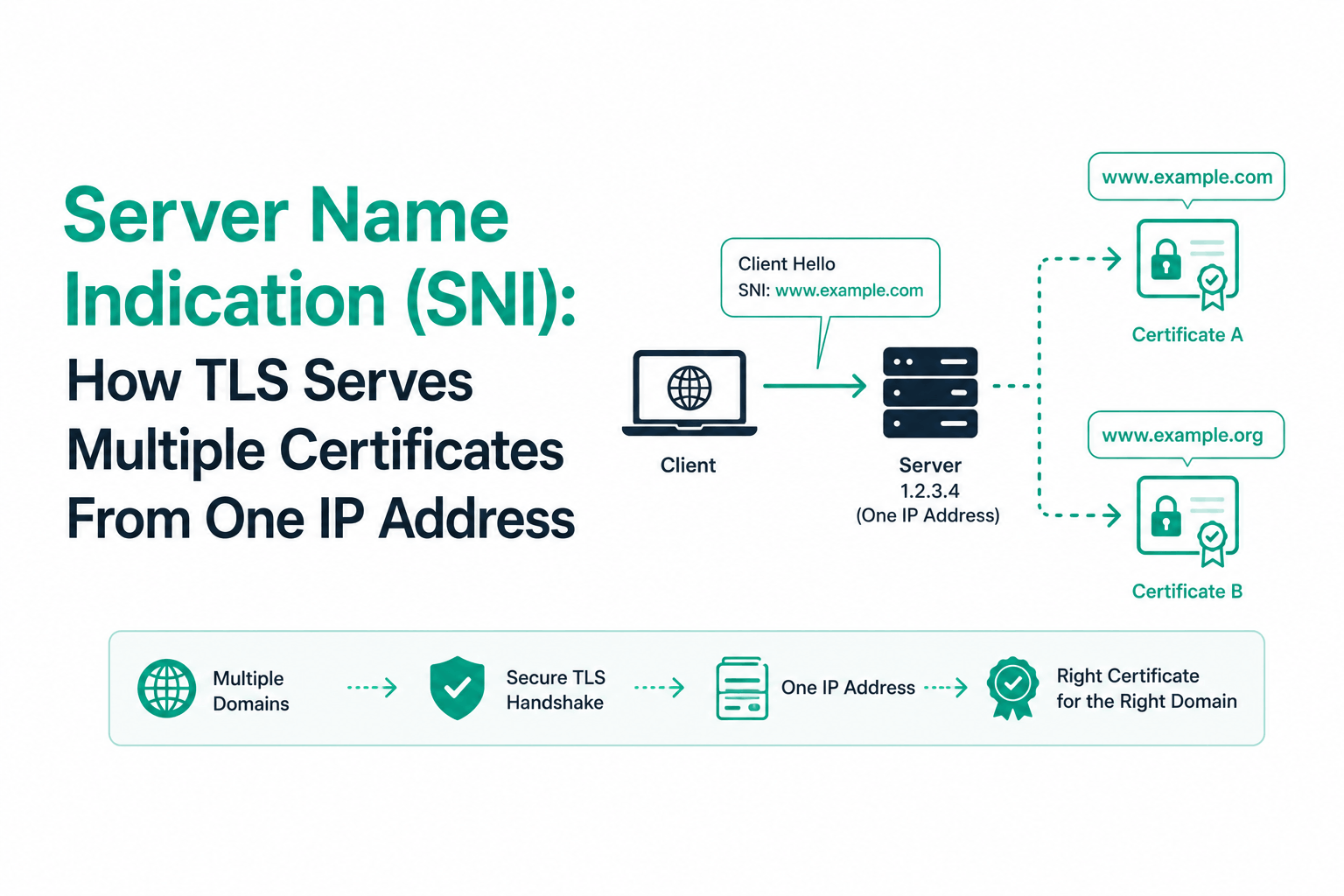
The TLS handshake has a sequencing problem. When a browser opens a connection to a web server, it needs the server to present its SSL certificate before the browser can declare which website it wants. The certificate must come first because it establishes the encryption context. The HTTP Host header, which tells the server which site you want, comes afterward inside the encrypted channel.
On a server hosting only one HTTPS website, this is not a problem. But on a server hosting many HTTPS websites on the same IP address, the server faces a question it cannot answer from the connection alone: which certificate should I present? Without that answer, it can only guess or present a default certificate. Every other site on that IP gets the wrong certificate, and browsers reject those connections with a hostname mismatch error.
Server Name Indication (SNI) resolves this by adding a single field to the very first message of the TLS handshake: the hostname the client wants to reach. The server reads it, selects the appropriate certificate, and proceeds. In its essentials, SNI is a three-byte type indicator plus a hostname string added to the ClientHello. But it is a field that enables the entire shared-hosting model of modern HTTPS.
Before SNI: One IP Address Per HTTPS Site
The name-based virtual hosting model for HTTP was straightforward. A web server receives a connection on port 80, reads the HTTP Host header from the first request, and routes the request to the appropriate site. One IP address, hundreds of sites, all identified by their Host headers. This worked because HTTP has no encryption layer. The Host header is readable the moment it arrives.
HTTPS inserted a complication. The TLS handshake must complete before any HTTP data flows. The certificate must be presented, validated, and an encrypted channel established before the browser sends a single HTTP byte. The Host header the server needs to pick the right certificate is locked inside the encryption the certificate is supposed to establish.
Before SNI, the only reliable solution was one dedicated IP address per HTTPS website. The server knows which IP received the connection and maps that IP to a certificate. With the TLS handshake preceding HTTP, the IP address is the only hostname signal available before encryption begins.
| Era | HTTP Hosting | HTTPS Hosting | SSL Certificate Per Site | IP Cost |
| Pre-SNI (before 2003) | One IP, many sites via Host header | One IP per HTTPS site (no alternative) | Required dedicated IP | High: each HTTPS site needed its own IPv4 address |
| SNI era (2003-present) | Unchanged | Many HTTPS sites per IP via SNI hostname in ClientHello | Works without dedicated IP (SNI selects cert) | Low: SNI eliminates per-site IP requirement for HTTPS |
| ECH era (emerging 2025+) | Unchanged | Many HTTPS sites per IP, with hostname encrypted via ECH | Works as SNI does, but hostname hidden from network observers | Low: same as SNI, plus privacy protection |
The IP address constraint was significant. IPv4 addresses became scarcer. Web hosting providers offering SSL certificates to hundreds or thousands of customers would have needed a dedicated IPv4 address per customer. The cost and scarcity made shared SSL hosting economically and technically difficult. SNI removed that constraint.
How SNI Works: The Hostname Field in the ClientHello
SNI is formally defined as a TLS extension. The TLS specification allows extensions to be included in handshake messages to provide additional information or negotiate capabilities without changing the core protocol structure. SNI adds a single extension to the ClientHello: the server_name extension (type 0x0000), containing a list of server names the client is trying to reach.
In practice, that list always contains exactly one entry: the hostname from the URL the user typed or clicked. The ClientHello is the very first message the client sends in a TLS handshake. It is sent in plaintext before any encryption is established.
| # Capture a TLS ClientHello to see SNI in action:
openssl s_client -connect yourdomain.com:443 -servername yourdomain.com
# The -servername flag explicitly sets the SNI hostname. # Without it, openssl uses the hostname from -connect (same effect here). # On some older servers, SNI is required — if the cert changes between # with and without -servername, the server depends on SNI for cert selection.
# Test SNI on a multi-tenant server: openssl s_client -connect shared-host.example.com:443 -servername site1.com # Should return site1.com’s certificate openssl s_client -connect shared-host.example.com:443 -servername site2.net # Should return site2.net’s certificate # Same IP address (shared-host.example.com), different certs per SNI hostname |
The server receives the ClientHello, extracts the server_name extension, and uses the hostname to look up which certificate to present. The TLS handshake then continues normally: ServerHello with the selected certificate, key exchange, and establishment of the encrypted session. Once the encrypted channel is open, the browser sends the HTTP request with the Host header, which the server uses for application-layer routing to the correct virtual host.
SNI and the HTTP Host header serve the same purpose at different protocol layers. SNI operates at the TLS layer, before encryption, enabling certificate selection. The HTTP Host header operates at the application layer, inside the encrypted channel, enabling content routing. On a server running HTTPS, both are present on every request: SNI for certificate selection during the handshake, Host header for content routing after the handshake.
The TLS Handshake Step by Step With SNI
Tracing the full handshake sequence shows exactly where SNI fits and how it interacts with certificate selection.
| Step | Direction | Message / Action | SNI Involvement |
| 1 | Client to Server | ClientHello: TLS version list, cipher suite list, random nonce, extensions including server_name (SNI hostname) | SNI hostname sent here in plaintext |
| 2 | Server (internal) | Server reads SNI hostname, looks up matching certificate in its configuration | SNI value used for certificate lookup |
| 3 | Server to Client | ServerHello: selected TLS version, selected cipher suite, server random | No SNI in response; selection already made |
| 4 | Server to Client | Certificate: the certificate chain selected based on the SNI hostname | Certificate for the SNI-specified site |
| 5 | Both | Key exchange (ECDHE in TLS 1.3), derivation of session keys | Not SNI-related |
| 6 | Server to Client | CertificateVerify (TLS 1.3): server signs handshake transcript with its private key | Proves server holds private key for selected cert |
| 7 | Both | Finished messages: handshake transcript verification | Not SNI-related |
| 8 | Client to Server | HTTP request with Host header (now inside encrypted channel) | Host header redundant for cert selection but used for routing |
In TLS 1.3, steps 3 through 6 are combined into a single server message, and the Certificate and CertificateVerify are encrypted using the handshake keys derived from the key exchange. The SNI hostname at step 1, however, remains in plaintext regardless of TLS version. This is the privacy issue that Encrypted Client Hello (ECH) addresses.
What Happens When SNI Is Missing or Mismatched
No SNI extension present
When a client connects without sending an SNI extension (this is unusual in modern browsers but can occur with older clients, command-line tools configured without SNI, or certain network appliances), the server cannot determine which certificate to serve based on the hostname. Most servers respond by presenting a default certificate, typically the first one in their configuration, or the one with the lexicographically first hostname. The browser checks whether the presented certificate covers the requested hostname. If the default certificate does not match the requested domain, the browser shows NET::ERR_CERT_COMMON_NAME_INVALID.
SNI required and not provided
Some server configurations are set to require SNI and reject connections that arrive without it. This is less common on public-facing web servers but occurs in certain CDN configurations, load balancers, and enterprise environments. A client that does not send SNI receives either a handshake failure alert or a default error response.
SNI hostname does not match any configured site
If a client sends an SNI hostname that does not match any certificate or virtual host in the server’s configuration, the server either presents the default certificate or returns a TLS handshake failure. On servers that always present a default certificate, the browser sees an untrusted or mismatched certificate for the requested hostname.
Debugging SNI-related certificate errors
When a browser shows a certificate mismatch error on a shared-hosting server, the first diagnostic step is checking whether the SNI field is being sent correctly and whether the server is routing it to the right certificate:
| # Check whether a server supports SNI and which cert it returns per hostname:
openssl s_client -connect 203.0.113.10:443 -servername yourdomain.com 2>/dev/null | openssl x509 -noout -subject -issuer
# Compare with the default (no SNI or wrong SNI): openssl s_client -connect 203.0.113.10:443 2>/dev/null | openssl x509 -noout -subject -issuer
# If the two outputs show different certificates, SNI is working. # If they show the same certificate regardless, either SNI is not # configured on the server or the requested hostname has no certificate.
# Also verify in Nginx that virtual hosts are configured for the right cert: grep -r ‘ssl_certificate’ /etc/nginx/sites-enabled/ grep -r ‘server_name’ /etc/nginx/sites-enabled/ |
Configuring SNI on Web Servers
SNI support is enabled by default on all modern web servers. What requires configuration is the set of virtual hosts and their associated certificates. Each virtual host tells the server which hostname maps to which certificate.
Nginx virtual host configuration with SNI
Nginx selects the certificate based on the server_name directive in each server block. When a connection arrives with an SNI hostname, Nginx finds the server block whose server_name matches and uses its ssl_certificate for the handshake.
| # /etc/nginx/sites-enabled/site1.conf
server { listen 443 ssl; server_name site1.com www.site1.com; ssl_certificate /etc/ssl/certs/site1.com.crt; ssl_certificate_key /etc/ssl/private/site1.com.key; # … site1 configuration }
# /etc/nginx/sites-enabled/site2.conf server { listen 443 ssl; server_name site2.net www.site2.net; ssl_certificate /etc/ssl/certs/site2.net.crt; ssl_certificate_key /etc/ssl/private/site2.net.key; # … site2 configuration }
# Both server blocks listen on the same port (443). # Nginx uses SNI from the ClientHello to select the correct block. # No dedicated IP addresses needed. |
Apache virtual host configuration with SNI
Apache uses the ServerName directive and NameVirtualHost (for older versions) or simply multiple VirtualHost blocks on the same port for SNI-based certificate selection. All modern Apache versions (2.2.12+) include SNI support compiled in.
| # /etc/apache2/sites-enabled/site1.conf
<VirtualHost *:443> ServerName site1.com ServerAlias www.site1.com SSLEngine on SSLCertificateFile /etc/ssl/certs/site1.com.crt SSLCertificateKeyFile /etc/ssl/private/site1.com.key SSLCertificateChainFile /etc/ssl/certs/site1.com.chain.crt # … site1 configuration </VirtualHost>
<VirtualHost *:443> ServerName site2.net ServerAlias www.site2.net SSLEngine on SSLCertificateFile /etc/ssl/certs/site2.net.crt SSLCertificateKeyFile /etc/ssl/private/site2.net.key SSLCertificateChainFile /etc/ssl/certs/site2.net.chain.crt # … site2 configuration </VirtualHost>
# Apache 2.4.8+: use SSLCertificateFile for the full bundle # (combines cert + chain into one file) |
CDN and load balancer SNI configuration
CDNs and cloud load balancers handle SNI transparently. You upload certificates and map them to hostnames in the CDN or load balancer’s configuration interface. The infrastructure handles SNI header reading and certificate selection at the edge without requiring configuration of the individual origin servers.
Cloudflare, AWS Application Load Balancer, Google Cloud Load Balancing, Azure Application Gateway, and Fastly all support multiple SSL certificates per configuration with SNI-based selection. For Cloudflare specifically, all certificates deployed through the dashboard are served with SNI automatically. The Cloudflare Universal SSL certificate covers the apex domain and one level of subdomains per zone.
The Privacy Problem SNI Creates: Hostname Exposed in Plaintext
SNI solved the IP address problem so effectively that its adoption was nearly universal. By 2012, all major browsers supported it. By 2020, HTTPS adoption exceeded 80% of web traffic. And throughout this entire journey, every single HTTPS connection broadcast the target hostname in cleartext in the ClientHello.
Anyone with the ability to observe network traffic between a user and the internet can read SNI fields. This includes Internet Service Providers, network administrators, corporate firewalls, government surveillance infrastructure, and anyone performing a man-in-the-middle attack on an unencrypted network segment. The content of the HTTPS connection is fully encrypted. But which site the user is visiting is visible at the network layer to any observer.
This distinction matters in several contexts. Users on corporate networks may have their browsing destinations monitored without their awareness. ISPs in some jurisdictions log SNI fields for regulatory compliance or sell browsing behavior data. Censors in some countries block connections to specific hostnames by inspecting SNI fields and dropping connections to blocked domains. The encryption that was supposed to protect users turns out to protect the content but not the metadata of which sites they visit.
In countries that conduct network-level censorship, SNI inspection is a primary enforcement mechanism. When a user attempts to reach a blocked site over HTTPS, the firewall reads the SNI field in the ClientHello and drops the connection before the TLS handshake completes. The user sees a connection failure, not a block page. SNI censorship is harder to detect than HTTP censorship precisely because the block happens at the protocol layer before any application content is exchanged.
Encrypted Client Hello (ECH): Solving the SNI Privacy Problem
The IETF response to SNI’s privacy limitation went through several iterations. Encrypted SNI (ESNI) was an early proposal that encrypted specifically the SNI field. Cloudflare and Firefox deployed experimental ESNI support in 2018. But ESNI had architectural limitations: it only protected the SNI extension, leaving other sensitive fields in the ClientHello visible, and it proved vulnerable to certain traffic analysis techniques.
Encrypted Client Hello (ECH) takes a broader approach. Rather than encrypting a single field, it splits the ClientHello into two parts. The outer ClientHello contains only the information required to establish the initial connection to the CDN or hosting provider, including a generic public server name. The inner ClientHello, which contains the actual target hostname and other sensitive extensions, is encrypted using a public key published in the domain’s DNS records.
How ECH works mechanically
Before connecting to a domain, the browser queries DNS for the domain’s HTTPS resource record. This record contains the ECH configuration: a public key the server published for encrypting ClientHellos. The browser uses this key to encrypt the inner ClientHello, which contains the real SNI hostname, and sends the encrypted payload inside the outer ClientHello.
The outer ClientHello’s SNI field contains a generic cover hostname, not the real target. For Cloudflare-hosted domains, this cover hostname is cloudflare-ech.com regardless of which specific Cloudflare-hosted site is the actual target. A network observer sees that the user connected to cloudflare-ech.com. They cannot determine which specific site was the destination.
The server (or CDN) that receives the ClientHello holds the private key corresponding to the published ECH public key. It decrypts the inner ClientHello, extracts the real hostname, and selects the appropriate certificate as it would with standard SNI.
| Technology | What Is Visible to Network Observers | Hostname Protection | Browser Support | Server Support |
| Standard HTTP | Full URL, all request content | None | N/A | N/A |
| HTTPS (TLS 1.2) | Destination IP, certificate (including hostname), SNI hostname | Content encrypted; hostname visible | Universal | Universal |
| HTTPS (TLS 1.3) | Destination IP, SNI hostname (certificate encrypted in handshake) | Content encrypted; hostname still visible | Universal (Chrome 70+, Firefox 63+) | Wide |
| HTTPS + ESNI | Destination IP, encrypted SNI field (experimental, deprecated) | SNI encrypted; other fields visible | Firefox only (experimental 2018-2020) | Cloudflare only (experimental) |
| HTTPS + ECH | Destination IP, generic cover hostname (e.g. cloudflare-ech.com) | Real hostname encrypted; only provider visible | Chrome 117+, Firefox 119+, Edge 117+ | Cloudflare, growing |
ECH and DNS over HTTPS: the dependency
ECH has a critical dependency on DNS. The ECH public key is distributed via the HTTPS DNS resource record. If the DNS query for that record is observable (sent in plaintext to an ISP’s resolver), a network observer or censor can see which domain’s ECH keys are being fetched, recover the intended target from that DNS query, or block the HTTPS record entirely to force ECH to fail.
ECH failing means the browser falls back to a standard ClientHello with the real SNI in plaintext. ECH failure is silent; users do not see a warning. This is why ECH is typically deployed alongside DNS over HTTPS (DoH): DoH encrypts the DNS query itself, preventing the DNS lookup for ECH keys from leaking the destination to a network observer or being blocked to disable ECH.
| # Check whether a domain supports ECH via DNS:
dig yourdomain.com HTTPS
# An ECH-enabled response includes an ech= parameter: # yourdomain.com. 300 IN HTTPS 1 . alpn=’h2,h3′ ech=AEX+DQA…
# Verify ECH is active for a connection using Cloudflare’s checker: # https://www.cloudflare.com/ssl/encrypted-sni/
# Or check in Firefox: visit about:about then network security indicator # Chrome: Security tab in DevTools shows ‘Encrypted Client Hello’ if active |
ECH represents the final closure of the last significant privacy gap in HTTPS. TLS 1.3 already encrypted the server certificate (which was visible in TLS 1.2). ECH encrypts the ClientHello, leaving only the IP address and cover hostname visible to network observers. Combined with DoH, which encrypts the DNS query, a fully ECH+DoH connection reveals only that the user is connecting to a major CDN provider, not which specific site. The IETF specification was at draft version 25 as of late 2025 and was approaching final RFC status.
SNI Client Compatibility: Who Does Not Support It
SNI requires support from both the client (browser or application) and the server. Server support is universal on any actively maintained server software. Client support covers all modern browsers and operating systems by a large margin.
The legacy systems that do not support SNI are genuinely old. Internet Explorer on Windows XP does not support SNI. Android 2.2 (Froyo) and earlier do not support SNI. These systems are not meaningfully present in modern web traffic analytics. If your site still serves visitors on these platforms and requires HTTPS for those visitors, the only solution is a dedicated IP address with a certificate that covers all hosted domains, or a wildcard/SAN certificate covering all hosted names as a fallback when SNI is absent.
| Platform / Client | SNI Support | Notes |
| Chrome (all modern versions) | Yes | Full SNI support since Chrome 6 (2010) |
| Firefox (all modern versions) | Yes | Full SNI support since Firefox 2 (2006) |
| Safari (all modern versions) | Yes | Full SNI support on all current Apple platforms |
| Edge (all versions) | Yes | Chromium-based Edge; full SNI support |
| Internet Explorer 8+ on Vista/7+ | Yes | IE8 on Vista was the first IE with SNI |
| Internet Explorer on Windows XP | No | XP cannot use SNI; requires dedicated IP or shared cert |
| Android 2.3+ | Yes | SNI support in Android’s default browser from 2.3 onward |
| Android 2.2 and earlier | No | Legacy; essentially absent from modern traffic |
| Java default | Requires explicit config | Java 7+ can use SNI but SNI must be explicitly enabled in code |
| Python requests library | Yes | Full SNI support via the ssl module |
| curl | Yes | Full SNI support; use -servername flag for testing |
For practical purposes, SNI compatibility is a non-issue for any new deployment in 2026. The platforms that do not support SNI have negligible market share. If your analytics show any traffic from these legacy platforms, dedicated IP or SAN/wildcard certificates remain the solutions, but this applies to an extremely narrow audience.
Frequently Asked Questions
What is Server Name Indication and why does it exist?
Server Name Indication (SNI) is an extension to the TLS protocol that allows a browser to include the target hostname in the first message of the TLS handshake. It exists because TLS encryption must be established before HTTP data flows, which means the server cannot read the HTTP Host header (which would tell it which site you want) before it needs to present a certificate. Without SNI, a server hosting multiple HTTPS sites on one IP address cannot determine which certificate to present during the handshake. SNI provides that hostname signal at the TLS layer, before encryption begins.
How does SNI allow multiple SSL certificates on one IP address?
The server reads the SNI hostname from the client’s ClientHello message, looks up which certificate corresponds to that hostname in its virtual host configuration, and presents that certificate during the TLS handshake. Different clients connecting to the same IP address but requesting different SNI hostnames receive different certificates. Without SNI, the server can only present one default certificate regardless of which hostname the client wants, which causes certificate mismatch errors for every site except the default.
Is SNI visible to network observers?
Yes. The SNI hostname is transmitted in the ClientHello, which is sent before any encryption is established. Anyone who can observe the network traffic between a client and server can read the SNI field and determine which hostname the client is connecting to. This includes ISPs, corporate network administrators, and anyone with network observation capabilities. The content of the HTTPS connection is encrypted, but the destination hostname is not. Encrypted Client Hello (ECH) addresses this by encrypting the ClientHello including the SNI field using a public key distributed through DNS.
What is the difference between SNI and the HTTP Host header?
Both convey the target hostname, but at different protocol layers. SNI is in the TLS ClientHello, transmitted before encryption is established, used by the server to select the correct certificate for the TLS handshake. The HTTP Host header is in the HTTP request, transmitted inside the encrypted TLS channel after the handshake, used by the server to route the request to the correct virtual host. On an HTTPS server, both are present on every request. SNI handles certificate selection at the TLS layer; Host handles content routing at the HTTP layer.
What happens if my client does not send SNI?
If a client connects without sending an SNI extension, the server cannot determine the target hostname during the TLS handshake. Most servers present a default certificate, typically the first configured virtual host. If that default certificate does not cover the hostname the client intended to reach, the client sees a certificate mismatch error (NET::ERR_CERT_COMMON_NAME_INVALID in Chrome). Modern browsers, operating systems, and libraries all send SNI by default. A missing SNI field typically indicates a very old client, a misconfigured library, or a network appliance that strips TLS extensions.
What is Encrypted Client Hello and how does it relate to SNI?
Encrypted Client Hello (ECH) is a TLS extension that encrypts the ClientHello message, including the SNI field, using a public key the server publishes in its DNS records. Without ECH, the SNI hostname is in plaintext and visible to network observers. With ECH, the real hostname is encrypted inside the ClientHello. The outer ClientHello that network observers can read contains only a generic cover hostname (such as cloudflare-ech.com for Cloudflare-hosted sites), not the real target. ECH requires support from the browser, the server, and the DNS infrastructure. Chrome, Firefox, and Edge added ECH support in 2023. Cloudflare operates the most widely deployed ECH infrastructure as of 2026.
Do I need to configure SNI on my server or does it work automatically?
SNI is enabled by default on all modern web servers. You do not configure SNI itself. What you configure is the set of virtual hosts with their associated certificates. When you create separate server blocks in Nginx or separate VirtualHost blocks in Apache for each domain, each with its own ssl_certificate directive, the web server automatically uses the SNI hostname from incoming connections to select which virtual host and which certificate to use. SNI is the mechanism that makes virtual host selection work for HTTPS. The virtual host configuration is what you manage; SNI is what makes it function.

