
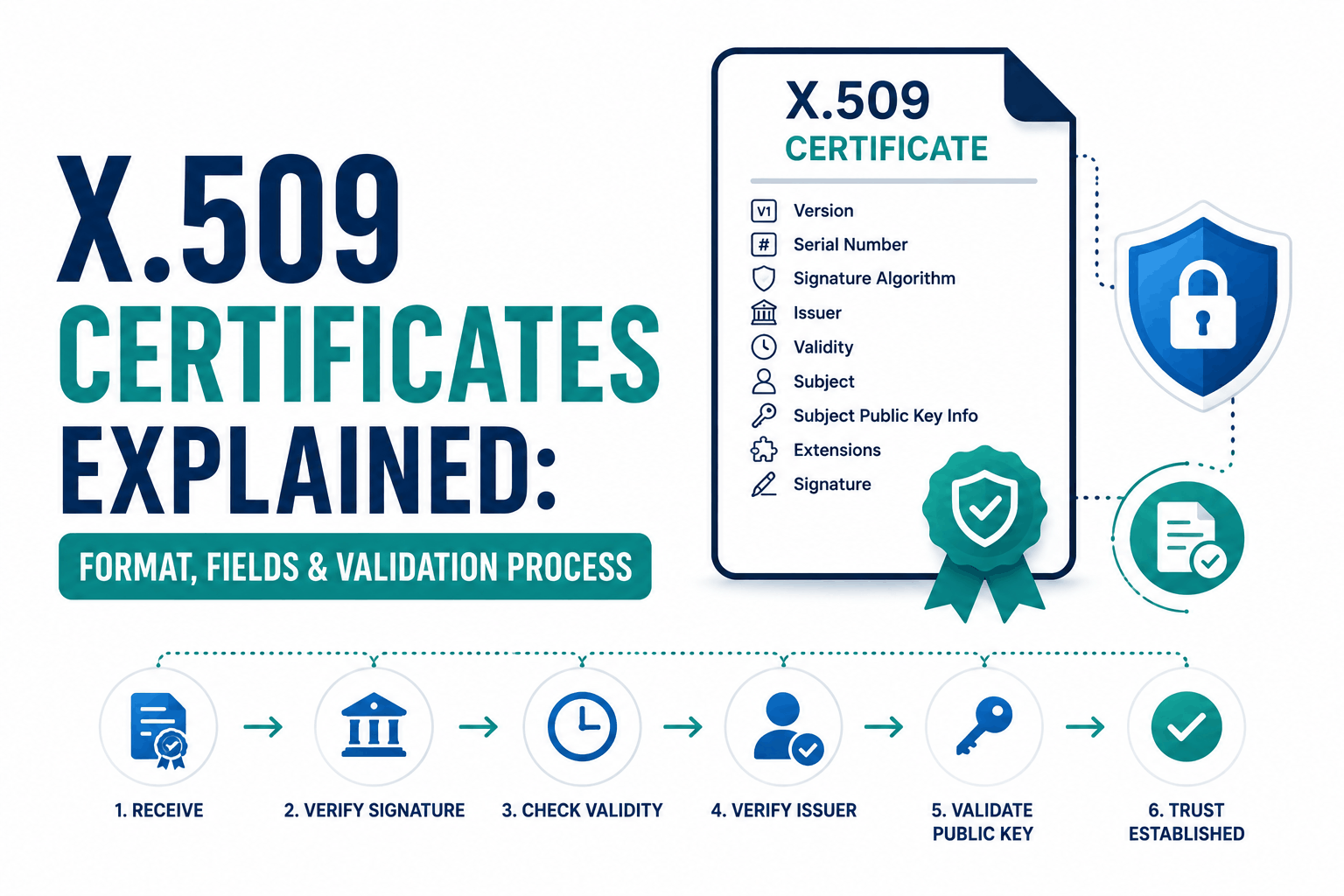
Every SSL certificate, code signing certificate, email signing certificate, and device identity certificate on the internet is an X.509 digital certificate. X.509 is not a product, a company, or a specific security level. It is the international standard that defines the format of a public key certificate: what fields it must contain, how those fields are structured, how the data is encoded for transmission, and what extensions can add additional information or capabilities.
The ITU-T published the first version of the X.509 standard in 1988 as part of the X.500 directory service specification. Version 2 followed in 1993 with minor revisions. Version 3, published in 1996 and incorporated into RFC 5280 by the IETF, added the extensibility mechanisms that make today’s X.509 certificates so flexible. When people say X.509 certificate, they almost always mean an X.509 version 3 certificate.
This reference covers the complete X.509 version 3 certificate structure, every core field, the most important extensions, the file formats and encoding rules, how different applications use X.509 certificates, and what changed across the standard’s version history.
What Is an X.509 Digital Certificate?
An X.509 digital certificate is a data structure that binds a public cryptographic key to an identity through the digital signature of an issuing Certificate Authority. The certificate contains the identity information (who this certificate was issued to), the public key itself, the validity period during which the certificate is trusted, and the CA’s signature proving the certificate is genuine and has not been modified since issuance.
The binding between the identity and the public key is the core function. When a browser connects to a website, it receives the site’s X.509 certificate. The certificate tells the browser: this public key belongs to this domain, and this CA verifies that claim. The browser validates the CA’s signature, confirms the domain matches, checks the validity period, and trusts the public key for the purpose of establishing the encrypted connection.
X.509 is the format. PKI (Public Key Infrastructure) is the system of CAs, policies, and procedures that makes the format trusted. An X.509 certificate without a trusted CA’s signature is just a data structure, not a trusted identity. A self-signed X.509 certificate is one where the subject and the issuer are the same entity, which browsers reject for public websites because no independent CA has verified the identity claim.
X.509 certificates are sometimes called digital certificates, public key certificates, or PKI certificates. All these terms refer to the same X.509 format. An SSL certificate is a specific application of an X.509 certificate used for TLS/SSL web security. An X.509 certificate is the underlying format; SSL or TLS is one of the protocols that uses it.
X.509 Version History: What Changed in Each Version
| Version | Year | RFC | Key Changes |
| X.509 v1 | 1988 | N/A (ITU-T X.509) | Initial standard. Core fields: version, serial, issuer, validity, subject, public key, signature. No extensions. |
| X.509 v2 | 1993 | N/A (ITU-T X.509) | Added unique identifier fields for issuer and subject to handle CA name reuse over time. Rarely used in practice. |
| X.509 v3 | 1996 | RFC 5280 (2008 update) | Added the extensions mechanism. Any information not fitting core fields goes in extensions. Enables SANs, key usage constraints, CRL distribution points, OCSP URLs, CT SCTs, and custom enterprise extensions. This is the version universally used today. |
The extensions mechanism introduced in X.509 v3 is what makes the format applicable across so many different use cases. Without extensions, a single certificate format could not simultaneously serve SSL/TLS certificates, S/MIME email certificates, code signing certificates, and device identity certificates. Extensions allow each application to add the fields it needs without changing the core format.
The X.509 Version 3 Certificate Structure: Every Field Explained
An X.509 v3 certificate has two main sections: the TBSCertificate (To Be Signed Certificate) containing all the data, and the signature over that data computed by the issuing CA. The TBSCertificate contains all the fields below. The CA signs a hash of the TBSCertificate using its private key and appends that signature to the complete certificate.
Core fields (present in all X.509 v3 certificates)
| Field | Type | What It Contains | Example Value |
| Version | Integer | Certificate version. Always 2 (encoded) meaning version 3 for modern certs. | 2 (= v3) |
| Serial Number | Integer | Unique identifier assigned by the issuing CA. Must be unique within a CA’s issued certificates. | 0A:5B:3C:7D:9E:2F (hex) |
| Signature Algorithm | OID + params | The algorithm the CA used to sign this certificate. Identifies both the hash and the key algorithm. | sha256WithRSAEncryption |
| Issuer | Distinguished Name | The full name of the CA that issued and signed this certificate. | C=US, O=DigiCert Inc, CN=DigiCert Global Root CA |
| Validity: Not Before | UTC or GeneralizedTime | The date and time from which the certificate is valid. | 2026-03-15 00:00:00 UTC |
| Validity: Not After | UTC or GeneralizedTime | The date and time after which the certificate is expired and should be rejected. | 2026-09-01 23:59:59 UTC |
| Subject | Distinguished Name | The identity this certificate was issued to. For TLS certs: the organization or domain owner. | C=US, O=Example Corp, CN=example.com |
| Subject Public Key Info | AlgorithmID + key | The public key associated with this identity, and the algorithm it uses. | RSA 2048-bit or EC P-256 public key |
| Issuer Unique ID | Bit string (optional) | A unique identifier for the issuer, if needed. Rarely used. Added in v2. | Not typically present |
| Subject Unique ID | Bit string (optional) | A unique identifier for the subject, if needed. Rarely used. Added in v2. | Not typically present |
| Extensions | Sequence of extensions | All v3 extensions. See the extensions section below. | Multiple — see below |
The Distinguished Name (DN) format
The Issuer and Subject fields use the Distinguished Name format, a hierarchical identifier defined in the X.500 directory standard. A DN is a sequence of Relative Distinguished Names (RDNs), each consisting of an attribute type and a value.
| DN Attribute | OID | Abbreviation | Meaning |
| Common Name | 2.5.4.3 | CN | For TLS: the primary domain name. For people: the full name. For CAs: the CA name. |
| Organization | 2.5.4.10 | O | The legal organization name. Populated in OV and EV certificates. |
| Organizational Unit | 2.5.4.11 | OU | Department or division within the organization. Removed from public TLS certs by CA/B Forum as of 2022. |
| Country | 2.5.4.6 | C | Two-letter ISO country code. |
| State or Province | 2.5.4.8 | ST | State, province, or region. |
| Locality | 2.5.4.7 | L | City or locality. |
| Email Address | 1.2.840.113549.1.9.1 | emailAddress | Email address. Used in S/MIME and client certificates; not typically in TLS server certs. |
For TLS certificates, browsers since 2017 use only the Subject Alternative Names extension for hostname verification, not the Common Name (CN) field. The CN field is still present in certificates but is ignored by Chrome and other modern browsers when SANs are present. A TLS certificate must have at least one SAN entry listing the domain, even if the CN also lists the same domain.
X.509 v3 Extensions: The Fields That Make Certificates Useful
Extensions are the most important part of understanding what any specific X.509 certificate can do and how it is constrained. Each extension has an OID (Object Identifier) that uniquely identifies it, an optional criticality flag, and a value. A critical extension must be understood and processed by any application using the certificate. An application that does not understand a critical extension must reject the certificate. Non-critical extensions can be ignored by applications that do not understand them.
Subject Alternative Name (SAN)
The Subject Alternative Name extension lists every identity the certificate is valid for. For TLS server certificates, this means every domain name and optionally IP address the certificate covers. For S/MIME email certificates, this includes email addresses. For client certificates used in mTLS, this may include URIs identifying the client service (as in SPIFFE identity format).
The SAN extension supports several name types: DNS names (the most common in TLS certificates), IP addresses (for certificates covering specific IP addresses), email addresses (for S/MIME), URIs (for service identity in systems like SPIFFE/SVID), and directory names (for complex enterprise identity scenarios). A wildcard DNS SAN entry uses an asterisk to cover one subdomain level, such as *.example.com covering api.example.com but not api.v2.example.com.
Key Usage
The Key Usage extension defines what cryptographic operations the certificate’s public key may be used for. When marked critical, this extension means the key must only be used for the specified purposes. Common Key Usage values include digitalSignature (for signing data or the TLS handshake), keyEncipherment (for encrypting session keys in RSA key exchange), and keyCertSign and cRLSign (for CA certificates that issue other certificates and sign CRL revocation lists).
A TLS server certificate typically has Key Usage set to digitalSignature (for ECDSA) or both digitalSignature and keyEncipherment (for RSA). A CA certificate must have keyCertSign in its Key Usage to be permitted to issue other certificates. Setting the wrong Key Usage can cause TLS connections to fail or certificate issuance to be rejected by path validation software.
Extended Key Usage (EKU)
The Extended Key Usage extension provides more specific purposes than Key Usage. For TLS, the most important EKU values are serverAuth (OID 1.3.6.1.5.5.7.3.1), which marks a certificate as valid for TLS server authentication, and clientAuth (OID 1.3.6.1.5.5.7.3.2), which marks it for TLS client authentication. Other important EKU values include codeSigning for code signing certificates, emailProtection for S/MIME, and timeStamping for trusted timestamp services.
Browsers strictly enforce EKU. A certificate without serverAuth in its Extended Key Usage will be rejected for TLS connections in Chrome and Firefox regardless of its other fields being correct. This is a common source of certificate errors after internal CA issuance when the certificate profile was not configured to include serverAuth.
Basic Constraints
The Basic Constraints extension indicates whether the certificate is a CA certificate (capable of issuing other certificates) or an end-entity certificate. It contains a cA boolean flag and an optional pathLenConstraint integer. The cA flag set to TRUE means this certificate may be used to sign other certificates. A pathLenConstraint of 0 means the CA certificate can only issue end-entity certificates, not other CA certificates. A pathLenConstraint of 1 means it can issue certificates that themselves can only issue end-entity certificates.
The Basic Constraints extension is critical in CA certificates. An end-entity certificate (like an SSL certificate for a website) must have either no Basic Constraints extension or have cA set to FALSE. A certificate without the cA flag set to TRUE cannot issue other certificates, regardless of the Key Usage. This prevents end-entity certificates from being used to impersonate CAs.
Authority Key Identifier and Subject Key Identifier
The Authority Key Identifier (AKI) extension contains a unique identifier for the public key of the CA that signed the certificate. This allows path-building software to efficiently find the issuing CA certificate by matching the AKI in the issued certificate with the Subject Key Identifier (SKI) of CA certificates, without having to compare full Distinguished Names, which may not be unique across time.
The Subject Key Identifier extension contains an identifier for the certificate’s own public key. CA certificates use the SKI as the value that issued certificates reference in their AKI. This chain of AKI-to-SKI links is how browsers build the certificate chain from a leaf certificate up to a trusted root.
CRL Distribution Points
The CRL Distribution Points extension contains one or more URLs where the issuing CA publishes its Certificate Revocation List. When a browser or certificate validation library wants to check whether a certificate has been revoked, it downloads the CRL from this URL and checks whether the certificate’s serial number appears in the list. CRLs can become very large for busy CAs; OCSP provides a more efficient alternative.
Authority Information Access
The Authority Information Access extension provides two key URLs. The OCSP access description contains the URL of the CA’s OCSP responder, allowing real-time individual certificate revocation status queries. The caIssuers access description contains a URL where the issuing CA’s certificate can be downloaded, which browsers use to fetch missing intermediate certificates when the server does not send the complete chain.
Certificate Policies
The Certificate Policies extension identifies the policies under which the certificate was issued, expressed as OIDs. The CA/B Forum defines specific OIDs for DV, OV, and EV certificates. Browsers read these OIDs to determine the validation level and display appropriate trust indicators. The EV certificate OID triggers browsers to display the organization name in the address bar on older browsers. The presence of specific policy OIDs is how certificate transparency monitoring tools and browser policy enforcement identify certificate types.
Signed Certificate Timestamp (SCT)
The Certificate Transparency SCT extension contains cryptographic proof that the certificate was submitted to and accepted by at least one Certificate Transparency log before issuance. Chrome has required CT logging for all publicly trusted TLS certificates since April 2018. A certificate without valid SCTs is rejected by Chrome with the NET::ERR_CERTIFICATE_TRANSPARENCY_REQUIRED error. SCTs can alternatively be delivered via the TLS handshake extension or via OCSP stapling rather than embedded in the certificate itself.
How X.509 Certificates Are Encoded and Stored
X.509 certificate data is defined using ASN.1 (Abstract Syntax Notation One), a formal language for describing data structures. ASN.1 defines what fields exist and their types. The actual binary encoding of those fields uses DER (Distinguished Encoding Rules), a subset of the BER (Basic Encoding Rules) encoding rules. DER produces a deterministic binary representation of any ASN.1 structure, which is essential for cryptographic operations: the CA’s signature is computed over the DER encoding of the TBSCertificate, so every validator must produce the same DER encoding to verify the signature correctly.
| — X.509 v3 Certificate top-level structure (ASN.1 notation)
Certificate ::= SEQUENCE { tbsCertificate TBSCertificate, signatureAlgorithm AlgorithmIdentifier, signatureValue BIT STRING }
TBSCertificate ::= SEQUENCE { version [0] EXPLICIT INTEGER DEFAULT v1, serialNumber CertificateSerialNumber, signature AlgorithmIdentifier, issuer Name, validity Validity, subject Name, subjectPublicKeyInfo SubjectPublicKeyInfo, issuerUniqueID [1] IMPLICIT UniqueIdentifier OPTIONAL, subjectUniqueID [2] IMPLICIT UniqueIdentifier OPTIONAL, extensions [3] EXPLICIT Extensions OPTIONAL } |
In practice, most people never interact with DER encoding directly. DER-encoded certificates are the binary form used inside TLS handshakes and in Java KeyStore files. For human-readable text, certificates are typically stored and transmitted in PEM format.
PEM format
PEM (Privacy Enhanced Mail, originally designed for secure email) is a base64 encoding of the DER binary with header and footer lines. A PEM-encoded certificate begins with the line —–BEGIN CERTIFICATE—– and ends with —–END CERTIFICATE—– with base64-encoded DER content in between. PEM is the most common format for SSL/TLS certificates on Linux-based web servers (Nginx, Apache) and can contain a single certificate or a concatenated chain of certificates.
DER format
DER is the raw binary encoding without base64 wrapping. The same certificate data as PEM but in binary form. DER files use the .der or .cer extension. Windows systems and Java applications frequently use DER-encoded certificates. Tools like OpenSSL can convert between PEM and DER. A DER file opened in a text editor shows unreadable binary data.
PKCS#12 / PFX format
PKCS#12 (also called PFX from Microsoft’s Personal Information Exchange format) is a container format that can hold a certificate, its corresponding private key, and the certificate chain together in one password-protected file. Web server migrations and some hosting environments use PFX files because they bundle everything needed for SSL configuration in one portable package. Tools like OpenSSL and Windows Certificate Manager can import and export PFX files.
Other common X.509 certificate file formats
| Extension | Format | Contents | Typical Use |
| .pem | Base64 DER | Certificate, key, or chain (or combined) | Nginx, Apache, Linux servers |
| .crt | PEM or DER | Certificate only (usually PEM on Linux) | SSL certificate files for web servers |
| .cer | PEM or DER | Certificate only (usually DER on Windows) | Windows certificate imports |
| .der | Binary DER | Certificate in raw binary | Java KeyStore, Windows, embedded systems |
| .p12 / .pfx | PKCS#12 | Certificate + private key + chain, encrypted | Windows, iOS, server migrations |
| .p7b / .p7c | PKCS#7 | Certificate chain (no private key) | Windows certificate chain import |
How X.509 Digital Certificates Are Used Across Different Applications
The X.509 format’s flexibility through its extensions mechanism means the same underlying standard powers authentication across almost every secure internet protocol. The differences between applications come from which fields and extensions they require and how they validate the certificate chain.
TLS/SSL for HTTPS web security
TLS server certificates are the most widely deployed X.509 certificates. The Extended Key Usage must include serverAuth. The Subject Alternative Names must list every hostname the certificate covers. The certificate must chain to a root CA in browsers’ trust stores. The Basic Constraints must have cA set to FALSE. The CA/B Forum Baseline Requirements define additional specific constraints: no SHA-1 signature algorithm, no OU field, maximum validity of 200 days (from March 2026), and Certificate Transparency logging required.
Code signing
Code signing certificates use X.509 with the Extended Key Usage set to codeSigning. Software developers use them to sign executable files, installers, scripts, and packages. When Windows, macOS, or a browser encounters a signed file, it validates the code signing certificate chain and checks whether the signature is valid. A valid code signing certificate reduces security warnings and, for Windows kernel drivers, is required for installation on 64-bit Windows. Code signing certificates require at minimum OV validation.
Email security with S/MIME
S/MIME (Secure/Multipurpose Internet Mail Extensions) uses X.509 certificates to sign and encrypt email. An S/MIME certificate must have the emailProtection EKU and include the sender’s email address in the Subject Alternative Names as an rfc822Name entry. The certificate signs the email body, allowing recipients to verify that the email came from the stated sender and has not been modified in transit. S/MIME encryption requires the sender to have the recipient’s public key from their certificate, which the recipient shares by sending a signed email first.
Document signing
Adobe PDF, Microsoft Office, and other document formats support digital signatures using X.509 certificates. A document signing certificate typically has documentSigning in its Extended Key Usage. Signed documents carry the signature alongside the document content. When the document is opened, the application validates the X.509 certificate, checks the signature, and confirms the document has not been modified since it was signed. Some regulatory frameworks for contracts, financial documents, and government submissions require qualified electronic signatures based on X.509 certificates from accredited CAs.
Device and IoT identity
Every IoT device, network appliance, and managed enterprise endpoint can carry an X.509 certificate as its cryptographic identity. The certificate is provisioned at manufacture or during enrollment, signed by the device manufacturer’s or organization’s private CA. When the device connects to a management platform or cloud service, it presents its certificate in an mTLS handshake. The server validates the certificate against the trusted CA and accepts only devices whose certificates are valid and not revoked. This is the mechanism behind 802.1X network access control, Microsoft’s Azure IoT Hub device authentication, and most zero-trust device identity implementations.
VPN and network access
Certificate-based VPN authentication uses X.509 client certificates to identify users or devices connecting to a VPN gateway. OpenVPN, IPsec IKEv2, and other VPN protocols all support certificate authentication. The VPN gateway validates the client’s certificate chain against its configured trusted CA. If valid and not revoked, the connection is permitted. This provides stronger security than password authentication because the private key cannot be phished and is typically stored in hardware (a TPM or smart card).
X.509 Certificate Types by Validation Level
All SSL/TLS certificates share the same X.509 format. The validation level determines how thoroughly the CA verified the certificate holder’s identity before issuing the certificate, not the format itself. The validation level is recorded in the Certificate Policies extension and is visible in the certificate details.
| Validation Level | What the CA Verifies | Identity in Subject DN | Certificate Policies OID | Issuance Time |
| Domain Validated (DV) | Domain control only — the applicant can respond to a challenge on the domain | CN field only; no O or L fields | 2.23.140.1.2.1 (CA/B Forum DV OID) | Minutes (automated) |
| Organization Validated (OV) | Domain control + business registration, address, phone number | CN, O, L, ST, C populated and verified | 2.23.140.1.2.2 (CA/B Forum OV OID) | 1-3 business days |
| Extended Validation (EV) | Domain control + full legal entity verification + authorized requestor | Full DN including jurisdiction of incorporation fields | CA-specific EV OIDs plus 2.23.140.1.1 | 3-7 business days |
Frequently Asked Questions
What is an X.509 certificate?
An X.509 digital certificate is a standardized data structure that binds a public cryptographic key to a verified identity through the digital signature of a Certificate Authority. The X.509 standard, maintained by the ITU-T and documented in RFC 5280, defines the fields every certificate must contain (version, serial number, issuer, validity dates, subject, public key, and CA signature), the extensions that add additional capabilities and constraints, and the encoding rules that produce a deterministic binary representation for cryptographic operations. X.509 version 3 certificates are used for SSL/TLS, code signing, email security, document signing, device authentication, and many other security applications.
What is the difference between an X.509 certificate and an SSL certificate?
An SSL certificate is a specific application of an X.509 certificate used to secure TLS/SSL connections for HTTPS websites. All SSL certificates are X.509 certificates, but not all X.509 certificates are SSL certificates. Code signing certificates, S/MIME email certificates, document signing certificates, and device identity certificates are also X.509 certificates but serve different purposes. What makes an X.509 certificate suitable for SSL/TLS is having the serverAuth Extended Key Usage, having the domain names listed in Subject Alternative Names, and being issued by a CA trusted by browsers.
What does X.509 v3 add over earlier versions?
X.509 v3, published in 1996 and updated in RFC 5280 in 2008, added the extensions mechanism that is now fundamental to how certificates work. Extensions allow any additional information to be attached to a certificate beyond the core fields. The Subject Alternative Names extension (enabling wildcard and multi-domain certificates), Key Usage and Extended Key Usage (restricting certificates to specific purposes), Basic Constraints (distinguishing CA certificates from end-entity certificates), CRL Distribution Points (enabling revocation checking), and Certificate Transparency SCTs (enabling CT log verification) are all v3 extensions. Without the v3 extensions mechanism, certificates could only cover a single domain and could not carry the usage restrictions that enable different certificate types.
What is the Subject Alternative Name extension and why is it required?
The Subject Alternative Name (SAN) extension lists every domain name, IP address, email address, or URI that a certificate is valid for. For TLS server certificates, browsers since 2017 use only the SAN extension for hostname validation, ignoring the Common Name (CN) field entirely. A certificate that lists a domain in its CN but has no SAN extension will fail validation in Chrome and Firefox. A wildcard SAN entry (*.example.com) covers all first-level subdomains. Multiple SAN entries in one certificate create a multi-domain or SAN certificate covering completely different domain names.
What is DER encoding and how does it relate to PEM format?
DER (Distinguished Encoding Rules) is the binary encoding format for X.509 certificate data. It produces a deterministic byte-for-byte representation of the certificate structure, which is essential for the CA’s signature to be verifiable (everyone computing the same DER encoding gets the same bytes to verify). PEM is a base64-encoded wrapper around DER, with header and footer lines added to make the binary data transmissible as text. Most web servers store and reference certificates as PEM files. The actual cryptographic operations happen on the underlying DER data. OpenSSL and most certificate management tools can convert freely between PEM and DER formats.
How do I read the fields in an X.509 certificate?
In Chrome, click the padlock in the address bar, click Connection is secure, then Certificate is valid, then the Details tab to see every field. In Firefox, click the padlock, More information, View Certificate. Via command line using OpenSSL, the command openssl x509 -in certificate.pem -text -noout displays every field in human-readable form. The SSL Labs test at ssllabs.com/ssltest also shows the certificate fields for any publicly accessible HTTPS site. Key fields to verify are Signature Algorithm (should be SHA-256), Subject Alternative Names (should list your domains), validity dates, and the Extended Key Usage (should include serverAuth for TLS certificates).

