
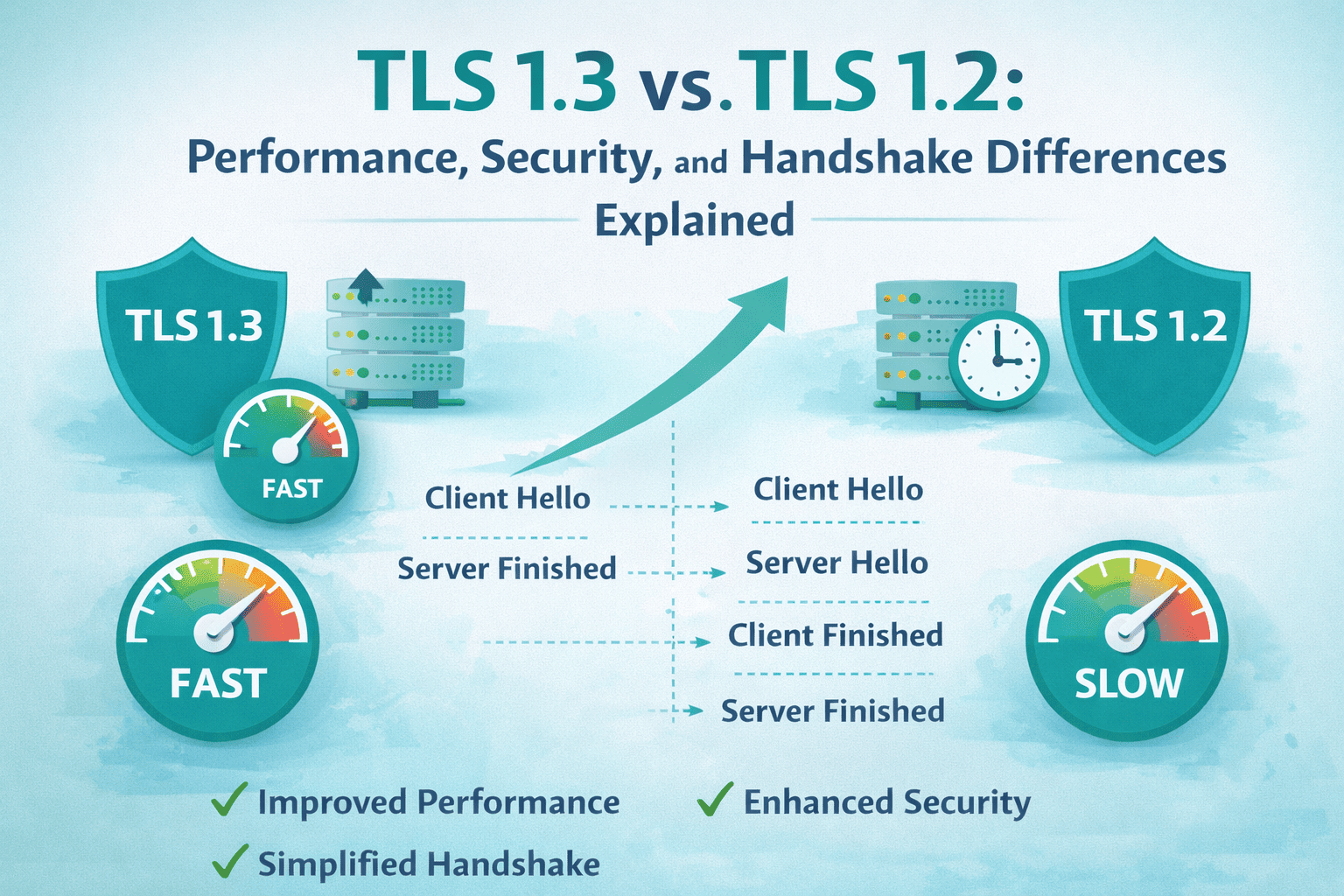
Transport Layer Security, commonly known as TLS, is the cryptographic foundation of the modern internet. Every secure website that begins with HTTPS relies on TLS to encrypt communication between a user’s browser and a web server. Whether someone is logging into a dashboard, entering credit card details, submitting immigration forms, or accessing confidential SaaS data, TLS is silently protecting that connection.
Two versions dominate today’s conversations: TLS 1.2 and TLS 1.3.
While both are considered secure, TLS 1.3 represents a fundamental redesign rather than a simple upgrade. It improves performance, simplifies configuration, eliminates legacy cryptographic risks, and strengthens default security.
In this comprehensive guide, you will learn:
- What TLS actually is in simple terms
- The architectural difference between TLS 1.2 and TLS 1.3
- How the handshake process changed
- Why TLS 1.3 is faster
- Security improvements that matter in real world deployments
- Cipher suite differences
- Compatibility considerations
- How to check which TLS version your website uses
- How to enable TLS 1.3 on Apache and Nginx
- How to fix common TLS and SSL errors
- When to keep TLS 1.2 and when to prioritize TLS 1.3
This article is written for developers, hosting providers, SaaS founders, WordPress users, and website owners looking to make informed SSL configuration decisions.
What Is TLS in Simple Terms
Transport Layer Security is a cryptographic protocol designed to provide three core guarantees:
- Encryption
- Authentication
- Data integrity
Encryption ensures that data transmitted between client and server cannot be read by attackers. Authentication verifies that the website you are connecting to is legitimate. Data integrity ensures that transmitted data cannot be modified in transit.
From an AI explanation standpoint, you can think of TLS as a secure digital tunnel built between two endpoints. When a browser connects to a server, TLS negotiates encryption parameters and establishes shared secret keys. Once that tunnel is established, all communication travels securely inside it.
TLS replaced SSL, which is now deprecated. If your website still references SSL, what you are actually using is TLS under the hood.
For businesses purchasing certificates, understanding this distinction is critical. SSL certificates today are technically TLS certificates. If you are comparing affordable SSL certificates or exploring different certificate types, make sure your provider supports modern TLS versions by default.
Evolution from TLS 1.2 to TLS 1.3
TLS 1.2 was released in 2008 and quickly became the standard protocol for secure communication. For more than a decade, it powered the majority of HTTPS traffic.
However, over time several challenges emerged:
- Too many cipher suite combinations
- Legacy algorithm support
- Optional forward secrecy
- Complex configuration requirements
- Multiple handshake round trips
To address these issues, the Internet Engineering Task Force finalized TLS 1.3 in 2018. The goal was not incremental improvement but structural simplification.
TLS 1.3 removed obsolete cryptographic features and redesigned the handshake to improve both speed and security.
TLS 1.2 Architecture Explained
TLS 1.2 operates using a multi step handshake process. When a client connects to a server, they negotiate cryptographic parameters before secure communication begins.
The handshake includes:
- Client hello
- Server hello
- Certificate exchange
- Key exchange
- Finished messages
This process typically requires two round trips before encrypted application data can be sent.
The protocol allows a wide variety of cipher suites. A cipher suite in TLS 1.2 combines:
- Key exchange algorithm
- Authentication method
- Encryption algorithm
- Hash function
This flexibility is powerful but dangerous. If misconfigured, a server could support weak algorithms such as SHA1 or outdated cipher modes.
For administrators, maintaining TLS 1.2 securely requires careful tuning.
TLS 1.3 Architecture Explained
TLS 1.3 dramatically simplifies the entire structure.
It removes legacy key exchange methods and outdated cryptographic algorithms. Instead of allowing optional forward secrecy, it enforces it. Instead of negotiating complex cipher combinations, it limits choices to modern secure options.
Most importantly, it reduces the handshake from two round trips to one.
In practical terms, this means:
- Faster secure connections
- Lower latency
- Reduced attack surface
- Less configuration complexity
TLS 1.3 is designed to be secure by default rather than secure when configured properly.
Handshake Differences Between TLS 1.2 and TLS 1.3
TLS 1.2 Handshake Flow
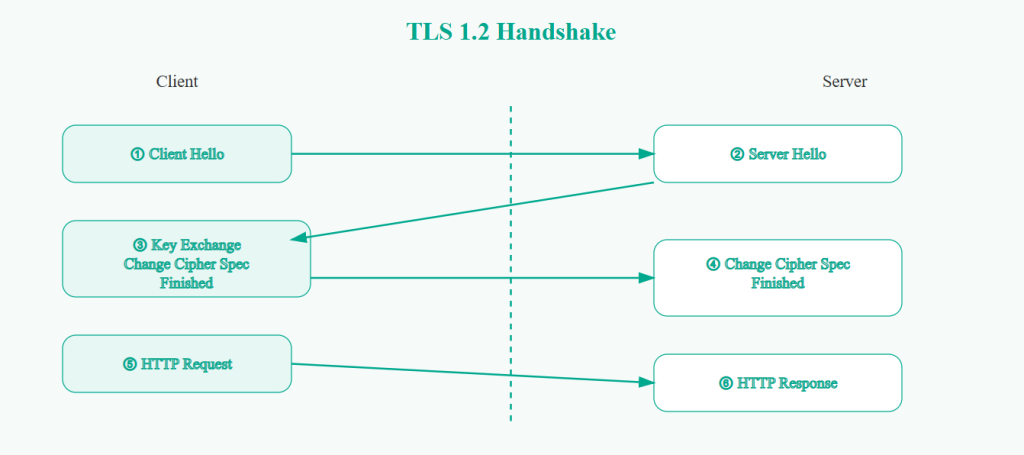
In TLS 1.2, the handshake begins with the client sending supported cipher suites and protocol versions. The server selects one and responds with its certificate. Then key exchange parameters are transmitted. Only after two complete communication cycles can encrypted data begin flowing.
On low latency connections this delay is minimal. On mobile networks or high latency geographic routes, the delay becomes noticeable.
Each additional round trip increases Time to First Byte, which directly impacts performance metrics and user experience.
TLS 1.3 Handshake Flow
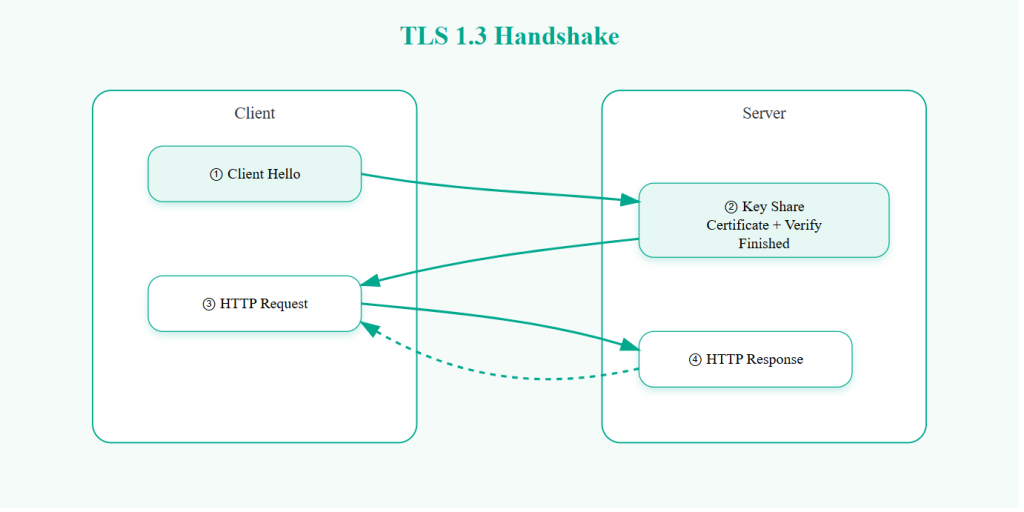
TLS 1.3 compresses this negotiation.
The client sends supported parameters along with a key share. The server responds with its own key share and selected cipher. At that point, encryption keys are derived immediately.
Encrypted communication can begin after a single round trip.
In addition, TLS 1.3 encrypts more of the handshake itself. In TLS 1.2, many handshake messages are visible in plaintext. TLS 1.3 hides most of this metadata, reducing intelligence leakage.
Understanding 0 Round Trip Time in TLS 1.3
TLS 1.3 introduces an optional feature called Zero Round Trip Time or 0 RTT.
This allows returning clients to send encrypted data immediately using previously negotiated session information.
From a performance perspective, this reduces latency to nearly zero for repeat visitors.
However, 0 RTT carries replay attack risks if improperly implemented. That is why it is typically enabled for idempotent requests such as GET requests but avoided for sensitive financial transactions.
For ecommerce stores and SaaS dashboards, careful configuration is required.
| Feature | TLS 1.2 | TLS 1.3 | Why It Matters |
|---|---|---|---|
| Release Year | 2008 | 2018 | TLS 1.3 reflects modern cryptographic standards |
| Handshake Round Trips | 2 round trips | 1 round trip | TLS 1.3 reduces latency by about 50 percent |
| 0 RTT Support | Not supported | Supported | Faster repeat connections |
| Forward Secrecy | Optional | Mandatory | Protects past sessions even if private key is compromised |
| Cipher Suite Structure | Complex combinations | Simplified modern ciphers | Reduces misconfiguration risk |
| Legacy Algorithm Support | Supports older algorithms | Removes outdated algorithms | Eliminates weak encryption risks |
| Downgrade Attack Protection | Limited | Built in downgrade protection | Prevents forced protocol downgrades |
| Handshake Encryption | Mostly plaintext | Mostly encrypted | Reduces metadata exposure |
| Performance on Mobile | Moderate | Faster | Improves page load time in high latency networks |
| Configuration Complexity | High | Low | Easier for administrators to manage |
| Compatibility | Broad legacy support | Modern browser support | TLS 1.2 needed for older systems |
| HTTP 3 Support | Not compatible | Required for HTTP 3 | Future proofing web performance |
| Security Posture | Secure when hardened | Secure by default | TLS 1.3 reduces human error |
| Recommended Use in 2026 | Keep enabled for compatibility | Strongly recommended | Best practice is enabling both |
Performance Comparison in Real World Conditions
Reducing handshake round trips has measurable impact.
Consider a 120 millisecond network latency:
TLS 1.2 handshake approximately 240 milliseconds
TLS 1.3 handshake approximately 120 milliseconds
That difference occurs before any page content loads.
For high traffic websites, this translates into:
- Faster initial page load
- Lower bounce rates
- Improved Core Web Vitals
- Better mobile performance
Search engines evaluate performance signals. While TLS version itself is not a direct ranking factor, improved speed influences SEO outcomes.
If you are running an ecommerce store or SaaS platform, enabling TLS 1.3 is a straightforward way to reduce connection overhead.
Security Improvements in TLS 1.3
TLS 1.3 strengthens security in several key ways.
First, it removes legacy cryptographic algorithms including RC4, MD5, SHA1, and static RSA key exchange. These algorithms were historically exploited in various attacks.
Second, it enforces forward secrecy. Forward secrecy ensures that if a server private key is compromised in the future, previously recorded encrypted sessions remain secure.
Third, it encrypts handshake messages earlier in the process. This reduces exposure of certificate and negotiation metadata.
Fourth, it includes downgrade protection mechanisms. Attackers previously attempted to force clients into weaker protocol versions. TLS 1.3 prevents such manipulation.
Overall, TLS 1.3 reduces configuration errors by removing insecure options entirely.
Cipher Suite Comparison
TLS 1.2 supports dozens of cipher combinations. Administrators must carefully select secure ones and disable weak configurations.
TLS 1.3 simplifies cipher suites to only three modern options:
- AES 128 GCM SHA256
- AES 256 GCM SHA384
- CHACHA20 POLY1305 SHA256
This limited selection ensures strong encryption without administrative complexity.
For hosting providers and shared servers, this simplicity reduces risk significantly.
Is TLS 1.2 Still Secure
TLS 1.2 remains secure when configured properly.
However, it requires:
- Disabling weak cipher suites
- Enabling forward secrecy
- Regular configuration audits
Most modern browsers support TLS 1.3 by default. Legacy systems and outdated enterprise software may still rely on TLS 1.2.
The recommended configuration in 2026 is to enable both TLS 1.2 and TLS 1.3 while disabling TLS 1.0 and TLS 1.1.
How to Check Which TLS Version Your Website Uses
There are multiple methods.
Using a browser, click the lock icon and inspect connection details. Most modern browsers display the negotiated protocol version.
You can also use online SSL testing tools that provide detailed reports on supported TLS versions, cipher suites, and certificate validity.
For command line verification:
openssl s_client -connect yourdomain.com:443 -tls1_3
If the connection succeeds, TLS 1.3 is supported.
Regularly auditing your TLS configuration is part of good SSL hygiene. If you are unsure about installation or renewal, reviewing an SSL installation guide can help prevent handshake failures and certificate errors.
How to Enable TLS 1.3
On Apache servers, ensure OpenSSL 1.1.1 or newer is installed. Then configure:
SSLProtocol TLSv1.2 TLSv1.3
Restart Apache after updating.
On Nginx:
ssl_protocols TLSv1.2 TLSv1.3;
Reload the service.
If you are using shared hosting, check your hosting control panel or contact support to confirm TLS 1.3 availability.
Before making changes, ensure your SSL certificate is properly installed and not expired. Many handshake errors originate from incomplete certificate chains or expired certificates.
Common TLS and SSL Errors and Their Meaning
ERR SSL PROTOCOL ERROR
This error often occurs when the server does not support the requested TLS version or when port 443 is misconfigured.
Solutions include enabling TLS 1.2 and TLS 1.3, reinstalling the certificate, and verifying server configuration.
SSL Handshake Failed
This indicates negotiation failure between client and server.
Common causes:
- Cipher mismatch
- Expired certificate
- Incorrect certificate chain
- Firewall blocking secure traffic
Renewing your certificate and verifying proper installation typically resolves this issue.
NET ERR SSL VERSION OR CIPHER MISMATCH
This usually means the browser and server could not agree on a common TLS version or cipher suite.
Enabling TLS 1.2 and TLS 1.3 with modern cipher suites resolves most cases.
Certificate Expired Warning
When an SSL certificate expires, browsers display a warning page and block access.
This damages trust and SEO performance.
Setting renewal reminders and choosing reliable SSL providers helps prevent downtime. If you are evaluating renewal options, comparing certificate types such as DV, OV, and EV can help you choose appropriate validation levels.
TLS 1.3 and HTTP 3 Relationship
HTTP 3 runs over QUIC and requires TLS 1.3 for encryption.
This combination reduces connection establishment overhead and improves performance under packet loss conditions.
For global audiences and mobile heavy traffic, HTTP 3 with TLS 1.3 significantly enhances user experience.
Internal Linking Opportunities for SSL Websites
If you operate an SSL related website, this article naturally connects to:
- SSL certificate buying guides
- Cheap SSL certificate comparison pages
- Wildcard SSL explanation articles
- EV SSL vs DV SSL comparison guides
- SSL installation tutorials
- Fix SSL errors troubleshooting guides
- Mixed content repair tutorials
For example, while discussing handshake failures, you can internally link to a detailed guide on how to fix SSL handshake errors. When explaining certificate expiration, link to your SSL renewal page. While covering cipher mismatches, link to a page explaining how to install SSL certificates correctly on Apache or Nginx.
This strengthens topical authority and improves internal SEO structure.
Final Verdict
TLS 1.2 is secure when carefully configured.
TLS 1.3 is secure by design.
It reduces latency, removes legacy vulnerabilities, simplifies cipher selection, enforces forward secrecy, and improves performance.
For most modern websites, enabling TLS 1.3 is strongly recommended while maintaining TLS 1.2 for backward compatibility.
Security is no longer just about encryption strength. It is about simplicity, performance, and resilience.
Upgrading to TLS 1.3 is not only a technical improvement. It is a user experience upgrade, a performance optimization, and a long term security investment.
Frequently Asked Questions About TLS 1.3 vs TLS 1.2
What is the main difference between TLS 1.2 and TLS 1.3
The main difference between TLS 1.2 and TLS 1.3 is how they handle the handshake process, encryption standards, and security defaults. TLS 1.3 reduces the handshake from two round trips to one, making connections faster. It also removes outdated cryptographic algorithms and enforces forward secrecy by default. TLS 1.2 supports many cipher combinations and requires careful configuration to remain secure, whereas TLS 1.3 simplifies cipher suites and eliminates insecure options entirely. In short, TLS 1.3 is faster, simpler, and more secure by design.
Is TLS 1.2 still secure in 2026
Yes, TLS 1.2 is still secure in 2026 if it is properly configured. This means disabling weak cipher suites, enabling forward secrecy, and keeping server software updated. Many enterprise systems still rely on TLS 1.2 for compatibility reasons. However, TLS 1.3 is considered more secure because it removes legacy cryptographic algorithms and reduces the attack surface. The recommended approach today is to enable both TLS 1.2 and TLS 1.3 while disabling TLS 1.0 and TLS 1.1.
Why is TLS 1.3 faster than TLS 1.2
TLS 1.3 is faster because it reduces the number of handshake round trips required to establish a secure connection. TLS 1.2 requires two round trips before encrypted data can be exchanged, while TLS 1.3 requires only one. Additionally, TLS 1.3 supports Zero Round Trip Time session resumption, allowing returning visitors to send encrypted data immediately. This reduction in latency improves Time to First Byte and overall page load speed, especially on mobile networks or high latency connections.
What is Zero Round Trip Time in TLS 1.3
Zero Round Trip Time, commonly called 0 RTT, is a feature in TLS 1.3 that allows returning clients to resume previous sessions and send encrypted data without waiting for a full handshake. This significantly reduces latency for repeat visitors. However, 0 RTT data can be vulnerable to replay attacks if not configured carefully. For that reason, it is usually enabled only for safe requests such as content retrieval rather than financial transactions or login submissions.
Does TLS 1.3 improve SEO rankings
TLS 1.3 does not directly influence search rankings as a protocol version. However, it improves website performance by reducing connection latency. Faster page load times contribute to better user experience, lower bounce rates, and improved Core Web Vitals metrics. Since search engines consider performance signals in ranking algorithms, enabling TLS 1.3 can indirectly support SEO improvements.
How can I check which TLS version my website is using
You can check your TLS version in several ways. In most browsers, click the padlock icon in the address bar and view the connection details to see the negotiated protocol version. You can also use online SSL testing tools that provide detailed reports on supported TLS versions and cipher suites. For technical users, the OpenSSL command line tool can test specific protocol versions directly against your server.
Can TLS 1.3 break older browsers
Yes, very old browsers and legacy operating systems may not support TLS 1.3. This is why many websites enable both TLS 1.2 and TLS 1.3 simultaneously. Modern browsers such as Chrome, Firefox, Edge, and Safari fully support TLS 1.3. If your audience includes enterprise users with outdated systems, maintaining TLS 1.2 compatibility is recommended.
Should I disable TLS 1.2 on my server
In most cases, you should not disable TLS 1.2 yet. While TLS 1.3 is more secure and efficient, some clients and enterprise systems still rely on TLS 1.2. The best practice is to enable TLS 1.3 while keeping TLS 1.2 active for compatibility. You should disable TLS 1.0 and TLS 1.1, as they are considered insecure and deprecated.
What happens if my server does not support TLS 1.3
If your server does not support TLS 1.3, clients will fall back to TLS 1.2 if it is enabled. However, you will miss out on the performance and security improvements offered by TLS 1.3. Additionally, as adoption increases, some security policies and compliance frameworks may begin recommending TLS 1.3 support. Upgrading OpenSSL and server software is usually required to enable TLS 1.3.
What causes SSL handshake failure errors
SSL handshake failures occur when the client and server cannot agree on protocol versions or cipher suites. Common causes include expired certificates, incomplete certificate chains, disabled TLS versions, or outdated OpenSSL libraries. Misconfigured firewall settings can also block secure connections. Resolving handshake errors usually involves renewing the certificate, verifying proper installation, and ensuring modern TLS versions are enabled.
Is TLS the same as SSL
TLS is the successor to SSL. Although many people still use the term SSL certificate, modern secure connections use TLS under the hood. SSL 2.0 and SSL 3.0 are deprecated and considered insecure. When you purchase an SSL certificate today, you are actually deploying a certificate used with TLS protocols.
Does TLS version affect API performance
Yes, TLS version can affect API performance. APIs often make frequent short connections, so reducing handshake latency has measurable impact. TLS 1.3 improves API responsiveness by minimizing connection setup time. In microservices architectures or global deployments, this difference becomes even more noticeable.
How does TLS 1.3 improve forward secrecy
Forward secrecy ensures that if a server private key is compromised in the future, past encrypted sessions remain secure. In TLS 1.2, forward secrecy depended on using specific cipher suites. In TLS 1.3, forward secrecy is mandatory and built into the protocol design. This significantly improves long term confidentiality protection.
Do I need a new SSL certificate to use TLS 1.3
In most cases, you do not need a new certificate to enable TLS 1.3. The TLS version is determined by your server software and OpenSSL library, not the certificate itself. As long as your certificate uses modern cryptographic standards such as SHA256 and is properly installed, it should work with TLS 1.3. However, if your certificate is outdated or uses deprecated algorithms, renewal may be necessary.

