
Every day, millions of malicious links circulate through email inboxes, SMS messages, social media feeds, and messaging apps. Some are crude and easy to spot. Many are not. Modern phishing campaigns deploy near-perfect replicas of legitimate websites, SSL certificates on fake domains, and AI-generated messages that pass casual scrutiny without triggering any obvious suspicion.
This guide is built around a different approach than most. Rather than a checklist of obvious red flags (bad grammar, suspicious sender), it walks through how malicious URLs are actually constructed, why each technique works, and what a systematic inspection process looks like. By the end, you will know how to read any URL before clicking it and what tools exist to verify links you are still unsure about.
| WHAT IS A MALICIOUS URL? | A malicious URL is a web address designed to cause harm to the visitor. This harm can take several forms: stealing login credentials through a fake login page, silently downloading malware, harvesting personal data, or redirecting users through a chain of pages that eventually lands on an exploit. The malicious intent is built into where the URL points, not the URL itself. |
The Scale of URL-Based Attacks in 2025: Why This Matters Now
Understanding the threat requires knowing how large it actually is. URL-based attacks are not a niche concern limited to enterprise IT departments. They are the dominant method of initial compromise across virtually every category of cybercrime.
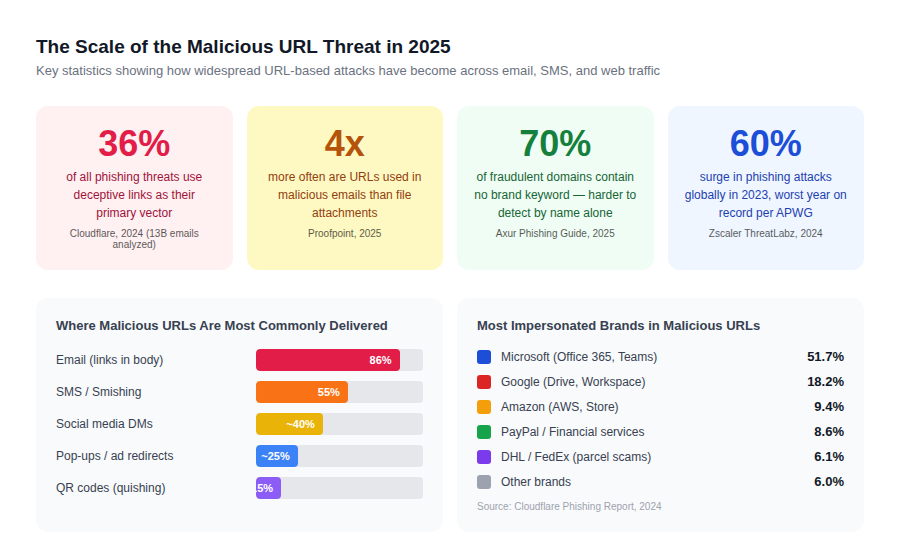
The data reveals something counterintuitive: 70% of fraudulent domains contain no brand-related keyword in the domain name itself. (Source: Axur, 2025) This means simple text scanning for well-known brand names misses the majority of malicious URLs in circulation. The threat has evolved well past obvious impersonation.
| ! | HTTPS does not mean safe. Attackers obtain valid SSL certificates for malicious domains in minutes. A padlock icon in your browser confirms the connection is encrypted, not that the destination is legitimate. This is one of the most dangerous misconceptions in everyday web safety. |
Reading a URL Like a Security Analyst: The Anatomy Breakdown
Most people read URLs from left to right and stop at the first recognizable word. Attackers exploit exactly this habit. Understanding what each component of a URL actually means changes how you read them.
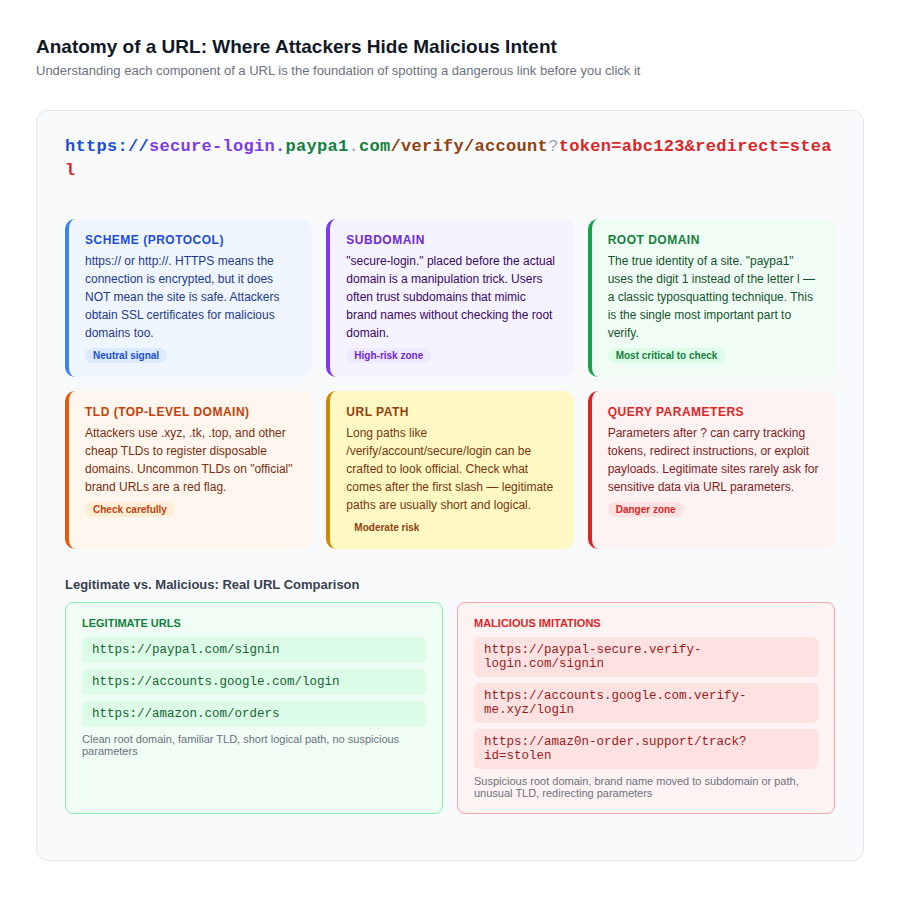
| THE SINGLE MOST IMPORTANT RULE | When evaluating a URL, the only part that identifies where you are actually going is the root domain — the text immediately before the first slash, after stripping the TLD. In ‘secure.paypal.com.login-now.xyz/account’, the root domain is login-now.xyz, not paypal.com. Paypal.com here is a subdomain of a fraudulent domain. |
The practical takeaway: train yourself to find the root domain first, before reading anything else in the URL. Subdomains, paths, and parameters are all under the control of whoever owns that root domain. If the root domain is wrong, nothing else in the URL matters.
Six Types of Malicious URL Attacks and the Logic Behind Each
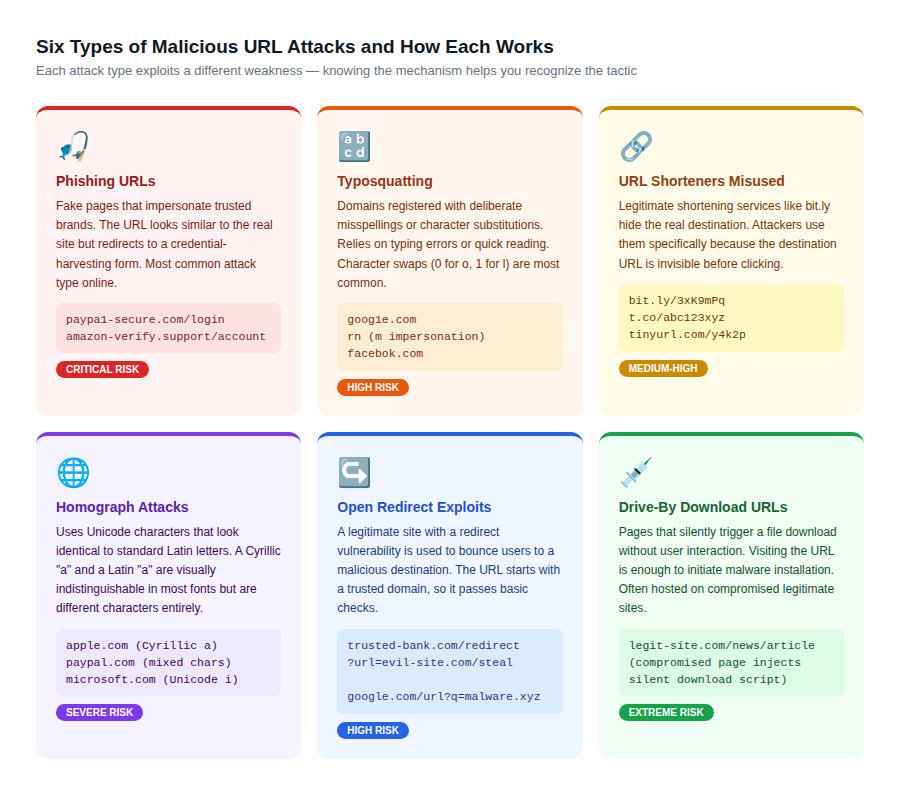
Each attack technique exploits a different cognitive or technical weakness. Phishing relies on visual similarity. Typosquatting relies on reading speed. Homograph attacks exploit font rendering. Understanding the mechanism makes each tactic far easier to recognize.
Phishing URLs
Phishing URLs create fake versions of login pages or checkout flows for trusted brands. The page looks authentic, but the form submits credentials to an attacker’s server. According to the APWG, the first quarter of 2024 saw unique phishing email campaigns increase by 64% compared to Q4 2023.
What makes modern phishing harder to detect: attackers now routinely obtain DV SSL certificates for their fake domains, install legitimate-looking page designs copied pixel-by-pixel from the target brand, and register domains like ‘secure-paypal-login.com’ that contain the brand name as a subdomain or path segment.
Typosquatting
Typosquatting registers domains that are one character off from a well-known site. Common patterns include swapping a letter for a visually similar digit (paypa1.com, g00gle.com), inserting an extra letter (gooogle.com), or using a common double-letter typo (amazoon.com). These domains wait passively for users who mistype a URL, or are actively sent as links in phishing campaigns where the error is subtle enough to miss.
Homograph Attacks
Homograph attacks use Unicode characters from non-Latin scripts that are visually indistinguishable from their Latin equivalents in most browser fonts. A Cyrillic ‘a’ (Unicode U+0430) looks identical to a Latin ‘a’ in many typefaces, so ‘аpple.com’ with a Cyrillic first character is technically a different domain from ‘apple.com’. Modern browsers display the Punycode version (xn--pple-43d.com) in the URL bar for domains that mix scripts, but this protection is inconsistently applied across all browsers and operating systems.
Open Redirect Exploits
Open redirect vulnerabilities exist on legitimate websites that pass a destination URL as a parameter without validating it. A URL like ‘trusted-bank.com/redirect?url=malicious-site.com’ starts on a domain you trust, passes basic URL reputation checks because the beginning of the URL is legitimate, and then silently forwards the user to the attacker’s destination. These are particularly dangerous because they bypass corporate security filters that check URL reputations.
How to Inspect Any URL Before Clicking: A Systematic 6-Step Process
Most people either click without looking or refuse to click anything that looks slightly unusual. Both extremes are impractical. The process below takes under 60 seconds for most URLs and covers the cases where quick visual inspection is not enough.
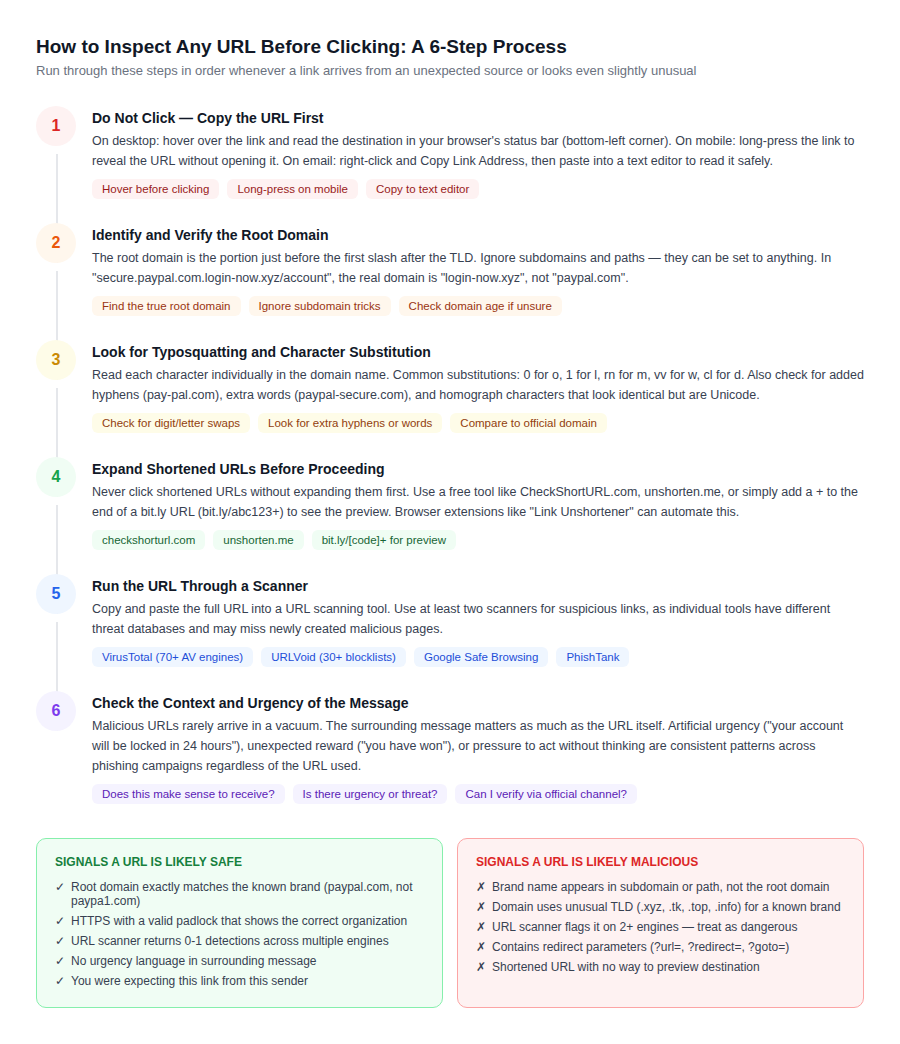
Step 1: Read the URL Without Clicking
On desktop, hovering over a link reveals its destination in the browser status bar. On mobile, long-pressing a link shows the URL in a preview dialog. In email clients, right-clicking allows copying the link address to a text editor without navigating anywhere. This step costs nothing and immediately surfaces obvious mismatches between the visible anchor text and the actual destination.
Step 2: Find and Verify the Root Domain
Locate the root domain by reading backward from the first forward slash, then identifying the text after the last period before that slash. That text plus the period before it is the TLD. Everything before the last non-TLD period is the root domain. Check it against what you expect.
| URL Example | Root Domain | Safe? | Why |
| https://paypal.com/signin | paypal.com | Yes | Exact match to known brand domain |
| https://secure.paypal.com/verify | paypal.com | Yes | Legitimate subdomain of paypal.com |
| https://paypal.secure-login.com/signin | secure-login.com | No | Paypal is a subdomain; real domain is attacker-controlled |
| https://paypa1.com/login | paypa1.com | No | Digit 1 substituted for letter l — typosquatting |
| https://amazon.com.orders-check.xyz | orders-check.xyz | No | Amazon.com is a subdomain of the malicious .xyz domain |
Step 3: Watch for Shortened and Redirected URLs
Shortened URLs from services like bit.ly, tinyurl.com, or t.co completely hide the destination. Before clicking any shortened URL from an unknown source, expand it using a preview tool. Adding a + to the end of most bit.ly URLs (bit.ly/abc123+) shows the destination page. Free services like checkshorturl.com and unshorten.me work for all major shorteners.
| ! | If you receive a shortened URL in an SMS message claiming to be from a bank, courier service, or government agency — do not click it. Legitimate institutions do not use generic URL shorteners for official communications. This combination is one of the clearest signals of a smishing (SMS phishing) attack. |
Step 4: Examine the TLD for Mismatch
Legitimate brands use their primary registered domain across all official communications. If a URL claims to be from Microsoft but uses .xyz, .top, .tk, .info, or any other unusual TLD, that is a red flag regardless of what the subdomain or path says. Attackers register cheap or free TLDs specifically because they can be obtained without verification and abandoned after a campaign ends.
Steps 5 and 6: Use Scanner Tools and Trust Your Context Instincts
URL scanning tools provide a second layer of verification when visual inspection is inconclusive. The surrounding context of how the link arrived is equally important. A link that prompts urgency (‘verify your account in the next 30 minutes or lose access’) combined with a slightly unusual domain is a near-certain phishing attempt. Legitimate services rarely send communications that require immediate action with no alternative contact method.
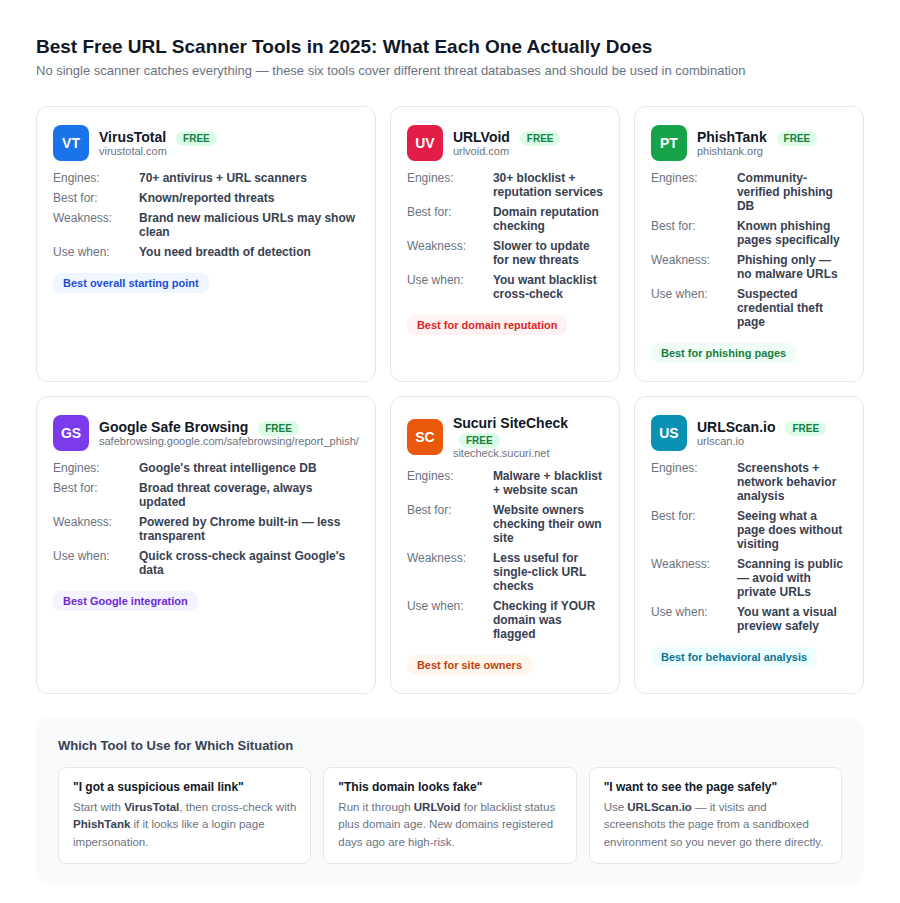
The Best Free URL Scanner Tools in 2025: What Each Actually Does
URL scanners work by checking a link against threat intelligence databases, blacklists, and reputation services. No single scanner has complete coverage because new malicious domains are created faster than any database can track. Using two or three tools in combination covers more of the threat landscape.
How to Interpret Scanner Results
Scanner results require interpretation, not just reading. The number of ‘flagged’ engines matters, but so does the base rate. VirusTotal checks against 70+ engines, so a single flag may represent a false positive. Apply these thresholds:
- 0-1 detections: likely safe, but exercise caution if the source is untrustworthy
- 2-5 detections: suspicious — cross-check with a second tool before proceeding
- 6+ detections: treat as malicious regardless of other indicators
A clean result from a scanner does not guarantee safety for newly registered domains. Attackers routinely rotate through freshly registered domains that have no reputation history, meaning they appear clean on all scanners for the first 24-48 hours of a campaign. If a domain was registered within the past week and carries no legitimate business presence, that alone is a risk signal.
Checking Domain Age and Registration
Domain age is a powerful signal that most URL scanning tools do not surface prominently. Legitimate businesses and institutions use domains that are months or years old. A domain registered within the past 30 days carrying a convincing brand name and SSL certificate is a textbook phishing setup. Check domain age using any WHOIS lookup service (whois.domaintools.com, icann.org/lookup). The creation date field in the WHOIS record tells you when the domain was first registered.
SSL Certificates on Malicious Domains: Why HTTPS Is Not a Safety Signal
The padlock in your browser’s address bar has been misunderstood as a safety indicator for years. It communicates exactly one thing: the connection between your browser and the server is encrypted. It says nothing about whether the server belongs to who you think it does or whether the page is designed to steal your data.
| HOW ATTACKERS GET SSL CERTIFICATES | Domain Validated (DV) SSL certificates require only proof that the applicant controls the domain, not proof that they are who they claim to be. A certificate for ‘paypal-verify.com’ can be obtained in minutes from any certificate authority. Since Chrome, Firefox, and Safari display the same padlock for DV certificates as they do for the padlock on paypal.com itself, the visual trust signal is identical. |
This is not a flaw in SSL. SSL was designed for encryption, not authentication of business identity. The certificate types that do verify business identity are Organization Validated (OV) and Extended Validation (EV). Clicking the padlock on an EV-secured site shows the verified organization name in the certificate details. On a DV-secured phishing site, the padlock shows only the domain name.
The practical implication: do not use the presence of HTTPS as a reason to trust a URL you were already suspicious of. Use it as a minimum threshold (an HTTP site is unacceptable) while still applying all other inspection steps.
| Certificate Type | Verifies | Browser Padlock Appearance | Protection Against Phishing? |
| DV (Domain Validated) | Domain ownership only | Standard padlock | No — attackers use DV too |
| OV (Organization Validated) | Domain + business identity | Padlock + org info in cert details | Partial — harder for attackers to obtain |
| EV (Extended Validation) | Full legal entity verification | Padlock + org name in cert | Better — requires verified identity |
Already Clicked a Malicious URL? The Emergency Response Protocol
Acting quickly after clicking a suspicious link substantially limits the damage. The first minutes matter most because credential theft happens instantly (when you submit a form) while malware installation may take longer to complete. The timeline below covers both scenarios.
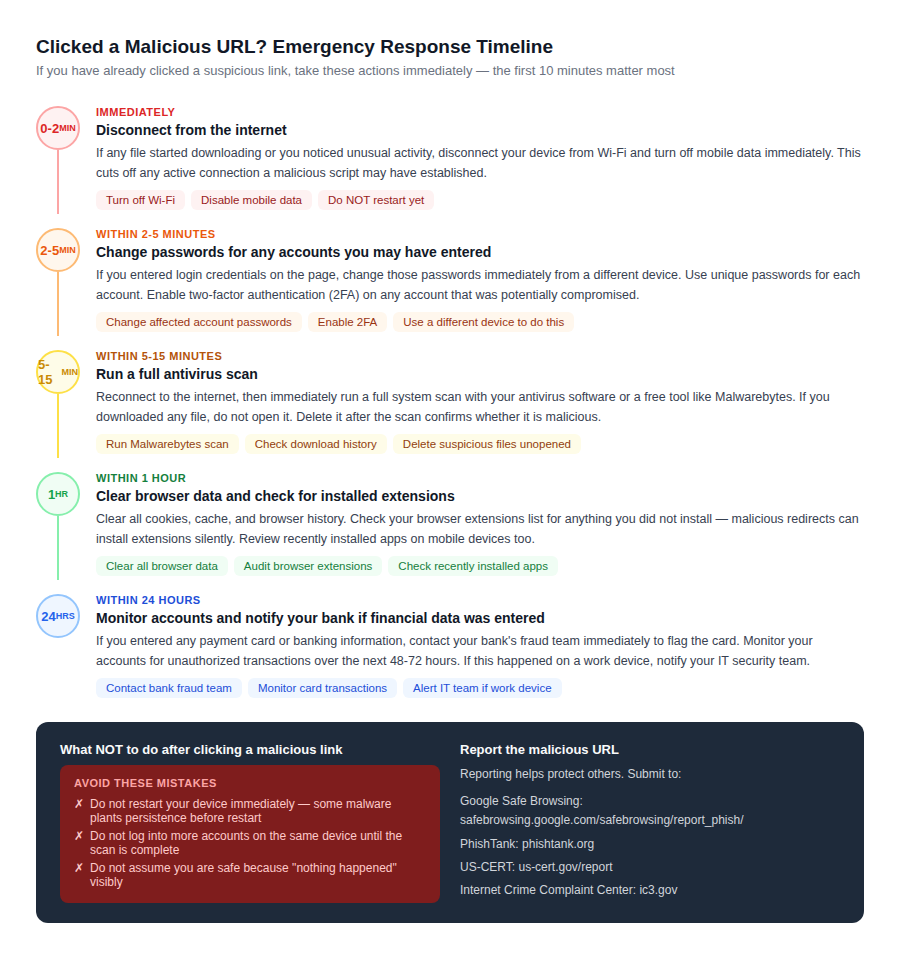
One factor that determines outcomes: whether you entered any information on the page. Visiting a malicious URL without entering data carries far less risk than a page where you typed a password, payment card number, or personal details. Drive-by download pages are the exception — they can deliver malware without any user interaction beyond the page load itself.
If You Entered Login Credentials
The most time-sensitive action is changing the compromised password before the attacker can use it. Go to the real version of the service (type the address directly into the browser, do not follow any link) and change your password from a different device if possible. Contact the service’s security team if your account shows any unauthorized activity.
If You Entered Payment Information
Contact your bank’s fraud department immediately. Most banks have 24-hour fraud lines and can flag your card for suspicious activity within minutes. You do not need to wait for a fraudulent transaction to appear before reporting — reporting proactively gives you stronger legal protection and the ability to request a new card before any charge posts.
Long-Term Protection: Habits and Tools That Make Malicious URLs Easier to Spot
Browser-Level Protections to Enable
- Enable Safe Browsing in Chrome (Settings > Privacy and Security > Security > Enhanced protection). Enhanced protection offers real-time URL checking against Google’s threat database.
- In Firefox, ensure DNS over HTTPS is enabled (Settings > Network Settings > Enable DNS over HTTPS). This encrypts DNS lookups and can block access to known malicious domains.
- Install uBlock Origin (available for Chrome, Firefox, and Edge). It blocks many malicious ad redirects and known phishing domains through community-maintained filter lists.
- Keep your browser updated. Browser vendors push Safe Browsing database updates and security patches continuously. An outdated browser misses recent threat intelligence.
Organizational and Email-Level Protections
- Enable anti-phishing features in your email provider. Gmail, Outlook, and most business email platforms have built-in phishing detection that flags suspicious links before they reach your inbox.
- Use a password manager. Password managers only autofill credentials when the current URL matches the saved domain. On a phishing site impersonating your bank, the password manager will not autofill because the domain does not match — this provides an automatic catch that bypasses visual inspection entirely.
- For organizations: implement DMARC, DKIM, and SPF on your email domain. These records prevent attackers from spoofing your domain in phishing emails sent to your customers or partners.
The SSL Certificate as a Starting Point, Not an Endpoint
For website owners, having the correct SSL certificate on your domain is the foundation of URL trustworthiness from your visitors’ perspective. EV and OV certificates, which are compared and available through comparecheapssl.com, provide visitors with verifiable proof that your domain belongs to a verified entity. This is the technical tool that makes the difference between being impersonated and being distinguishable from an impersonator.
Domain Validated certificates secure the connection. Organization and Extended Validation certificates secure the identity. For any site handling login, payment, or sensitive user data, the higher validation tiers close the gap that DV certificates leave open.
Frequently Asked Questions
Can a URL be malicious even if it starts with HTTPS?
Yes. Attackers routinely obtain free DV SSL certificates for malicious domains. The padlock indicates an encrypted connection, not a trustworthy destination. Always verify the root domain separately from the presence of HTTPS.
How do I expand a shortened URL without clicking it?
Go to checkshorturl.com or unshorten.me and paste the shortened URL into the tool. For bit.ly links specifically, add a plus sign to the end of the URL (bit.ly/abc123+) in your browser to see a preview page without visiting the destination.
What makes a homograph attack so hard to detect?
Homograph attacks use Unicode characters from non-Latin scripts that are visually identical to Latin characters in most fonts. A Cyrillic ‘a’ and a Latin ‘a’ look the same in your browser’s address bar but resolve to completely different domain names. The only reliable way to detect this is to paste the domain into a Unicode analyzer or check the Punycode version of the URL.
Is it safe to scan a URL using VirusTotal if the URL is from a private email?
Caution is warranted. URLs submitted to VirusTotal are logged and may be visible to VirusTotal users with access to threat intelligence feeds. For URLs from private or internal communications, avoid public scanners and use your organization’s internal security tools instead.
What is the difference between phishing and a drive-by download?
Phishing requires the user to actively submit information (credentials, payment details) on a fake page. A drive-by download attack installs malware simply from visiting the page — no form submission required. Drive-by downloads exploit browser or plugin vulnerabilities and are why keeping your browser updated is a critical protection.
What should I do if someone I know is being impersonated through a malicious domain?
Report the domain to Google Safe Browsing at safebrowsing.google.com/safebrowsing/report_phish/, submit it to PhishTank, and contact the brand being impersonated through their official security or abuse contact (usually listed as security@domain.com or abuse@domain.com). If financial fraud is involved, file a report with the Internet Crime Complaint Center (ic3.gov).
Related Reading on CompareCheapSSL.com
- SSL Certificate Types Compared: DV vs OV vs EV — which validates your identity to visitors
- EV SSL Certificates: How Extended Validation differs from standard certificates
- Browser Errors and Security Warnings: What each warning really means
- SSL Checker Tool: Verify your own domain’s certificate installation
- HTTPS vs HTTP: What the padlock actually tells your visitors

