
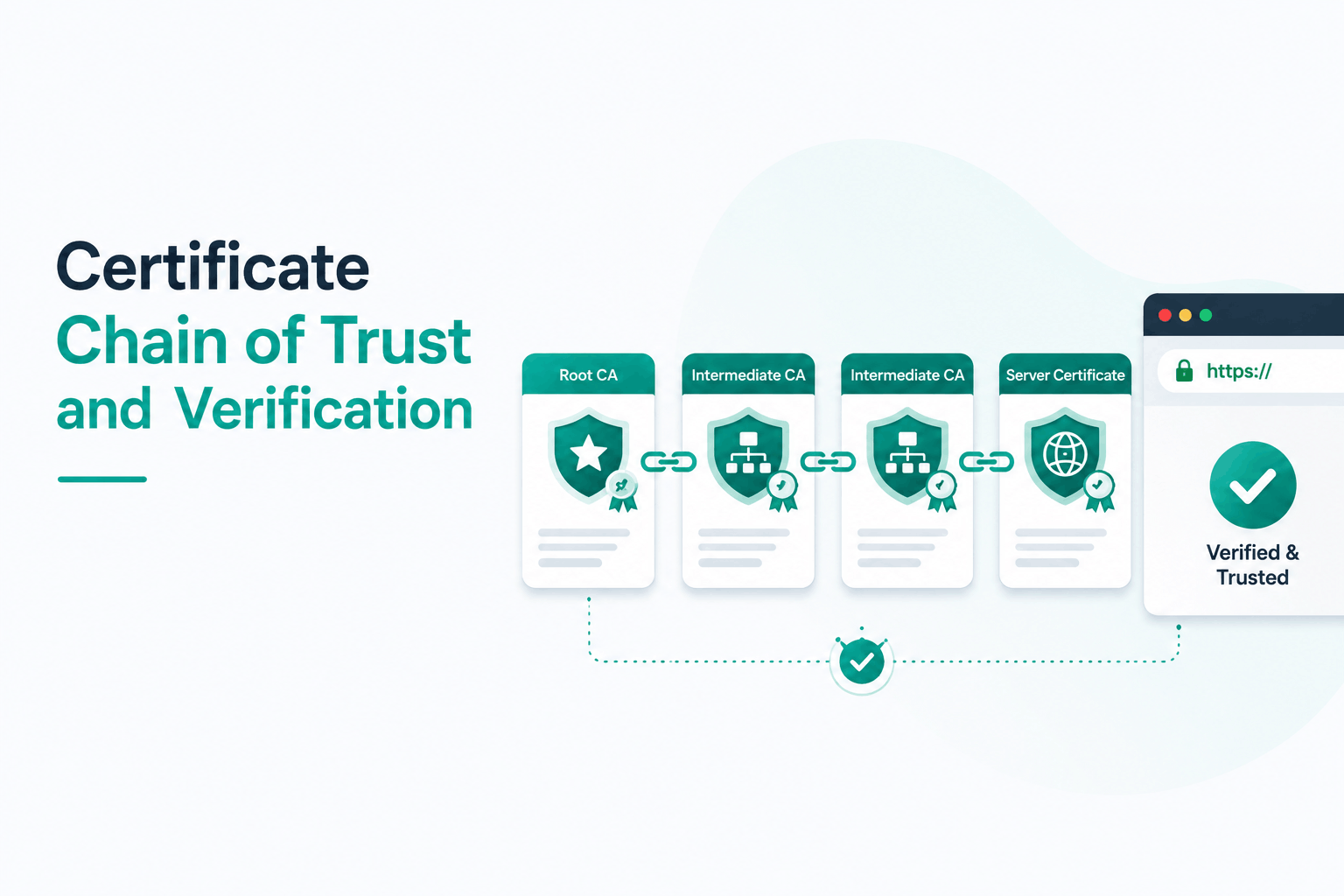
When a browser visits an HTTPS website, it does not simply check whether the site has an SSL certificate. It performs a multi-step verification process that traces a chain of cryptographic signatures from the certificate on the server all the way back to a root authority stored inside the browser itself. This chain is called the certificate chain of trust, and it is the foundational mechanism that makes all secure web communication reliable.
This guide explains how that chain is structured, how browsers verify it at every link, what happens when any part of it breaks, and what site owners must do to ensure their chain is always complete and correctly configured. The concepts covered here apply equally to everyone managing SSL certificates — whether you are installing a new certificate for the first time or troubleshooting a ‘Your connection is not private’ warning that appeared after a server migration.
| WHAT IS THE CERTIFICATE CHAIN OF TRUST? | The certificate chain of trust is a linked sequence of digital certificates that begins with the SSL certificate installed on a web server (the leaf/end-entity cert) and ends with a root certificate stored in the browser’s trust store. Each certificate in the chain is digitally signed by the one above it, and the browser verifies each signature in sequence. If the full chain from leaf to trusted root can be verified, the connection is considered secure. |
The Three-Layer Certificate Hierarchy: Root, Intermediate, and Leaf
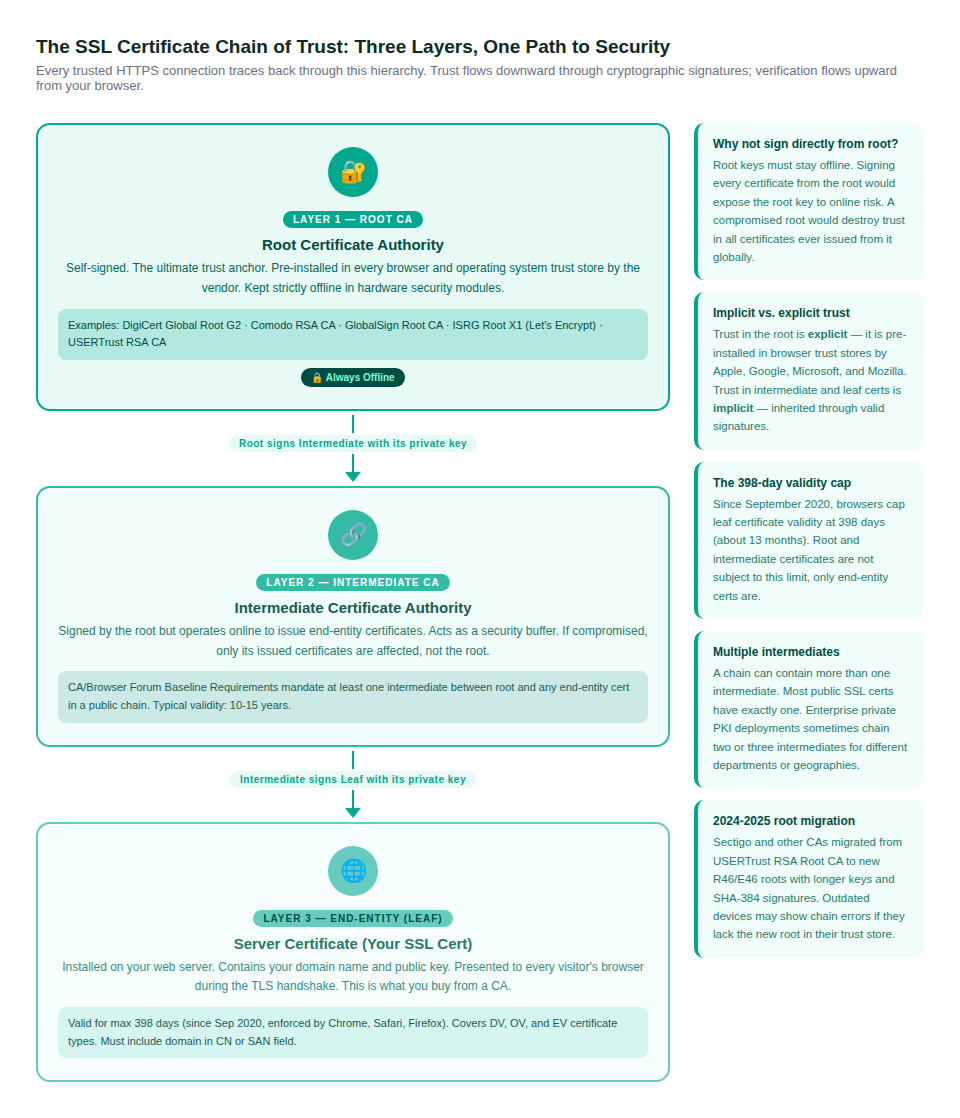
Every publicly trusted SSL certificate exists within a strict hierarchy of certificate authorities. Understanding this three-layer structure answers the most fundamental questions about how SSL trust works and why the system is designed the way it is.
The Root Certificate Authority
The root CA sits at the top of the entire trust hierarchy. It is a self-signed certificate, meaning it vouches for its own authenticity rather than being signed by a higher authority. Root certificates derive their trust from the simple fact that Apple, Google, Microsoft, and Mozilla have decided to pre-install them in the trust stores that ship with every browser and operating system.
Because root certificates are the ultimate source of trust, the private key of a root CA is extraordinarily sensitive. Root CAs are kept strictly offline, stored in hardware security modules (HSMs) in physically secured data centres. The CA/Browser Forum Baseline Requirements — the governing rules for all publicly trusted SSL certificates — actually prohibit issuing end-entity certificates directly from a root. Every publicly trusted chain must pass through at least one intermediate.
The Intermediate Certificate Authority
Intermediate CAs are certificates that sit between the root and the end-entity certificate. They are signed by the root (or by another intermediate), and in turn they sign the leaf certificates issued to websites and organisations.
The intermediate layer exists specifically to protect the root key. If an intermediate CA is compromised, its certificates can be revoked and a new intermediate can be issued from the root. The root’s key never needs to be exposed. Only the certificates issued from the compromised intermediate are affected — not the hundreds of thousands of other certificates hanging from different intermediates on the same root.
| CA/BROWSER FORUM RULE | The Baseline Requirements maintained by the CA/Browser Forum explicitly require that end-entity certificates in publicly trusted chains are signed by an intermediate CA, not directly by the root. The root CA must be kept offline. This is not optional — it is a mandatory requirement for inclusion in any major browser trust store. |
The End-Entity (Leaf) Certificate
The end-entity certificate, also called the leaf certificate or server certificate, is the one you purchase from a certificate authority and install on your web server. It contains your domain name (in the Subject Alternative Name and/or Common Name fields), your public key, the name of the issuing intermediate CA, and a validity period that as of September 2020 cannot exceed 398 days.
This is the certificate browsers inspect during every HTTPS connection. It is the only one of the three levels that website owners manage directly. Root and intermediate certificates are maintained by the certificate authority.
How the Browser Verifies the Chain: The TLS Handshake in Detail
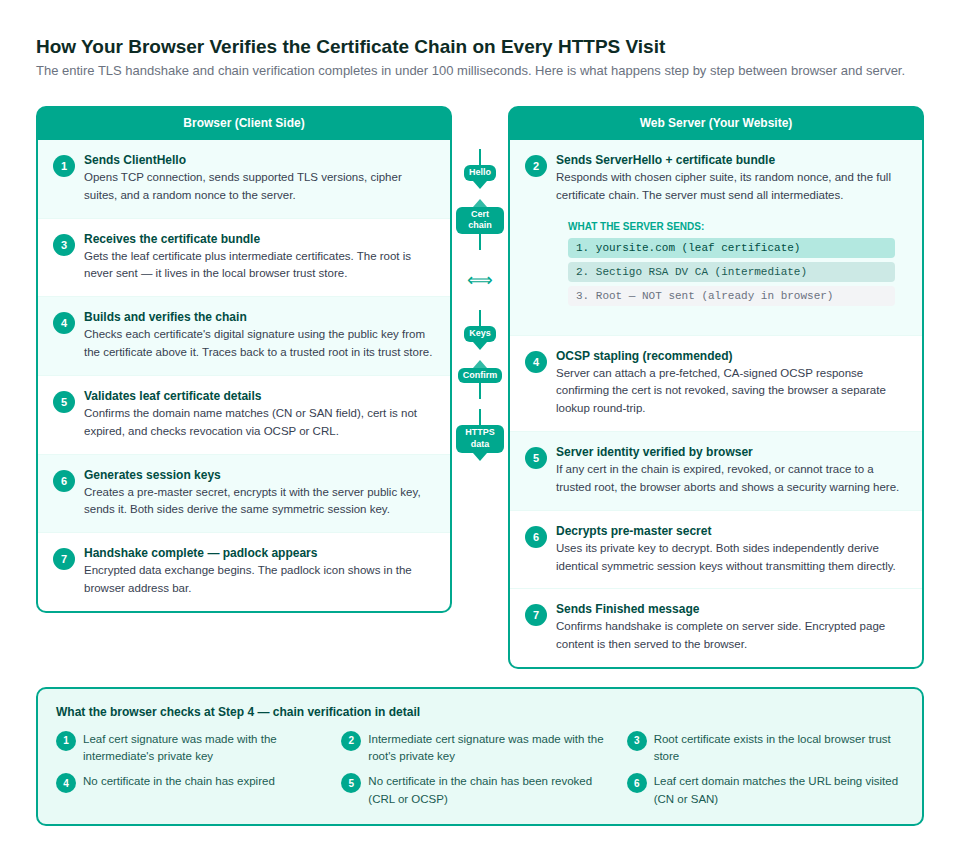
Chain verification is not a separate process from establishing an HTTPS connection — it is embedded inside the TLS handshake that happens every single time a visitor loads your site. The entire handshake, including chain verification, typically completes in under 100 milliseconds.
What the Browser Checks at Each Step
The chain verification portion of the handshake (Step 4 in the diagram above) involves six distinct checks. Each one must pass for the connection to proceed:
- The leaf certificate’s digital signature was created using the private key of the issuing intermediate CA. The browser verifies this using the intermediate’s public key.
- The intermediate certificate’s digital signature was created using the private key of the root CA. The browser verifies this using the root’s public key.
- The root certificate is present in the browser’s local trust store. Without this, the chain has no anchor and cannot be trusted regardless of the other certificates’ validity.
- No certificate in the chain has expired. All three levels must be within their validity period as of the current date.
- No certificate in the chain has been revoked. The browser checks either the Certificate Revocation List (CRL) or queries the Online Certificate Status Protocol (OCSP) responder.
- The domain name in the leaf certificate’s Subject Alternative Name or Common Name field matches the URL the browser is trying to reach.
| ! | The root certificate is never sent by the server during the TLS handshake. If the server sends the root, browsers typically ignore it. The root is expected to exist in the client’s local trust store. If a device or browser has an outdated trust store missing a newer root, it will fail to verify chains anchored to that root even if the server’s certificate is perfectly valid. |
Certificate Revocation: CRL, OCSP, and OCSP Stapling
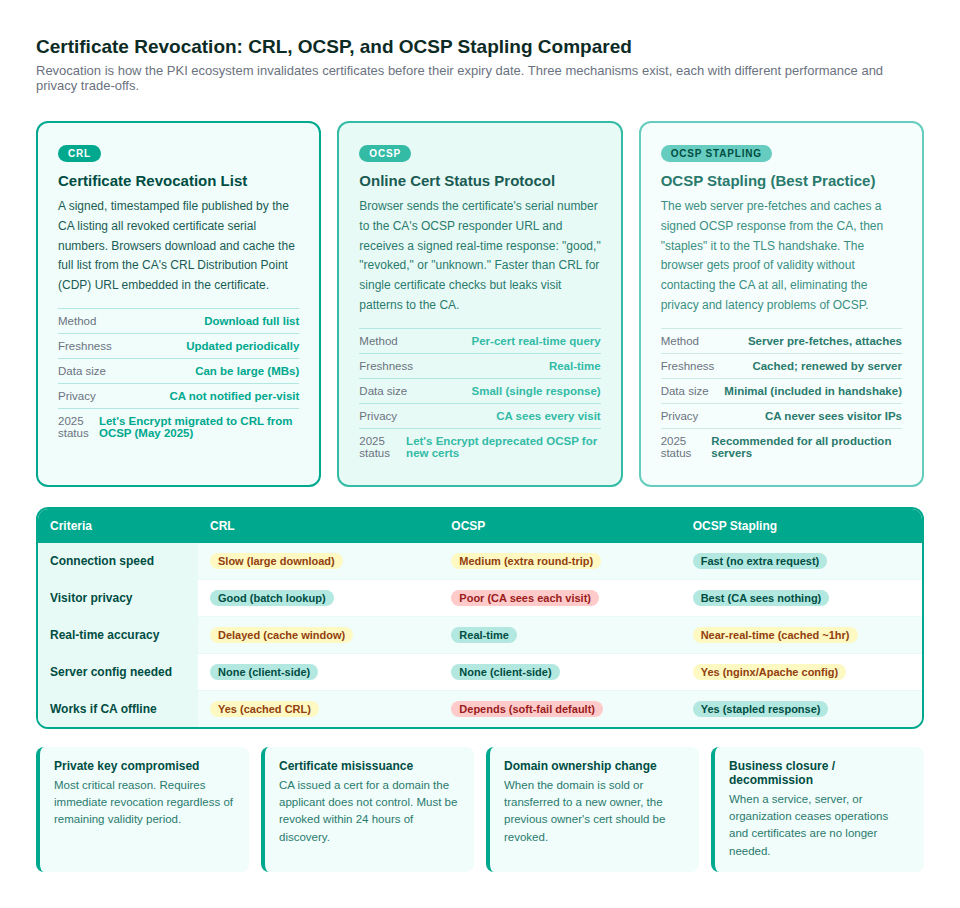
A certificate can become untrustworthy before its expiry date. Key compromise, misissuance, or ownership change all require invalidating a certificate immediately. The PKI ecosystem uses two primary mechanisms to communicate revocation status, with a third that improves on both.
Certificate Revocation Lists (CRL)
A CRL is a signed, timestamped file that a CA publishes at regular intervals listing the serial numbers of all certificates it has revoked. The URL where a CRL can be downloaded is embedded in each certificate in the CDP (CRL Distribution Point) extension field. Browsers download and cache the CRL, then check whether the certificate’s serial number appears on it.
CRLs are experiencing a revival in 2025. Let’s Encrypt completed its migration away from OCSP to CRL-based revocation in May 2025, and Chrome uses Google-curated CRL subsets (CRLSets) for its revocation checks rather than fetching CRLs directly. The trade-off: CRLs can be large files and may not reflect revocations in real-time until the next publishing cycle.
Online Certificate Status Protocol (OCSP)
OCSP allows a browser to query the CA’s OCSP responder server with a single certificate’s serial number and receive a real-time signed response indicating whether the certificate is ‘good,’ ‘revoked,’ or ‘unknown.’ This is faster and more bandwidth-efficient than downloading a full CRL.
The downside is privacy. Every OCSP query from a browser reveals to the CA exactly which website the user is visiting. For high-traffic sites with privacy-conscious users, this is a significant concern. Let’s Encrypt’s decision to drop OCSP for new certificates in 2025 was partly motivated by this privacy problem.
OCSP Stapling: The Best of Both Approaches
OCSP Stapling solves the privacy and latency problems of OCSP. Instead of the browser querying the CA’s OCSP server, the web server periodically pre-fetches its own OCSP response from the CA and caches it. During the TLS handshake, the server ‘staples’ this cached response to the certificate it sends, proving the certificate is currently valid without the browser ever contacting the CA.
This eliminates the privacy exposure (the CA never sees visitor IPs) and removes the latency of an additional network round-trip. OCSP Stapling is configurable in both Nginx and Apache with a few lines of configuration and is the recommended approach for any production web server.
| Revocation Method | How It Works | Speed | Privacy | When to Use |
| CRL | Browser downloads full revoked-cert list | Slow (large download) | Good (no per-visit tracking) | Let’s Encrypt; enterprise PKI |
| OCSP | Browser queries CA responder per cert | Medium (extra round-trip) | Poor (CA sees every visit) | Legacy support; being deprecated |
| OCSP Stapling | Server pre-fetches and attaches response | Fast (included in handshake) | Best (CA sees nothing) | Recommended for all production sites |
When the Chain Breaks: Error Diagnosis and Fixes
Incomplete or misconfigured certificate chains are the most common SSL installation error site owners encounter. The errors are alarming to visitors but almost always fixable in minutes once you understand the cause.
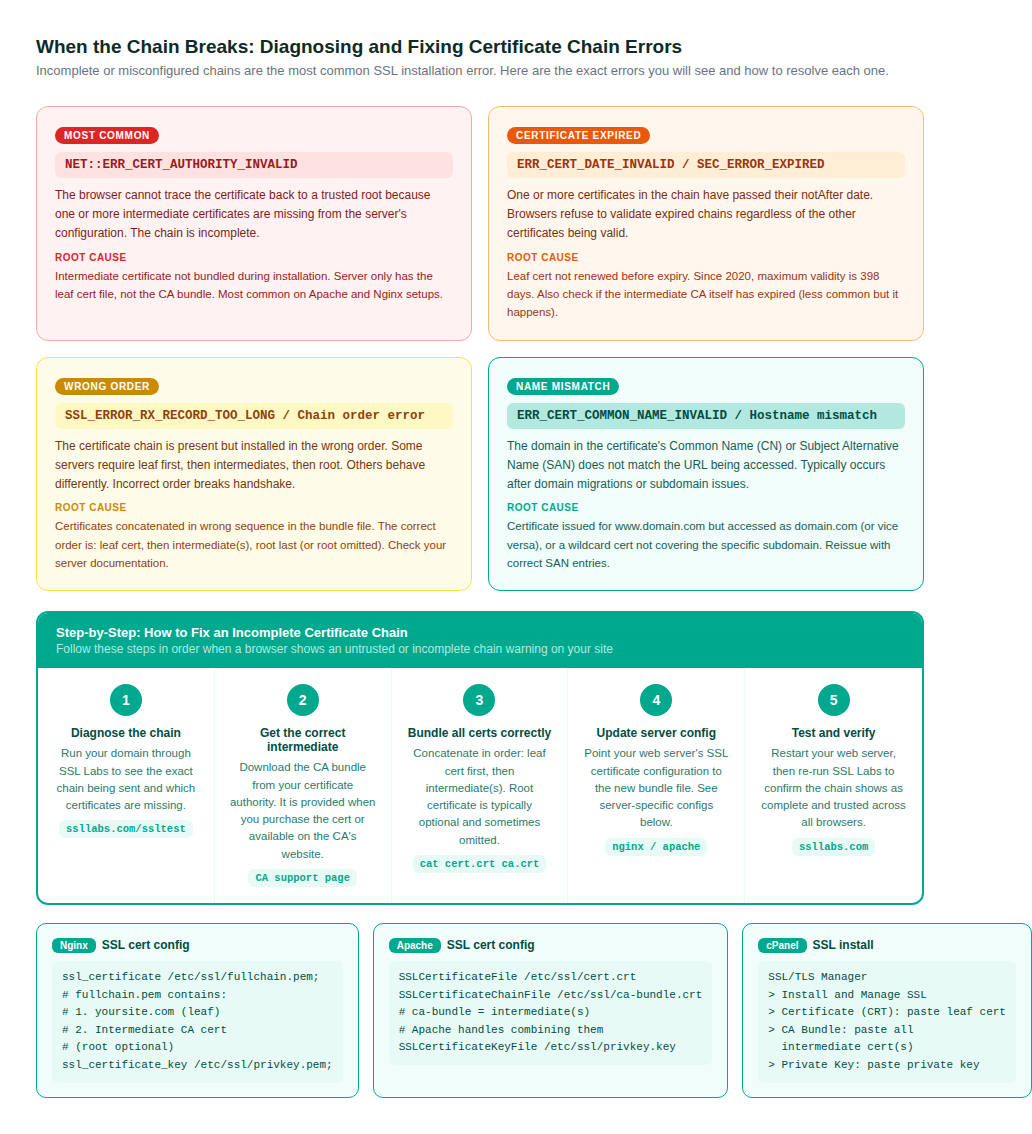
The Most Common Error: Missing Intermediate Certificate
The NET::ERR_CERT_AUTHORITY_INVALID error (and its equivalents in Firefox and Safari) most often appears because the server was configured with only the leaf certificate file, without the CA bundle containing the intermediate certificate(s). The server sends only one certificate during the handshake. The browser cannot trace the chain to a trusted root because the link between the leaf and root is missing.
This happens frequently when site owners install certificates manually through cPanel or copy only the certificate file from the CA’s delivery email. The fix is always the same: download the CA bundle from your certificate authority, concatenate the leaf cert and intermediate(s) into a single bundle file, and update the server configuration to point to that bundle.
| QUICK DIAGNOSIS | Run your domain through SSL Labs (ssllabs.com/ssltest/) to see the exact chain your server is presenting. Look for the ‘Extra download’ line in the results — if you see this, it means your server is not sending the intermediate and browsers are being forced to fetch it from the AIA URL in your leaf cert. While many modern browsers will handle this gracefully, older clients, mobile devices, and API clients will fail entirely. |
Chain Installation Order
When bundling certificates, order matters. The standard order when concatenating into a single PEM file is:
- Your leaf certificate (yoursite.com)
- The intermediate CA certificate(s) in order from leaf-adjacent to root-adjacent
- The root certificate (optional, often omitted in Nginx and Apache; required in some older configurations)
On Linux/Mac: cat yoursite.crt intermediate.crt > fullchain.pem will create the correctly ordered bundle. Check your server documentation for whether the root should be included in the bundle you point to from the server configuration.
Inside a Real Certificate: Fields, Anatomy, and Real-World Chain Examples
Understanding what each field in a certificate actually contains explains exactly how chain verification works at a technical level. Every field plays a specific role in either identifying the certificate, establishing trust, or providing the URLs needed for revocation checking.
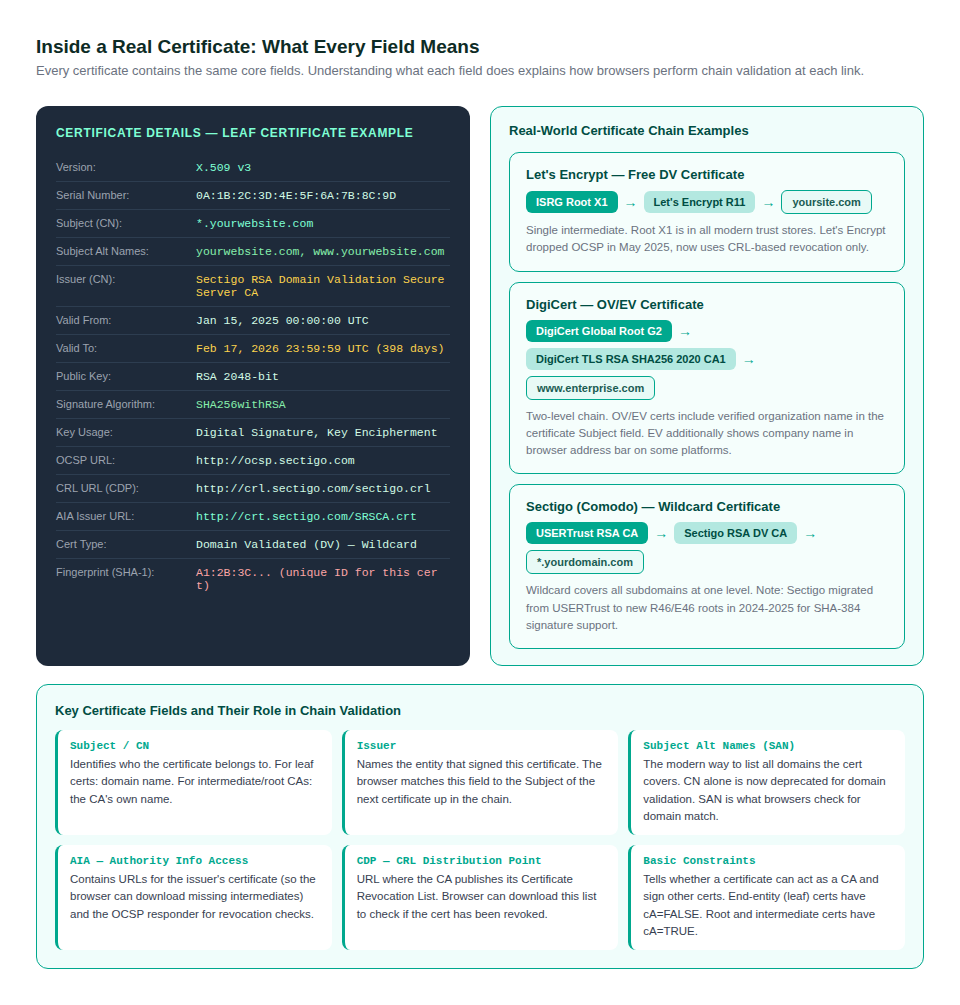
The Fields That Matter Most for Chain Verification
Two fields do the heavy lifting in chain validation. The Issuer field in the leaf certificate must match the Subject field of the intermediate certificate — this is how the browser finds the next link in the chain. The same relationship holds between the intermediate’s Issuer field and the root’s Subject field. If these do not match exactly, the chain is invalid regardless of the signatures.
The Subject Alternative Name (SAN) field is the modern replacement for validating domain names. Since 2017, browsers no longer check the Common Name (CN) for domain matching — they check only the SAN field. If your certificate was issued before 2017, or was generated without SAN entries, it will fail domain validation checks in all modern browsers even if the CN field shows the correct domain.
The AIA Field: How Browsers Find Missing Intermediates
The Authority Information Access (AIA) extension contains two important URLs: the OCSP responder URL for revocation checking, and the ‘issuer’ URL where the browser can download the issuing intermediate certificate. When a server fails to send its intermediate, modern desktop browsers fall back to fetching it from the AIA issuer URL. However, this fallback is not universal — older browsers, mobile clients, Java applications, and many API clients do not implement AIA chasing and will fail immediately without the intermediate being sent by the server.
This is why relying on AIA chasing to cover a missing intermediate is not an acceptable solution for production sites. The server must always send the complete chain.
Maintaining a Healthy Certificate Chain: Checklist and Tools
A certificate chain that works today may break after a renewal, a server migration, or a CA root migration. These are the maintenance practices that prevent chain problems from reaching visitors.
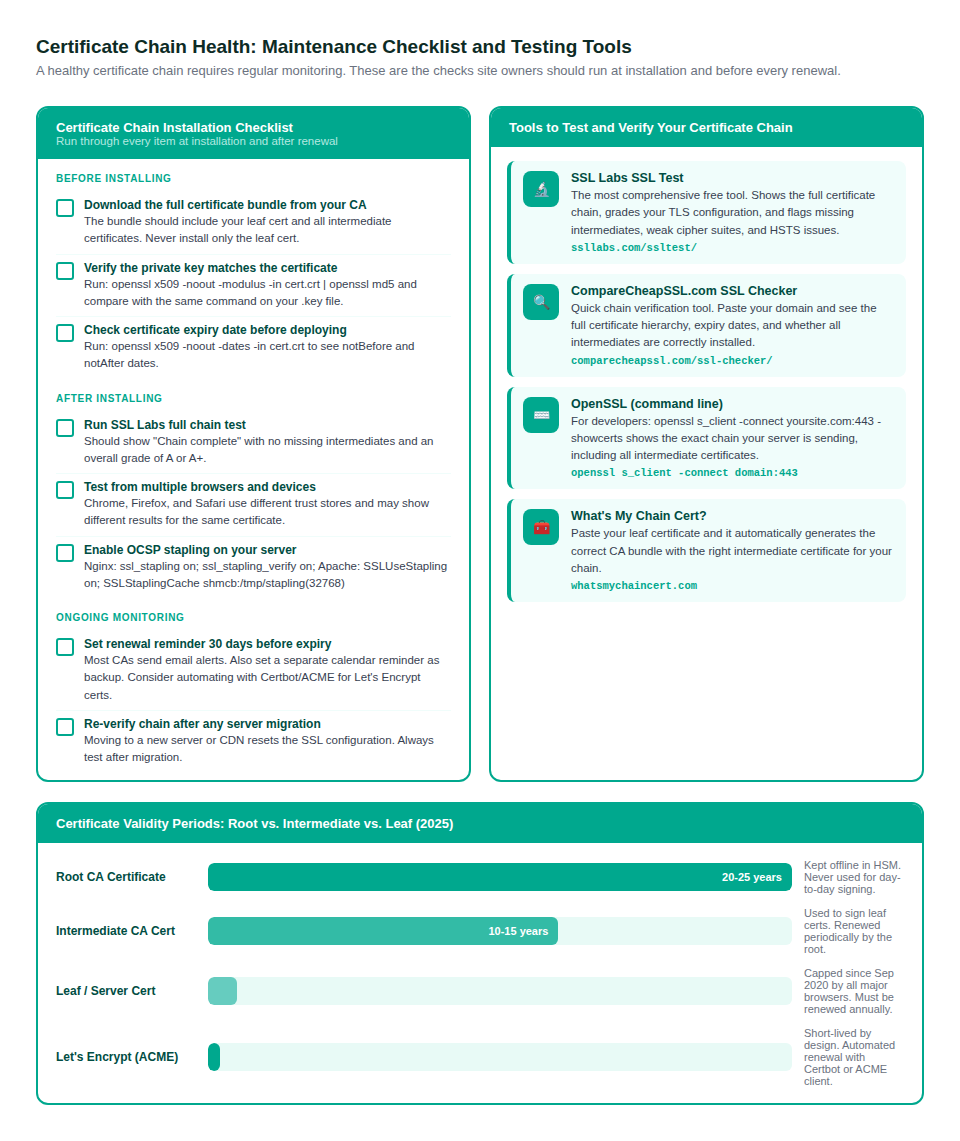
The SSL Labs Test Is Non-Negotiable
After every certificate installation, renewal, or server migration, run the domain through SSL Labs (ssllabs.com/ssltest/). This is the industry standard chain verification tool. It simulates a connection from dozens of different browser and OS configurations, shows exactly which certificates your server is sending, grades your TLS configuration, and flags incomplete chains, weak cipher suites, and missing HSTS headers.
An A or A+ grade requires a complete chain with no missing intermediates, TLS 1.2 or 1.3 supported, no support for known weak protocols (SSL 3, TLS 1.0, TLS 1.1), and HSTS configured. An A grade should be the minimum standard for any site handling user data or payments.
The 398-Day Validity Cap and Renewal Timing
Since September 2020, Apple, Google, and Mozilla enforce a hard limit of 398 days (about 13 months) on end-entity certificate validity. Certificates issued for longer periods are rejected by all major browsers regardless of their content. This means every SSL certificate must be renewed annually at minimum.
The practical advice: do not wait until the expiry warning from your CA. Renew 30 days early. This gives a buffer for server propagation, DNS changes, and any configuration problems that emerge during installation. Set calendar reminders independently of CA email alerts since email delivery cannot be guaranteed.
Let’s Encrypt and Automated Renewal
Let’s Encrypt certificates are valid for only 90 days and are designed to be renewed automatically using an ACME client like Certbot. The short validity period is intentional — it encourages automation and reduces the window of exposure if a certificate is compromised. Automated renewal via Certbot or similar tools should be standard practice for any site using Let’s Encrypt. The recommended Certbot renewal cron job checks twice daily and renews certificates when they are within 30 days of expiry.
| 2025 ECOSYSTEM CHANGE | In May 2025, Let’s Encrypt completed its migration from OCSP to CRL-based revocation and stopped issuing OCSP responses for new certificates. Site owners using Let’s Encrypt should remove any OCSP Stapling configuration pointing to Let’s Encrypt OCSP URLs as those endpoints are no longer maintained for new certificates. Check your CA’s documentation when renewing to confirm the current recommended revocation configuration. |
PKI Beyond Web Browsers: Other Contexts for Certificate Chains
The certificate chain of trust is not exclusive to websites. The same three-layer PKI model underpins several other security contexts that are increasingly relevant to organisations managing digital infrastructure.
Code Signing Certificates
Code signing certificates follow the same chain structure. When you install software on Windows or macOS, the operating system verifies the certificate chain on the code signing certificate attached to the installer. Missing intermediates in a code signing chain cause the exact same ‘untrusted publisher’ warnings in the OS that a missing web intermediate causes in a browser.
Email and S/MIME Certificates
S/MIME certificates used for encrypted and signed email follow identical chain validation rules. Enterprise email clients like Outlook verify the S/MIME certificate chain against the system trust store before displaying a signed email as verified.
Private Enterprise PKI
Organisations that run internal certificate authorities for VPN access, Wi-Fi authentication (802.1X), or device management use the same PKI hierarchy but with privately controlled roots. Devices must have the organisation’s root certificate installed in their trust store — this is typically managed through MDM (Mobile Device Management) systems. The same incomplete-chain and expired-certificate problems that affect public SSL certificates occur in private PKI environments and require the same diagnostic approaches.
Frequently Asked Questions
Why does my certificate show a warning even though it has HTTPS?
HTTPS confirms the connection is encrypted. The security warning means something in the certificate chain is wrong — the most common causes are a missing intermediate certificate, an expired certificate somewhere in the chain, a domain name mismatch, or a certificate that was revoked. Run SSL Labs on your domain to identify the exact issue.
Do I need to install the root certificate on my server?
Generally no, and including the root in your server’s certificate bundle can sometimes cause issues on older clients. Root certificates are expected to be in the client’s trust store, not sent by the server. Include your leaf certificate and all intermediate certificates. The root can be omitted from most server configurations unless your CA’s specific documentation says otherwise.
How do I know which intermediate certificate goes with my SSL cert?
Your certificate authority provides the intermediate certificate (or the full CA bundle) when they deliver your SSL certificate. If you cannot find it, download it from the CA’s website — they publish their intermediate certificates publicly. Tools like What’s My Chain Cert (whatsmychaincert.com) can automatically generate the correct bundle from your leaf certificate.
What is the difference between a CA bundle and a certificate chain file?
They refer to the same thing in different contexts. A CA bundle is the file containing the intermediate certificate(s) provided by the CA, separate from your leaf certificate. A certificate chain file or fullchain file is the result of concatenating the leaf cert and the CA bundle into a single PEM file. Some server configurations use a CA bundle file alongside a separate leaf cert; others use a single fullchain file.
Can I use the same intermediate certificate for multiple domains?
Yes. The intermediate certificate is issued to and maintained by the CA, not by you. Every certificate the CA issues from a given intermediate shares the same intermediate in their chain. You do not need to do anything with the intermediate except include it in your server bundle alongside your leaf certificate.
What happens when an intermediate CA certificate expires?
If an intermediate CA certificate expires while it is still being used to sign end-entity certificates, all certificates issued from it will fail chain validation immediately. This is extremely rare for major CAs who manage their intermediates carefully, but it has happened. If it occurs, the CA issues a new intermediate and you must reinstall your certificate with the new intermediate in the bundle.

