
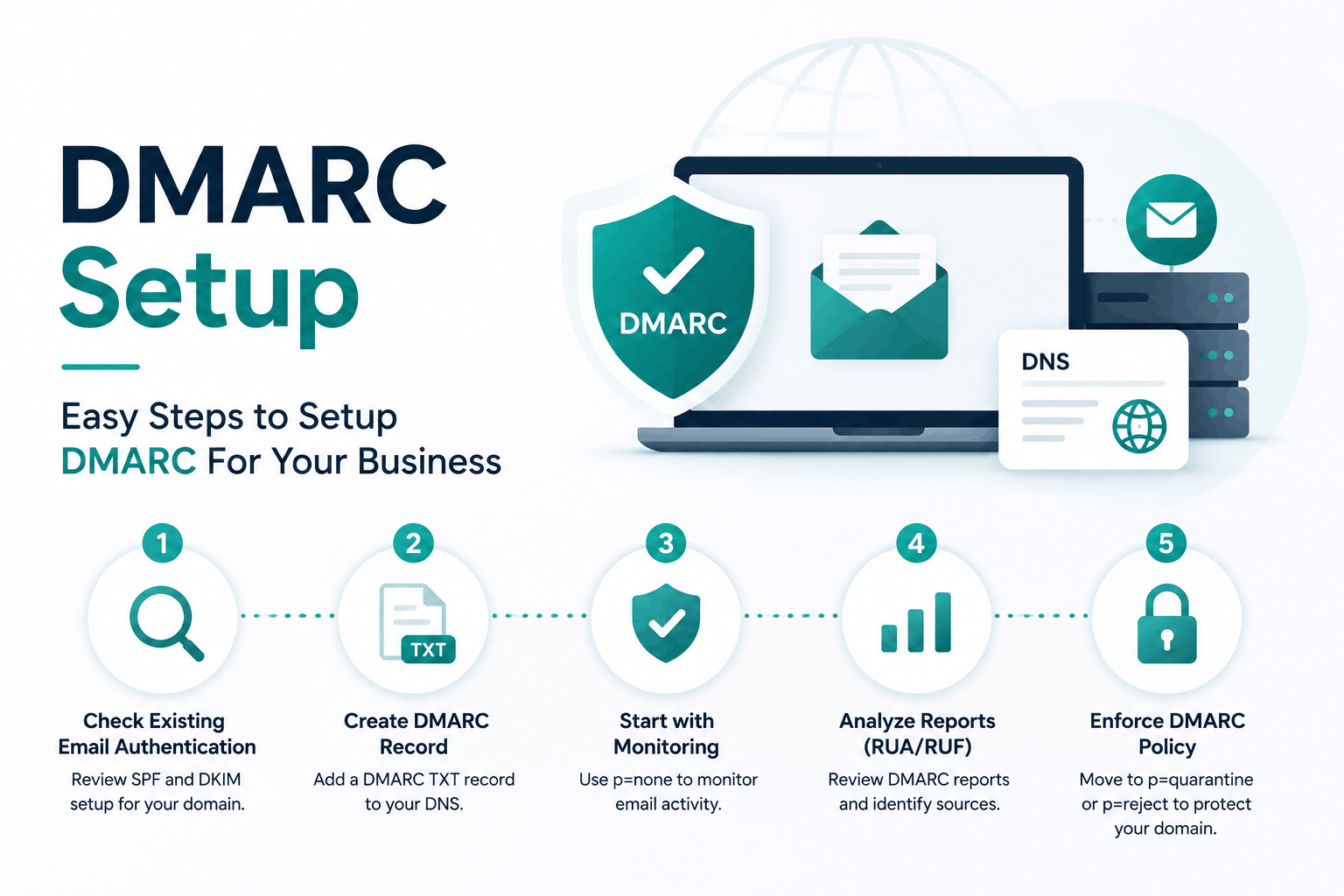
Somewhere right now, someone is sending email from your domain that you did not authorize. They are impersonating your brand, targeting your customers, and your reputation is the collateral damage. You will not get a notification. Your inbox will not light up. The attack is invisible to you until a customer calls asking why you told them to wire money to a new account.
DMARC is the protocol that stops this. But here is what the internet largely fails to explain: publishing a DMARC record is not the same as implementing DMARC. As of Q2 2025, 63% of organizations that have a DMARC record are sitting at p=none — monitoring mode. They can see the attacks happening in their reports. They have done nothing to stop them. (Source: Fortra, 2025)
This guide covers the whole path: what DMARC is and why the three-protocol stack beneath it matters, exactly how to configure SPF and DKIM correctly, how to read aggregate reports so they actually tell you something useful, the phased rollout strategy from p=none to p=reject without breaking a single legitimate email, and every compliance mandate requiring you to be at enforcement now.
| WHAT DMARC ACTUALLY IS | DMARC (Domain-based Message Authentication, Reporting and Conformance) is a DNS TXT record that instructs receiving mail servers how to handle email claiming to be from your domain. It works by checking whether the sending server passed SPF or DKIM authentication AND whether the authenticated domain matches the visible From: address (alignment). If both checks fail, DMARC triggers the policy you specified: do nothing, send to spam, or reject outright. Without DMARC, anyone can send email using your domain name as the From address and receiving servers have no policy to enforce. |
Why Your Business Is Already a Target (The Numbers Are Worse Than You Think)
Before getting into DNS records and alignment checks, it is worth understanding the threat landscape that DMARC was designed for. Email spoofing is not a niche problem that only happens to large enterprises. It is the most common entry point for business email compromise, and every domain — including yours — is a potential impersonation target.
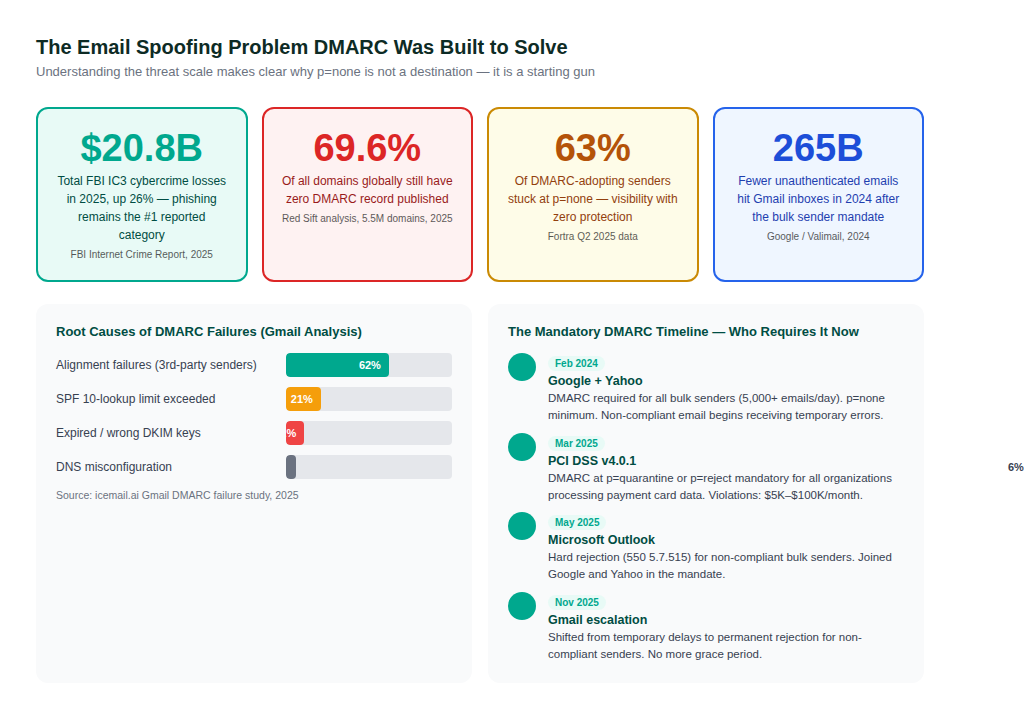
The enforcement timeline makes the urgency concrete. Google and Yahoo made DMARC mandatory for bulk senders in February 2024. Microsoft followed in May 2025. PCI DSS v4.0.1 — which affects every organization that processes payment card data — required DMARC at enforcement level from March 2025. Gmail escalated in November 2025 from temporary delays to permanent rejection for non-compliant senders.
If you send more than 5,000 emails per day to Gmail, Yahoo, or Outlook addresses and do not have DMARC published, your legitimate emails are already being rejected. Not routed to spam. Rejected outright with a hard error code.
| ! | The worst place to discover your DMARC is misconfigured is after you advance to p=reject and start getting reports that legitimate marketing emails are being rejected. The whole point of the phased rollout is to catch these problems at p=none when the consequences are zero. Do not skip the monitoring phase. |
The Three-Protocol Stack: SPF, DKIM, and DMARC Explained Without the Jargon
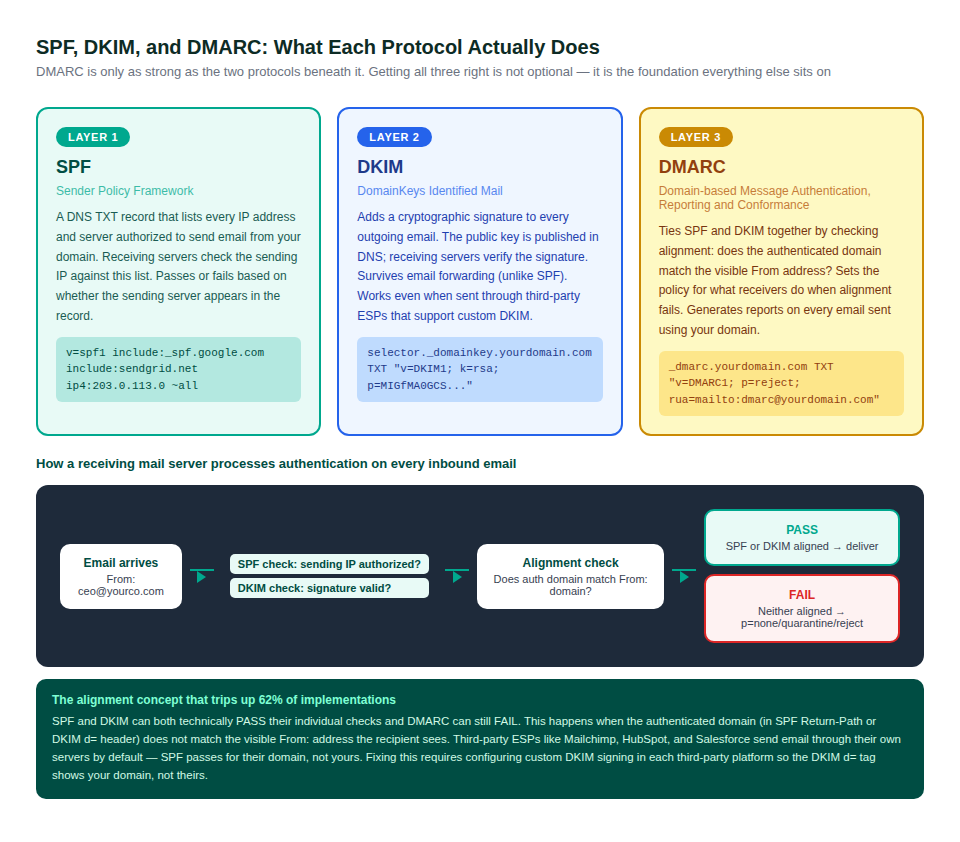
DMARC does not authenticate email on its own. It sits on top of SPF and DKIM, combining their results and adding the alignment check that makes the whole system meaningful. Getting DMARC wrong almost always means one of the two protocols underneath it is missing or misconfigured.
SPF: Authorizing Your Sending Servers
SPF (Sender Policy Framework) answers one question: is this email coming from a server I said was allowed to send for my domain? The answer lives in a DNS TXT record at your root domain, listing every IP address and service authorized to send on your behalf.
Two critical limitations of SPF that most guides understate. First, SPF breaks during email forwarding by design. When an email is forwarded, the forwarding server’s IP is not in your original SPF record, so SPF fails. This is expected, not a misconfiguration. Second, SPF has a hard limit of 10 DNS lookups. Every include: directive counts toward this limit. Complex sending environments with many third-party platforms routinely exceed it, causing SPF to return a permerror and fail for all mail.
DKIM: Cryptographic Proof the Message Was Not Tampered With
DKIM (DomainKeys Identified Mail) adds a cryptographic signature to every outgoing email. The signature is generated using a private key held by the sending server. The corresponding public key is published in DNS at selector._domainkey.yourdomain.com. Receiving servers verify the signature — if it checks out, the message is confirmed to have come from an authorized sender and not been modified in transit.
DKIM’s critical advantage over SPF: it survives email forwarding. When an email is forwarded, the DKIM signature travels with the message headers. As long as the message content was not modified, DKIM will still pass. This is why fixing DKIM alignment for third-party senders is more important than fixing SPF — DKIM alignment is what keeps DMARC passing in real-world sending scenarios.
DMARC: The Policy Layer That Ties It Together
DMARC adds two things to the SPF/DKIM picture. First, it introduces the alignment requirement: the domain authenticated by SPF (in the Return-Path header) or DKIM (in the d= tag) must match the visible From: domain the recipient sees. This is the check that prevents an attacker from passing SPF on their own domain while spoofing your brand in the From: field.
Second, DMARC defines a policy that tells receiving servers what to do when an email fails alignment: p=none (deliver and report), p=quarantine (send to spam folder), or p=reject (reject at the SMTP level before it reaches any inbox). Without this policy, SPF and DKIM are just measurements with no enforcement consequence.
| THE ALIGNMENT CONCEPT THAT BREAKS 62% OF DEPLOYMENTS | An email can pass SPF and pass DKIM individually and DMARC can still fail. This happens when the authenticated domain does not match your From: domain. Mailchimp, HubSpot, Salesforce, Zendesk, and most SaaS email platforms default to authenticating with their own domain. SPF passes for mailchimp.com — but your email claims to be from yourcompany.com. That mismatch is a DMARC alignment failure. The fix is configuring custom domain authentication (custom DKIM) in each platform, which makes the DKIM d= tag show your domain instead of theirs. |
Building Your DMARC Record: Every Tag Decoded and When to Use It
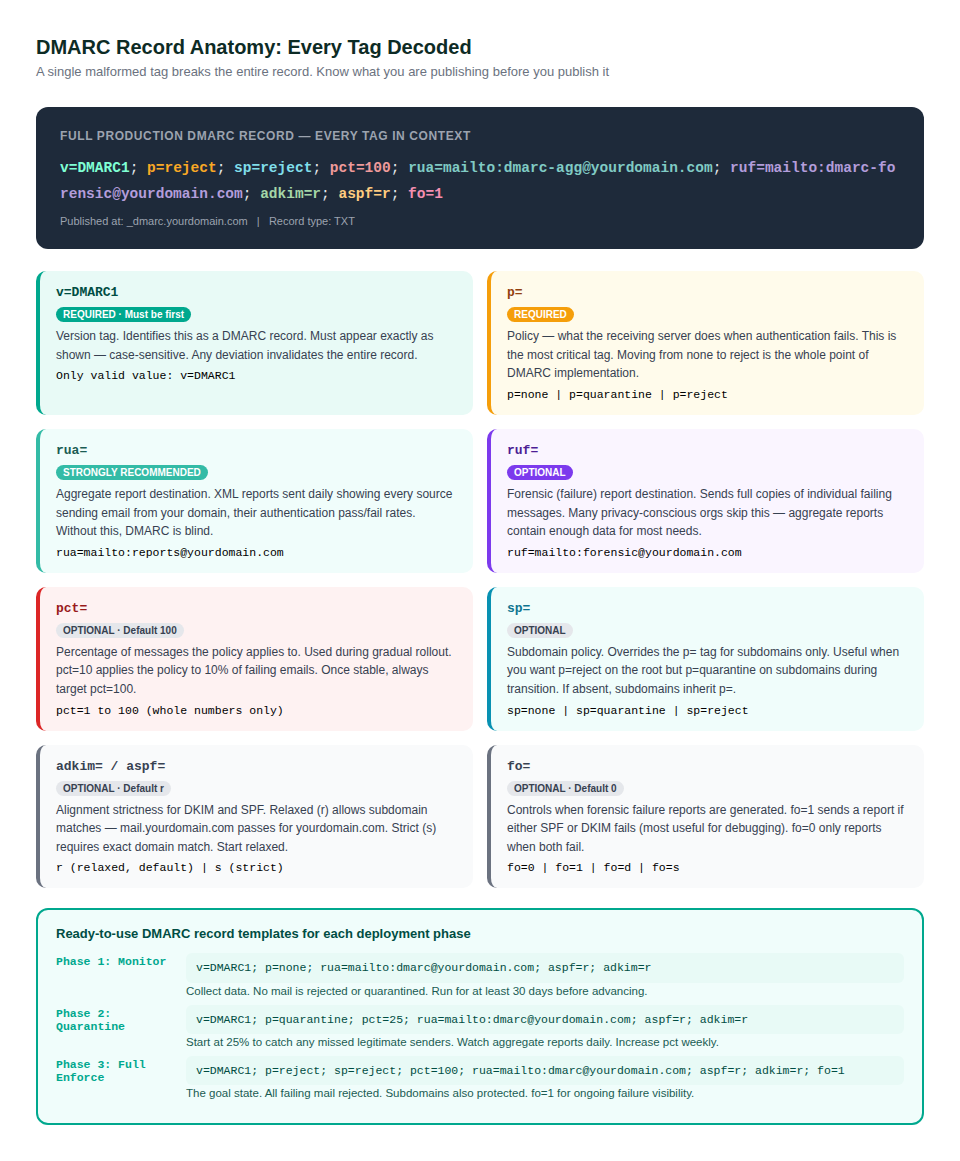
A DMARC record is a single line of text published in DNS. Every tag in that line controls a specific behavior. One malformed tag — wrong casing, missing semicolon, invalid value — and the entire record is silently ignored by receiving servers. They will not error. They will simply act as if no DMARC record exists.
The Two Tags You Must Get Right First
The v= tag must appear first, must be exactly v=DMARC1 in that casing, and any space or typo invalidates the record. The p= tag defines the policy and is the whole point of DMARC. Starting at p=none is correct. Staying there is not.
The rua= Tag: Your Window Into the Entire Email Ecosystem
Without the rua= (aggregate report) tag, DMARC runs blind. Receiving mail servers send daily XML reports to the email address you specify, showing every source that sent mail claiming to be from your domain — their IP address, volume, and authentication pass/fail results. This data is how you identify the legitimate senders you need to fix before advancing policy, and how you detect attacks happening against your domain in real time.
Set up a dedicated email address for DMARC reports (dmarc@yourdomain.com works well) or use a DMARC reporting tool that parses the XML automatically. The raw XML is unreadable without tooling — the reporting tools listed later in this guide make the data actionable.
The pct= Tag: Your Safety Valve During Rollout
The pct= (percentage) tag controls what fraction of failing emails the policy actually applies to. Setting p=quarantine; pct=25 means 25% of emails that fail DMARC are quarantined; the other 75% are still delivered normally. This gives you the ability to catch problems gradually rather than discovering them all at once when you advance to full enforcement.
Use pct= as a rollout tool, not a permanent setting. The goal is always pct=100. Every week your policy is at partial pct, 100% of spoofed emails targeting your domain continue reaching inboxes unchallenged.
Setting Up SPF: The Starting Layer Your DMARC Needs
SPF is a prerequisite for DMARC, not an optional add-on. Before you publish any DMARC record, SPF must be configured, tested, and verified to pass for all your legitimate sending infrastructure. Rushing to publish DMARC without valid SPF means your own legitimate mail starts failing.
Step 1: Inventory Every Source That Sends Email From Your Domain
This is the step that most implementations skip or do poorly. Every system that sends email claiming to be from yourcompany.com needs to be listed in your SPF record. This includes:
- Your primary mail server (Google Workspace or Microsoft 365)
- Marketing email platforms (Mailchimp, Klaviyo, HubSpot, SendGrid)
- CRM and sales tools that send emails (Salesforce, Outreach, Apollo)
- Customer support and helpdesk platforms (Zendesk, Freshdesk, Intercom)
- E-commerce and billing notifications (Shopify, Stripe, Recurly)
- HR and payroll systems (Workday, BambooHR, Rippling)
- Your web server if it sends transactional emails directly
- Any custom applications that send automated emails
The aggregate reports from your initial p=none DMARC record will reveal sending sources you had forgotten about. This is one of the primary values of the monitoring phase — every unfamiliar IP in your reports is a sender that needs to be accounted for.
Step 2: Build and Publish Your SPF Record
An SPF record is a DNS TXT record published at your root domain (yourcompany.com, not _dmarc.yourcompany.com). The format uses include: directives for services that publish their own SPF ranges:
v=spf1 include:_spf.google.com include:sendgrid.net ip4:203.0.113.5 -all
Use -all (hardfail) at the end of production SPF records — this tells receiving servers to reject any sender not explicitly listed. During initial testing, ~all (softfail) is acceptable but should be replaced with -all before advancing to DMARC enforcement.
| ! | The SPF 10-lookup limit catches many organizations off guard. Count every include: directive in your record — each one consumes one lookup. If your record has more than 10 includes (or includes that themselves contain many includes), SPF returns a permerror and all mail fails. Use MXToolbox SPF checker (mxtoolbox.com/spf.aspx) to count your current lookups before adding more. |
Configuring DKIM: The Protocol That Actually Survives Real-World Email
If SPF is the guestlist, DKIM is the signature on the invitation. It proves the email came from someone who holds the private key, and it travels with the message through forwarding scenarios where SPF would fail. Getting DKIM right for every sending source is what makes DMARC reliable at enforcement level.
Enabling DKIM on Your Primary Mail Platform
Google Workspace: Go to Admin Console, Apps, Google Workspace, Gmail, Authenticate email. Generate a new record, add the DKIM TXT record Google gives you to your DNS, then click Start Authentication. DKIM validation can take up to 48 hours after DNS propagation.
Microsoft 365: Go to Defender Portal (security.microsoft.com), Email and Collaboration, Policies and Rules, Threat Policies, Email Authentication Settings, DKIM tab. Select your domain and enable DKIM. Add the two CNAME records Microsoft provides to your DNS.
DKIM for Third-Party Senders: The Critical Step Most Organizations Miss
When a third-party platform sends email on your behalf, their default configuration signs with their own domain. The DKIM d= tag shows mailchimp.com or hubspot.com — not your domain. DMARC alignment fails because the authenticated domain does not match your From: address.
Every major ESP and CRM has a custom domain or branded sending feature that fixes this. The process is always the same: go into the platform’s email or sending settings, enable custom domain sending, and add the CNAME or TXT records the platform provides to your DNS. After DNS propagation, the DKIM d= tag in emails sent through that platform will show your domain.
| Platform | Where to Configure | DNS Records Needed |
| Google Workspace | Admin Console > Gmail > Authenticate Email | 1 TXT record (DKIM public key) |
| Microsoft 365 | Defender Portal > Email Auth Settings > DKIM | 2 CNAME records |
| Mailchimp | Account > Domains > Authenticate | 2 CNAME records |
| HubSpot | Settings > Website > Domains > Connect domain | 2 CNAME records |
| SendGrid | Settings > Sender Authentication | 3 CNAME records |
| Salesforce | Email > Email Domain Filters > DKIM keys | 1 TXT record |
| Klaviyo | Account > Settings > Email Domain | 2 CNAME records |
The p=none to p=reject Rollout: How to Get to Enforcement Without Burning Down Email Delivery
The number one DMARC implementation mistake is jumping directly to p=reject. The second most common is spending months at p=none with no plan to advance. The phased rollout solves both by giving you a structured path with clear criteria for advancement.
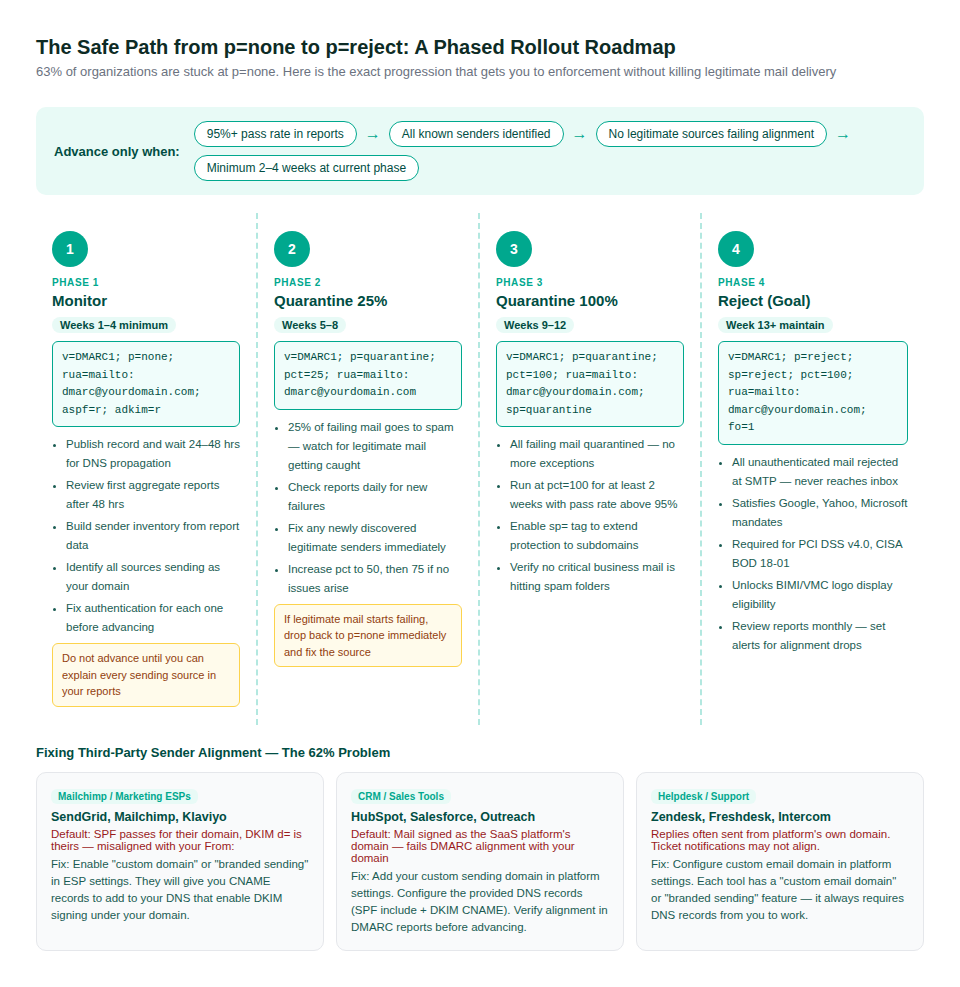
Phase 1: Monitor (p=none) — Minimum 4 Weeks
Publish your first DMARC record and do nothing aggressive with it. p=none means no mail is rejected or quarantined regardless of authentication results. The only output is reports, which are valuable precisely because they are generated without any enforcement consequence.
Your goal at this phase is to build a complete sender inventory. Every IP in your aggregate reports represents a system sending email as your domain. By the end of Phase 1, you should be able to explain every sending source that appears — and every legitimate one showing DMARC FAIL should have a fix in progress.
Phase 2 and 3: Quarantine — Gradual Escalation
Start at p=quarantine; pct=25. This applies the quarantine policy to 25% of failing emails — just enough to surface problems without catastrophic consequences. Run for two weeks, checking reports for any legitimate senders getting caught. Fix them. Increase pct to 50, then 75, then 100 over subsequent weeks.
At p=quarantine; pct=100, all emails that fail DMARC are directed to the recipient’s spam folder. Run here for at least two weeks with your pass rate above 95% before advancing. This is also when you should enable the sp= tag to extend quarantine protection to all your subdomains.
Phase 4: Reject — The Actual Goal
At p=reject; sp=reject; pct=100, unauthenticated emails claiming to be from your domain are rejected at the SMTP level. They never reach any inbox — not even spam. This is the only policy level that actually stops spoofing. Everything below it is monitoring.
Reaching p=reject satisfies the Google and Yahoo bulk sender requirements, the Microsoft mandate, PCI DSS v4.0.1, CISA BOD 18-01, and is the prerequisite for BIMI logo display. Maintain monthly report reviews going forward — new SaaS tools added by your team can reintroduce alignment failures weeks after you reach enforcement.
Reading DMARC Reports: Turning Raw XML Into Actionable Intelligence
Aggregate reports arrive daily as gzip-compressed XML files. Trying to read them raw is not practical. What you actually need to understand is the pattern each report row represents and what action it requires from you.
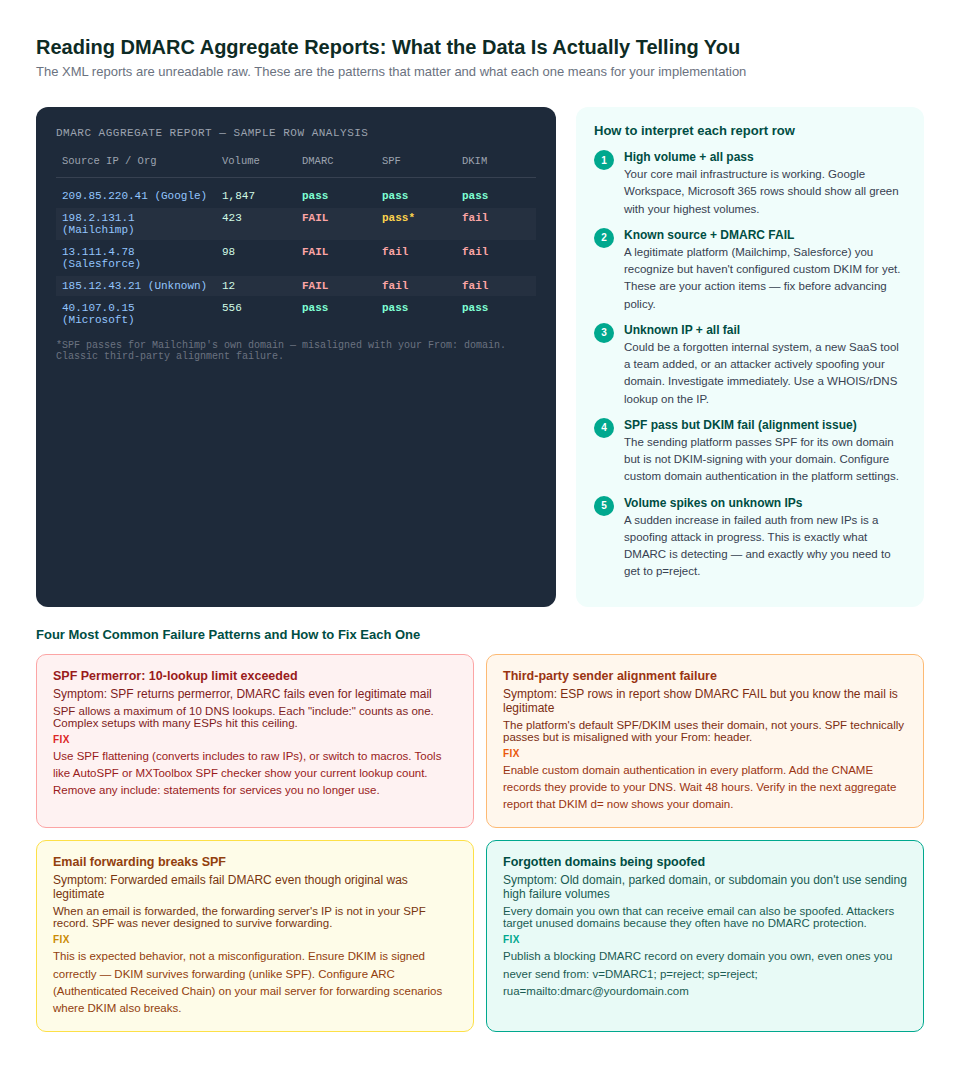
The Three Report Patterns That Require Immediate Action
Pattern 1: A recognizable platform (ESP, CRM, HR tool) showing high volume with DMARC FAIL. This is a legitimate sender you have not configured custom DKIM for yet. It will fail DMARC at every policy level until you fix alignment. The fix is always in the platform’s settings.
Pattern 2: An unfamiliar IP showing high volume with all-fail authentication. This is either a forgotten system (check with IT and department heads) or an active spoofing attack against your domain. If it is not a system you recognize after investigation, it is attack traffic — and exactly the volume that p=reject will eliminate.
Pattern 3: Volumes from known-good sources suddenly dropping or new failure spikes appearing. This indicates a configuration change somewhere — a new sending IP, an expired DKIM key, or a platform that changed its authentication behavior. Catch these early and they are trivial to fix.
DMARC Reporting Tools Worth Using
- MXToolbox DMARC Analyzer (mxtoolbox.com) — free report parsing with visual dashboards
- org tools — official free report viewer maintained by the DMARC standards body
- Dmarcian — paid tool with excellent sender discovery and alignment analysis
- EasyDMARC — well-documented free tier, good for SMBs starting implementation
- PowerDMARC — comprehensive monitoring with threat intelligence integration
The free tools are entirely adequate for most organizations during the p=none monitoring phase. Once you advance to enforcement, a paid tool pays for itself in analyst time saved — the report volumes can be substantial for high-sending domains.
Who Must Have DMARC Right Now: Mandates, Compliance Requirements, and What Happens If You Do Not
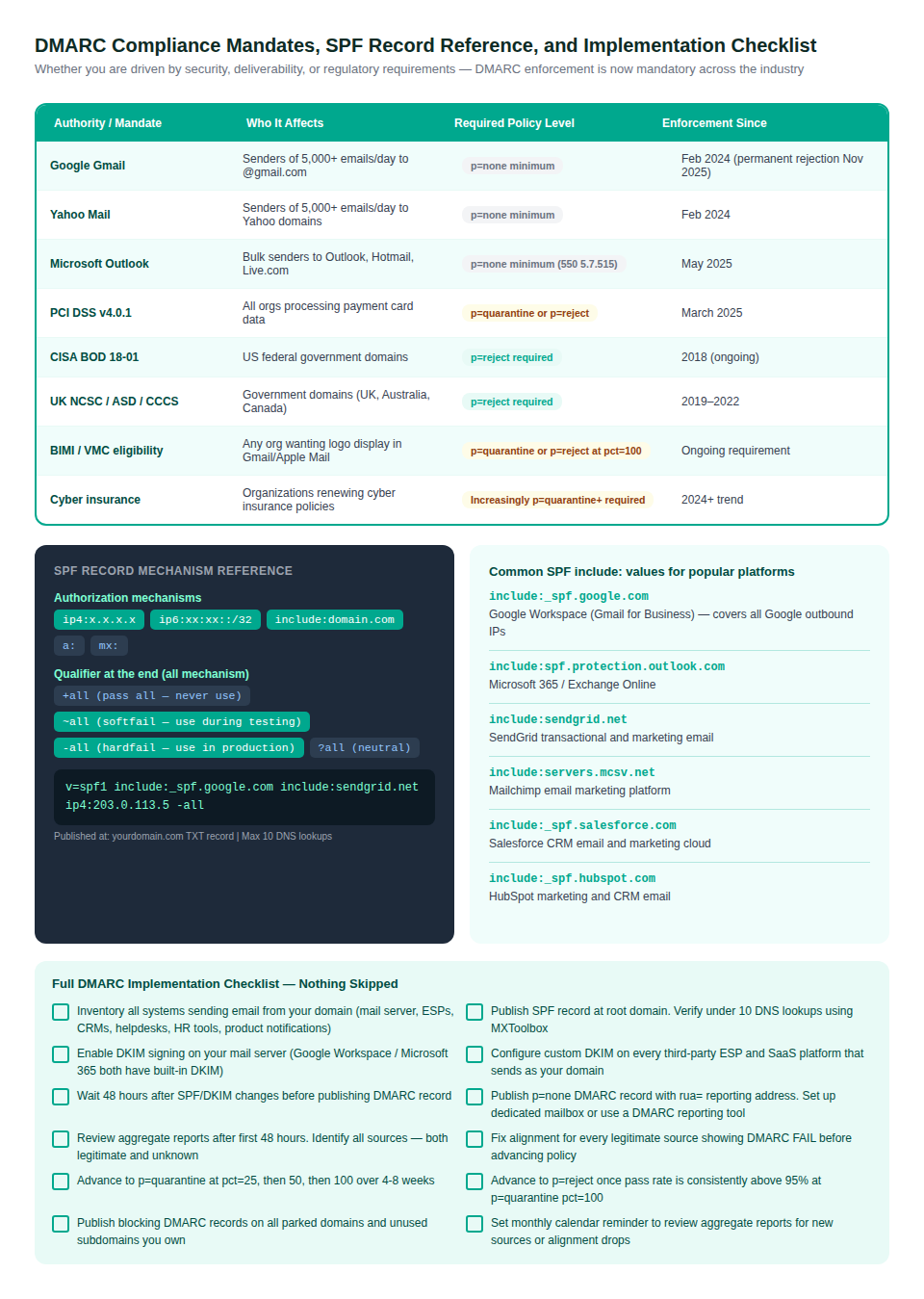
DMARC has shifted from a security recommendation to a legal and operational requirement across multiple frameworks simultaneously. If you are not at enforcement level, you are likely non-compliant with at least one regulation that applies to your business.
The PCI DSS v4.0.1 Requirement Is Not Optional
PCI DSS 4.0.1, which became the active standard in March 2025, explicitly requires DMARC at p=quarantine or p=reject for all organizations processing, storing, or transmitting cardholder data. This covers every e-commerce business, every SaaS platform that handles subscriptions or payments, and every organization that accepts credit card payments. Non-compliance can result in fines of $5,000 to $100,000 per month from card networks.
If your organization was already PCI DSS compliant under v3.2.1 and has not updated its email security posture, you are likely non-compliant now. The DMARC requirement is in section 5.4.1 of PCI DSS v4.0.
The Cyber Insurance Angle Most Organizations Are Missing
Cyber insurance carriers are increasingly checking DMARC enforcement status as part of underwriting. Some are now requiring p=reject as a condition of coverage. An organization that suffers a business email compromise attack while sitting at p=none may find their insurer questioning whether they took adequate preventive measures. Getting to p=reject is not just a security practice — it is documentation that you actively hardened your email infrastructure against a known attack vector.
Protecting Every Domain You Own, Including the Ones You Never Email From
Attackers do not exclusively target the domain you actively use. They target every domain associated with your brand — old domains, acquired domains, parked domains, and subdomains. If those domains have no DMARC record, they can be used to spoof email with zero authentication protection.
The fix is straightforward: publish a blocking DMARC record on every domain you own that you do not send email from. A domain that never sends mail should tell the world exactly that, with a policy that rejects anything claiming to come from it:
| BLOCKING RECORD FOR NON-SENDING DOMAINS | v=DMARC1; p=reject; sp=reject; rua=mailto:dmarc@yourdomain.comThis record tells receiving servers to reject all mail from this domain. You still get reports (via rua=) so you can see if anyone is attempting to use it for spoofing. The reports from parked domains are often eye-opening — some domains face significant spoofing attempts the owner never knew about. |
Also publish SPF records on non-sending domains that explicitly deny all mail: v=spf1 -all. This closes another vector attackers use when SPF records are missing — treating the absence of an SPF record as implicit authorization.
Frequently Asked Questions
What is DMARC and why does my business need it right now?
DMARC (Domain-based Message Authentication, Reporting and Conformance) is a DNS-based protocol that prevents unauthorized parties from sending email using your domain name. Without DMARC, anyone can send email that appears to come from yourcompany.com — which attackers use for phishing, business email compromise, and brand impersonation. Beyond security, DMARC is now a compliance requirement under PCI DSS v4.0 (March 2025) and a deliverability requirement from Google, Yahoo, and Microsoft for bulk senders. Organizations without DMARC face email rejection at the infrastructure level and potential compliance fines.
What is the difference between p=none, p=quarantine, and p=reject?
p=none: monitoring mode — collects data, takes no action on failing mail. Phishing emails still reach inboxes. p=quarantine: failing emails are directed to the recipient’s spam folder. Stops some spoofing but attackers can still reach sophisticated users who check spam. p=reject: the only policy that actually stops spoofing. Unauthenticated emails are rejected at the SMTP level before they reach any inbox anywhere. This is the goal. 63% of organizations are stuck at p=none — they have visibility but zero protection.
Can DMARC break my legitimate email?
Only if you skip the monitoring phase or advance policy before fixing all legitimate senders. This is why the phased rollout exists. At p=none, nothing breaks regardless of your configuration — you just collect reports. At p=quarantine with pct=25, only 25% of failing mail is affected, giving you time to catch problems. The organizations that break legitimate email are always the ones that jump directly from no DMARC to p=reject without reviewing a single aggregate report first.
My SPF and DKIM are both passing but emails still fail DMARC — why?
This is the alignment problem that affects 62% of deployments. SPF and DKIM passing their individual checks does not guarantee DMARC passes. DMARC also requires that the authenticated domain matches the From: domain recipients see. When you send through Mailchimp, their servers authenticate with mailchimp.com (SPF passes for Mailchimp), but your email says it is from yourcompany.com. That mismatch is an alignment failure. The fix is enabling custom DKIM signing in the third-party platform so the DKIM d= tag shows your domain.
How do I read DMARC aggregate reports without a paid tool?
The XML is human-readable if compressed with gunzip, but formatting it manually is tedious. Free options: DMARC.org maintains a free report viewer. MXToolbox has a free DMARC report parser. EasyDMARC offers a free tier that handles most SMB report volumes. For the first weeks of p=none monitoring, any of these will show you the sender breakdown you need. The key data points are: source IP/organization, volume, DMARC pass/fail, SPF pass/fail, and DKIM pass/fail. Any row with DMARC FAIL on significant volume is your action item.
How long does DMARC implementation take from start to full enforcement?
For organizations with straightforward email setups (one mail platform, one or two ESPs): 4 to 8 weeks from publishing p=none to reaching p=reject. For complex enterprise environments with many sending platforms, business units with their own tools, and legacy systems: 3 to 6 months. The timeline is driven entirely by how long it takes to identify and fix every legitimate sender — not by the technical complexity of DMARC itself.
Do I need DMARC on every domain I own, or just the one I send email from?
Every domain you own needs DMARC — including parked domains, legacy domains, and domains you acquired but never use for email. Attackers specifically target domains without DMARC protection. For domains you never send from, publish a blocking record (p=reject; sp=reject) and an SPF record that denies all sending (v=spf1 -all). The rua= tag is still recommended so you get reports on any spoofing attempts against those domains.
What is DMARC alignment and how does relaxed vs strict mode affect it?
Alignment is the check that the domain authenticated by SPF or DKIM matches your From: domain. In relaxed mode (adkim=r; aspf=r, the default), a subdomain match counts as aligned — mail.yourcompany.com aligns with yourcompany.com. In strict mode (adkim=s; aspf=s), only exact domain matches count. Start with relaxed alignment and only switch to strict if you have a specific security reason. Most organizations never need strict mode, and switching to it before auditing all senders will cause alignment failures on legitimate mail.

