Buy Cheap Code Signing Certificates
Verify Your Software. Protect Your Users.
Cheap code signing certificate simply means a legitimate, trusted code signing certificate offered at a lower cost, not a weaker or unsafe product. Finding the right Code Signing Certificate shouldn’t mean paying enterprise-level prices or dealing with complex validation.
Code Signing Certificates verify who published your software and protect it from unauthorized modification. Compare Cheap SSL connects you with trusted certificate authorities to meet modern OS and security requirements.
With trusted brands like DigiCert, Sectigo, and GlobalSign, CompareCheapSSL makes it easy to sign your software, verify your identity, and deliver malware-free applications your users can trust.
Shop Code Signing Certificates
Save upto 71% on Code Signing Certificates Direct Pricing – Lowest Price Guarantee! Cheap code signing certificate offers the same level of security, encryption, and OS trust as higher-priced certificates issued by the same trusted Certificate Authorities. Lower pricing does not mean reduced security. It simply reflects smarter purchasing through authorized resellers without enterprise markups.
SSL.com Code Signing Certificate
Sign Software with a Globally Trusted Certificate Authority
SSL.com Code Signing Certificate
SSL.com Standard Code Signing Certificates are organization-validated and ideal for signing applications, utilities, and scripts. For higher trust requirements, SSL.com EV Code Signing Certificates provide extended validation and are required for kernel-mode drivers and system-level software. EV certificates also help establish Microsoft SmartScreen reputation for newly distributed applications.
Sectigo Code Signing Certificate
Secure your software and applications with a trusted Sectigo Code Signing Certificate. Prevent tampering, ensure code integrity, and build user trust with digitally signed software.
DigiCert Code Signing Certificate
Protect your software, applications, and updates with a DigiCert Code Signing Certificate. DigiCert verifies publisher identity, prevents unauthorized code modification, and ensures maximum trust for end users.
Why Code Signing is Essential
Code signing is a critical requirement for secure software distribution, helping publishers protect their applications, users, and brand reputation.
Prevent Software Impersonation
Code signing protects your software from being modified or redistributed by attackers pretending to be the original publisher. Any unauthorized change immediately breaks the signature.
Meet Platform Security Requirements
Many operating systems and enterprise environments require applications to be digitally signed before execution. Code signing ensures compatibility with these security policies.
Strengthen User & Brand Trust
Signed software displays a verified publisher identity during installation, helping users recognize your brand and trust your application immediately.
Support Long-Term Software Updates
Code signing ensures your applications remain trusted across updates, patches, and future releases as operating system security expectations evolve.
OV Code Signing vs EV Code Signing
Organization Validation (OV) Code Signing Certificates verify the identity of the software publisher, ensuring applications originate from a legitimate organization and have not been altered after signing.
- Verifies publisher and organization identity
- Suitable for applications, utilities, and scripts
- Faster validation compared to EV Code Signing
Extended Validation (EV) Code Signing Certificates provide the highest level of trust through rigorous identity verification and are required for signing kernel-mode drivers and system-level software.
- Highest trust with strict validation checks
- Required for kernel-mode drivers and system software
- Builds Microsoft SmartScreen reputation faster
How Code Signing Works
Code signing uses cryptographic validation to confirm software authenticity and ensure that code remains unchanged after release.
Prepare the Software
The original application or script is finalized and prepared for signing before distribution.
Create a Digital Fingerprint
A cryptographic hash is generated from the code, producing a unique digital fingerprint.
Secure the Fingerprint
The fingerprint is encrypted using the publisher’s private key, which is securely stored and protected.
Attach Identity & Timestamp
The encrypted fingerprint is combined with the publisher’s certificate and a trusted timestamp.
Distribute Signed Software
The signed application is delivered to users, allowing systems to verify its authenticity before execution.
Key Capabilities of Modern Code Signing
Code signing enables secure software distribution by combining identity verification, cryptographic protection, and platform-level trust validation throughout the software lifecycle.
Verified Publisher Attribution
Each signed application is cryptographically linked to a verified organization, allowing operating systems to clearly identify who created the software before it is executed.
Executable Integrity Enforcement
Code signing enforces file integrity by detecting any post-signing modification, ensuring that users only run software exactly as it was released by the publisher.
Private Key Isolation & Control
Signing keys are protected against misuse through controlled storage mechanisms, reducing the risk of unauthorized signing or certificate abuse.
Long-Term Signature Validity
With trusted timestamping, signed software remains valid even after certificate expiration, allowing applications to continue functioning without disruption.
Platform Trust Recognition
Signed code is recognized by operating systems and security frameworks, allowing applications to pass execution checks without being flagged as untrusted.
Enterprise & Driver Readiness
Code signing supports advanced use cases such as system-level components and enterprise deployment scenarios that require higher validation standards.
Code Signing Certificate Delivery Methods
Secure options for receiving and managing your code signing certificate based on your security and infrastructure requirements.
Hardware Token Delivered to You
For enhanced security, code signing certificates can be delivered on a dedicated hardware token. The private key remains securely stored on the device and cannot be extracted or copied.
- Physical USB token shipped to your location
- Keys remain isolated from your system
- Required for EV Code Signing certificates
Install on Existing Secure Hardware
If you already use certified security hardware, your code signing certificate can be installed directly on your existing device to maintain centralized key management.
- Compatible with approved hardware security modules
- Supports enterprise signing workflows
- No additional hardware required
Platforms Compatible with Code Signing Certificates
Code Signing Certificates are designed for broad compatibility across operating systems, application frameworks, and development tools. They allow publishers to sign software used in desktop, enterprise, and automated environments.
From installers and scripts to enterprise workflows, code signing supports a wide range of platforms used in modern software delivery.
SmartScreen & OS Warning Prevention
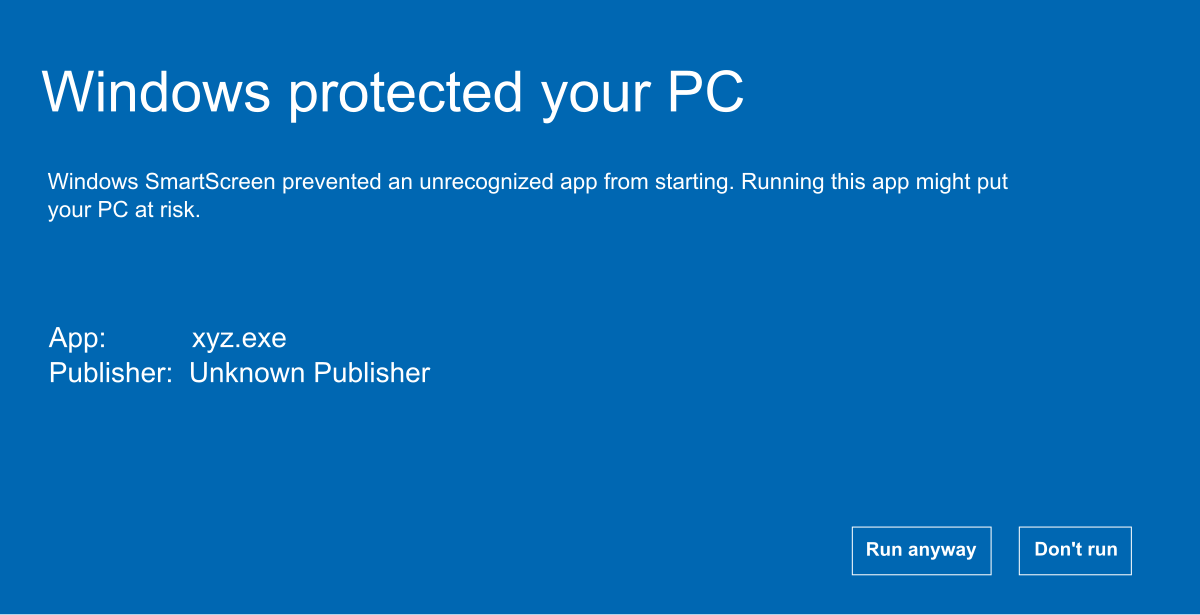
Unsigned applications often trigger operating system and browser warnings, such as Microsoft SmartScreen “Unknown Publisher” alerts, because the publisher’s identity cannot be verified.
Reduced Security Warnings
Code Signing Certificates digitally verify the software publisher, preventing unnecessary OS and browser warnings during installation.
Microsoft SmartScreen Recognition
Windows SmartScreen flags unsigned software as “Unknown Publisher.” A valid Code Signing Certificate allows SmartScreen to trust the publisher.
Verified Software Integrity
Digitally signed code confirms the application has not been altered after release, protecting users from tampered or malicious files.
Smoother Installation Experience
Trusted applications install with fewer interruptions, improving user confidence and reducing installation friction.

Frequently Asked Questions
What is a Code Signing Certificate?
A Code Signing Certificate is a digital certificate that verifies the identity of the software publisher. It confirms that the software comes from a trusted source and has not been modified.
Why are Code Signing Certificates required?
Many platforms such as Windows, macOS, iOS, and Android require signed software. Unsigned applications often trigger security warnings.
Are there different types of Code Signing Certificates?
Yes. There are individual, commercial, and Extended Validation (EV) Code Signing Certificates, each designed for different trust levels.
Can a Code Signing Certificate be issued for individuals?
Yes. Individual Code Signing Certificates are available for developers signing personal or small-scale software projects.
Why do I need a Code Signing Certificate?
It increases user trust, meets platform requirements, and protects your brand by ensuring software authenticity.
How much does Code Signing cost?
Pricing varies by certificate type and authority. Individual certificates start around $50 per year, while EV certificates cost more.
What is the easiest way to get a Code Signing Certificate?
Purchase one from a trusted Certificate Authority after comparing prices and validation requirements.
What is an EV Code Signing Certificate?
EV Code Signing Certificates offer the highest trust level and require extensive identity verification.
Why are Code Signing Certificates expensive?
They require strict compliance, security audits, and identity validation by Certificate Authorities.
Can I create my own Code Signing Certificate?
Self-signed certificates are possible but not recommended, as they are not trusted by operating systems.
Disclosure: This page contains affiliate links. We may earn a commission if you make a purchase through these links, at no additional cost to you.


Prove Software
Display Verified Publisher Name
Universal Platform Compatibility
Boost Customer Confidence
Secure Private Key Storage
Timestamping